What Is Low Code? The Developer Middle Ground in 2026

Low code is a development approach that uses visual interfaces, drag-and-drop tools, and pre-built components to speed up app creation while still letting professional developers write custom code when needed. According to OutSystems, it can accelerate development cycles by 5x to 10x compared to traditional hand-coded methods.
Table of Contents
- Why Low Code Exists (And Why Developers Should Care)
- How Low Code Actually Works Under the Hood
- Low Code vs. No-Code vs. Traditional Development
- Where Low Code Fits for Small Dev Teams and Agencies
- The Catch: Vendor Lock-In, Debt, and Governance Risks
- Key Takeaways
- FAQ
By the end of 2026, the global economy is expected to face a shortfall of nearly 1.2 million software developers. I've felt that squeeze firsthand, watching three-person dev teams get handed roadmaps that would've needed a dozen engineers five years ago. That gap between what businesses need built and who's available to build it is exactly why low code has moved from "nice experiment" to "serious infrastructure." This article breaks down what low code actually is, how it works at the architectural level, and where it makes sense for professional developers and small teams shipping real products in 2026.
Why Low Code Exists (And Why Developers Should Care)
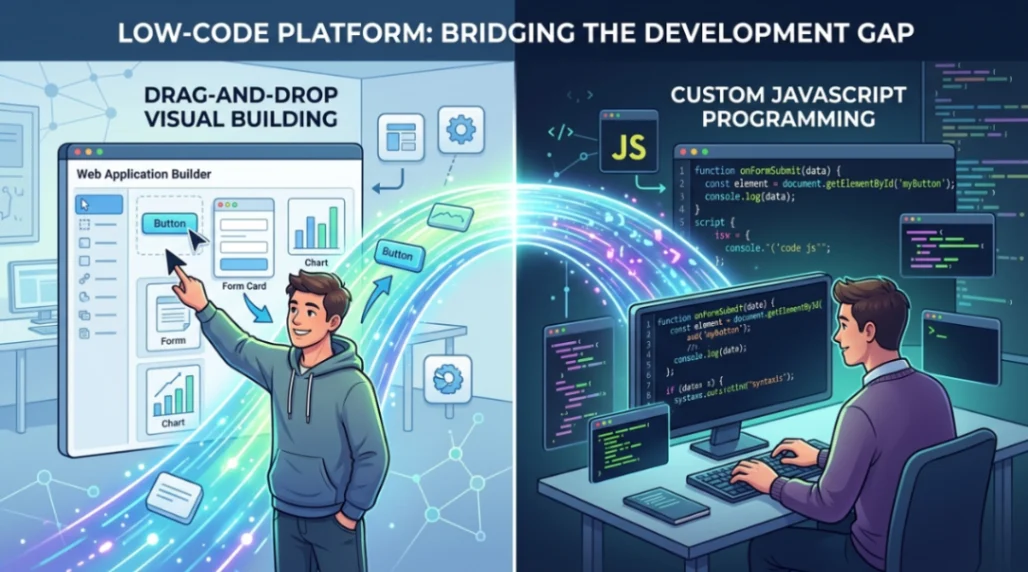
Low code exists because professional developers spend roughly 80% of their time writing boilerplate: authentication flows, CRUD operations, and standard UI scaffolding. Low code platforms automate those repetitive layers so engineers can focus on the 20% that actually differentiates the product.
According to research cited by Microsoft Power Apps, low code can compress initial development timelines by a factor of 5 to 10, particularly for data-intensive applications. That's not a rounding error. For a small agency juggling multiple client projects, that kind of speed means the difference between profitable delivery and burning through retainers on setup work.
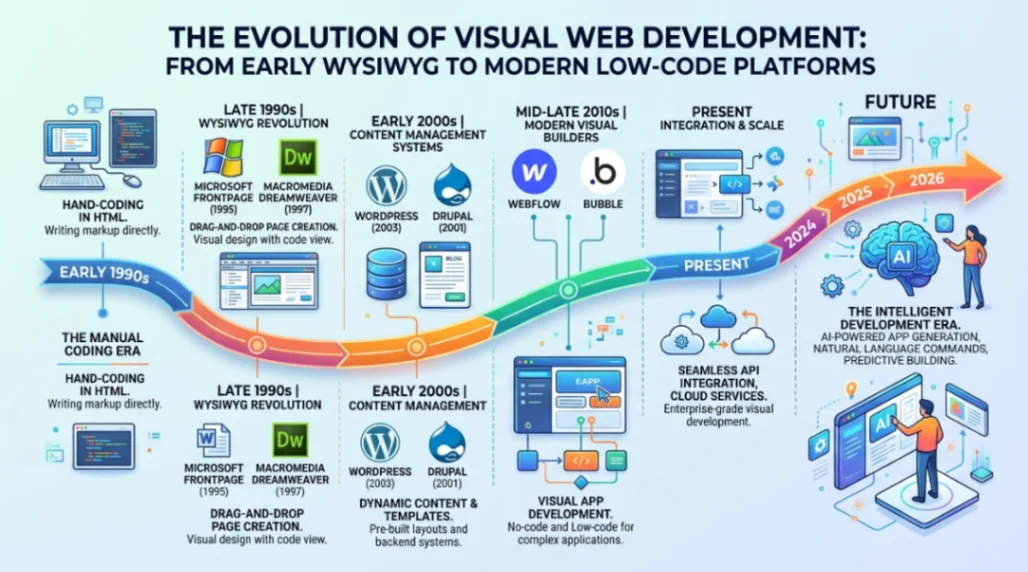
The idea of simplifying web development isn't new, either. Tools like Netscape Composer and Microsoft FrontPage tried to bridge the gap between visual editing and code decades ago. The difference in 2026 is that modern low code platforms don't just generate a static page. They produce full-stack applications with backend logic, API integrations, and automated deployment pipelines.
How Low Code Actually Works Under the Hood
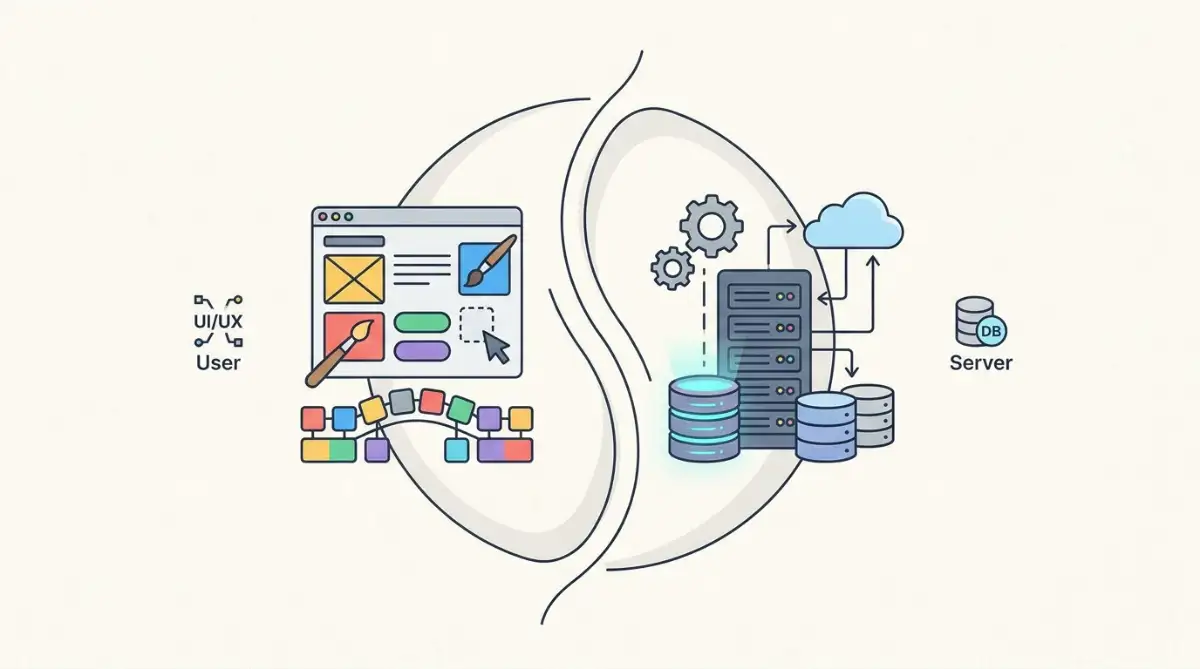
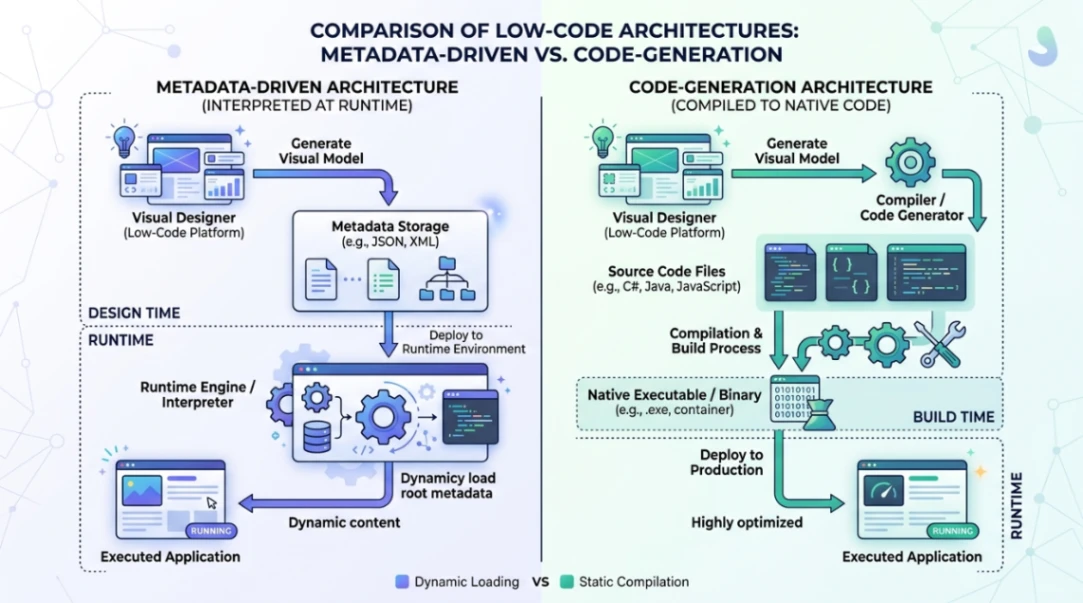
Low code platforms follow one of two core architectural patterns, and the one your platform uses shapes everything from performance to portability.
Metadata-driven platforms (like Mendix and Microsoft Power Apps) store your application as abstract models in JSON or XML. A proprietary runtime engine interprets that metadata on the fly to render the app. This makes cross-cutting changes easy to propagate, but the interpretation layer can introduce performance overhead. Debugging can also feel like a black box if you're used to stepping through source code.
Code-generation platforms (like OutSystems and WeWeb) take a different route. When you publish, the platform translates your visual models into standard code artifacts, think C# on the backend or Vue.js on the frontend. The app then runs as native compiled code, which eliminates the interpretation overhead. Some platforms even let you export the generated source code, giving you a real exit path if you ever want to leave.
For developers who've wrestled with the spaghetti code that plagued early WYSIWYG tools, this matters. Modern code-generation platforms produce clean, standard output rather than the tangled markup those older tools were known for.
Low Code vs. No-Code vs. Traditional Development
These three approaches serve different people solving different problems. Here's how they stack up across the attributes that matter most to dev teams, based on IBM's breakdown of the distinctions.
| Attribute | Traditional (High-Code) | Low Code (Professional) | No-Code (Citizen) |
|---|---|---|---|
| Speed | Slow (hand-coded) | 5x to 10x faster | Rapid (config-only) |
| Customization | Unlimited | High (via pro-code escape hatches) | Very limited |
| Skill Required | CS degree / algorithms | Logic and basic scripting | Minimal (domain knowledge) |
| Integration | Custom API / manual | Connectors + custom APIs | Built-in connectors only |
| Maintenance | High (code rot / debt) | Moderate (platform-managed) | Low (vendor-handled) |
| Deployment | Complex pipelines | Automated orchestration | One-click / instant |
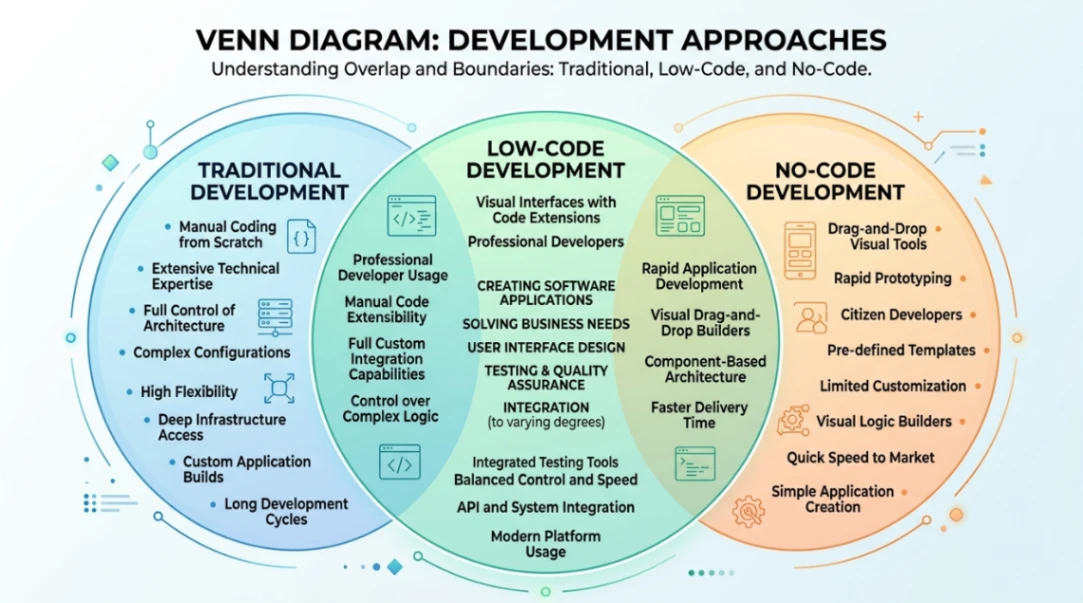
The key distinction is the "escape hatch." A no-code builder lets you configure pre-built blocks, which is great for landing pages or simple websites. But when you need custom backend logic, complex API orchestration, or performance tuning, you hit a wall. Low code gives you the visual speed but lets you inject custom JavaScript, C#, or .NET when the visual interface isn't enough.
That's what platforms like WeWeb do well: you drag and drop your UI, then import entire custom Vue.js components when the pre-built library falls short. It's the same principle that made tools like Dreamweaver popular during its battle with FrontPage, except now it scales to full web apps and cross-platform applications.
Where Low Code Fits for Small Dev Teams and Agencies
Low code shines brightest when small dev teams and agencies need to ship validated prototypes fast without sacrificing the ability to scale later. Here are the scenarios where it earns its keep.
Rapid prototyping and validation. Using templates and drag-and-drop tools, developers can build functional, interactive prototypes in days instead of weeks. This lets you validate ideas with stakeholders before committing engineering hours to features nobody actually wants.
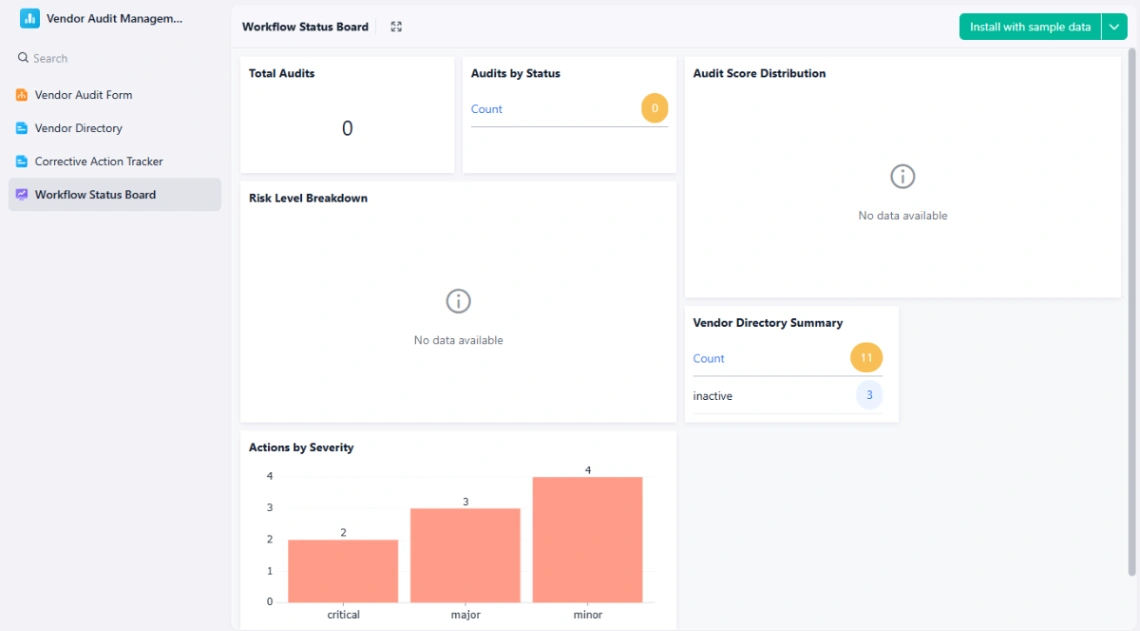
Internal tools and data-heavy apps. If you're building admin dashboards, client portals, or inventory trackers, low code handles the repetitive CRUD layers automatically. Your team writes custom code only for the business logic that's unique to your client.
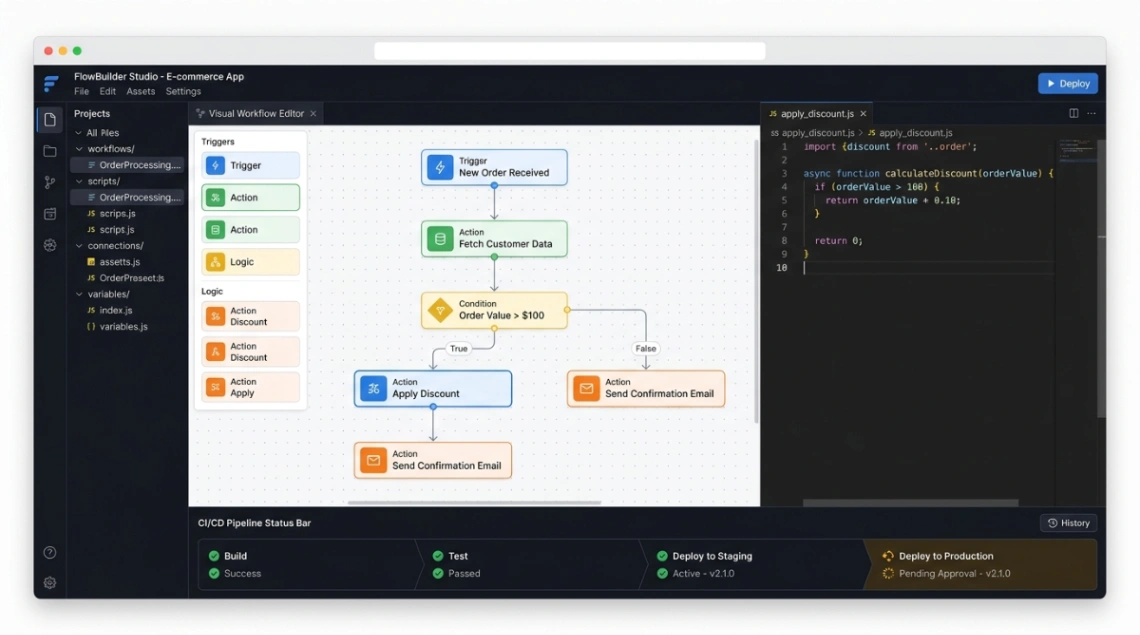
CI/CD and DevOps integration. One of the old knocks on low code was that it sat outside professional DevOps workflows. In 2026, enterprise platforms like OutSystems integrate with Jenkins, Azure DevOps, and GitHub Actions. Mendix offers quality and security management analysis. Even WeWeb supports staged releases with standard Vue.js CI/CD export. The gap between "visual builder" and "real engineering tool" has mostly closed.
The rise of vibe coding, where you describe intent in natural language and let AI generate the code, makes this middle ground even more relevant. According to Anthropic's 2026 Agentic Coding Trends Report, the developer's role has shifted from writing code to judging it. Low code platforms give you the structure to orchestrate AI-generated components without losing architectural control.
The Catch: Vendor Lock-In, Debt, and Governance Risks
Low code isn't without trade-offs, and small teams need to understand these before going all-in.
Vendor lock-in is the biggest risk. When your app depends on a platform's proprietary APIs and data formats, switching becomes painfully expensive. According to The National Law Review, AI vendor lock-in risks are a growing concern for enterprises in 2026. The safeguard? Choose platforms that export data in universal formats like JSON and let you export source code in standard languages. Code-generation platforms generally offer better portability than metadata-driven ones.
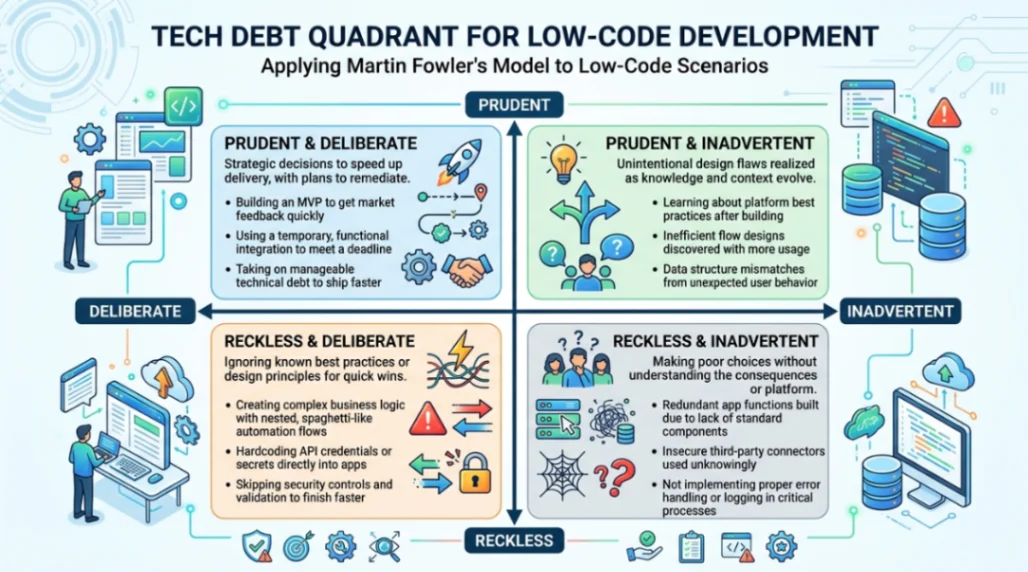
Technical debt accumulates fast when rapid release cycles encourage shortcuts. According to Mendix, using Martin Fowler's quadrant framework, debt ranges from "prudent and deliberate" (shipping now, refactoring later) to "reckless and inadvertent" (citizen developers accidentally creating security gaps). Professional teams mitigate this by establishing a Center of Excellence, running automated architectural analysis tools like OutSystems' AI Mentor, and allocating 20 to 30% of development time to refactoring sprints.
Governance matters because the same ease-of-use that makes low code productive can also spawn unsanctioned "shadow IT" apps. Enterprise platforms address this with Role-Based Access Control, audit trails, and environment lifecycle management. If your team standardizes on a single platform rather than a sprawling set of niche tools, enforcing security protocols like AES-256 encryption and multi-factor authentication gets much simpler.
Start exploring launch-ready no-code templates here!
Key Takeaways
-
Low code is a developer tool, not a developer replacement. It automates the 80% of boilerplate work (auth, CRUD, UI scaffolding) so professional developers can focus on custom business logic, architecture, and performance. According to OutSystems, this can compress timelines by 5x to 10x for data-intensive apps.
-
Architecture choice shapes your exit options. Metadata-driven platforms offer consistency but can lock you in. Code-generation platforms produce standard output you can export, giving small teams and agencies a safer long-term bet.
-
Speed without governance creates new problems. Vendor lock-in, technical debt, and shadow IT are real risks. The teams that win with low code in 2026 are the ones that pair rapid delivery with a Center of Excellence, automated quality checks, and clear platform exit terms.
The tools we use to build software have been evolving since the days of GeoCities and Angelfire. What's different now is that the middle ground between visual building and hand-coded engineering has finally matured into something professionals can trust with production workloads, not just prototypes.
FAQ
What is the difference between low code and no-code? Low code gives professional developers visual tools plus "escape hatches" for custom code. No-code targets non-technical users with configuration-only interfaces and very limited customization.
Can low code handle enterprise-scale applications? Yes. Platforms like OutSystems, Appian, and Mendix support large datasets, heavy user loads, automated CI/CD pipelines, and cloud-native deployment via Kubernetes.
Is vendor lock-in a real risk with low code platforms? It can be. Metadata-driven platforms carry higher lock-in risk. Code-generation platforms that export standard source code (C#, Vue.js) and data in JSON offer better portability.
How does low code handle DevOps and version control? Modern platforms integrate with Git, Jenkins, Azure DevOps, and GitHub Actions. Specialized visual merge tools handle the challenge of diffing visual models instead of text-based code.
Will low code replace traditional developers? No. According to Anthropic's 2026 Agentic Coding Trends Report, the developer's role has shifted to orchestrating and judging code quality, architecture, and security, skills that low code and AI can't replicate.
Start building without code
Browse thousands of no-code templates for Webflow, Framer, Bubble, Lovable, Replit and more.
Explore Templates