Netscape Composer: The Original Browser Builder
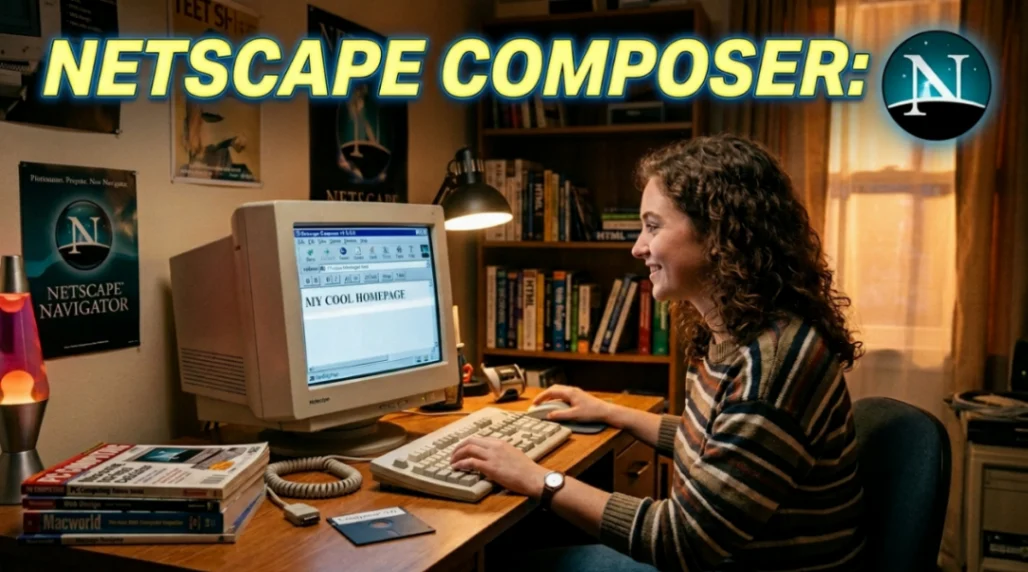
Netscape Composer was a WYSIWYG HTML editor bundled inside Netscape Communicator from 1997. It was the first major browser builder to let everyday users create and publish web pages without writing code. Its influence lives on in modern no-code website builders like Wix, Squarespace, and Webflow.
Table of Contents
- The Browser That Also Built Things
- How Netscape Composer Actually Worked
- The One-Button Publish Dream (And Why It Flopped)
- Composer vs. FrontPage vs. Dreamweaver
- The Legacy: From Browser Builder to No-Code Tools
- Key Takeaways
- FAQ
The Browser That Also Built Things
Back in 1996, most people thought building a website required knowing HTML by heart.
You'd write code in Notepad, refresh your browser every 30 seconds, and pray it looked half-decent.
Then Netscape came along and said: what if the browser could also be the builder?
That idea gave us Netscape Composer, arguably the first true browser builder ever shipped to a mass audience. And honestly, its story is way more fascinating than most people realise.
Netscape Navigator captured 75 percent of the browser market within four months of its December 1994 launch. By 1997, Netscape Communicator 4.0 packaged Navigator alongside Composer, an email client, a newsgroup tool, and a conferencing app, all bundled in one suite.
Composer was the piece that changed the web's creative culture forever. If you want the broader story of how browsers evolved around this era, Firefox's History of Web Browsers is a solid starting point.
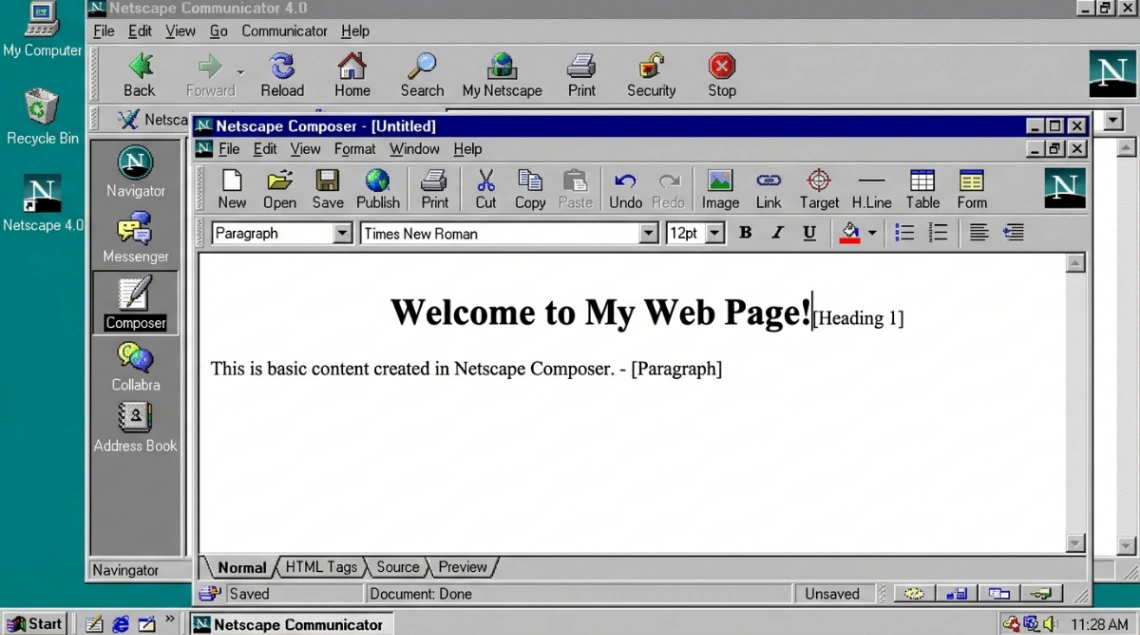
How Netscape Composer Actually Worked
Composer was designed for people who knew Microsoft Word but were terrified of HTML. That was a huge audience in the late 90s.
Think of it like this: Composer was the Canva of 1997, minus the drag-and-drop polish and plus a lot of table-based chaos.
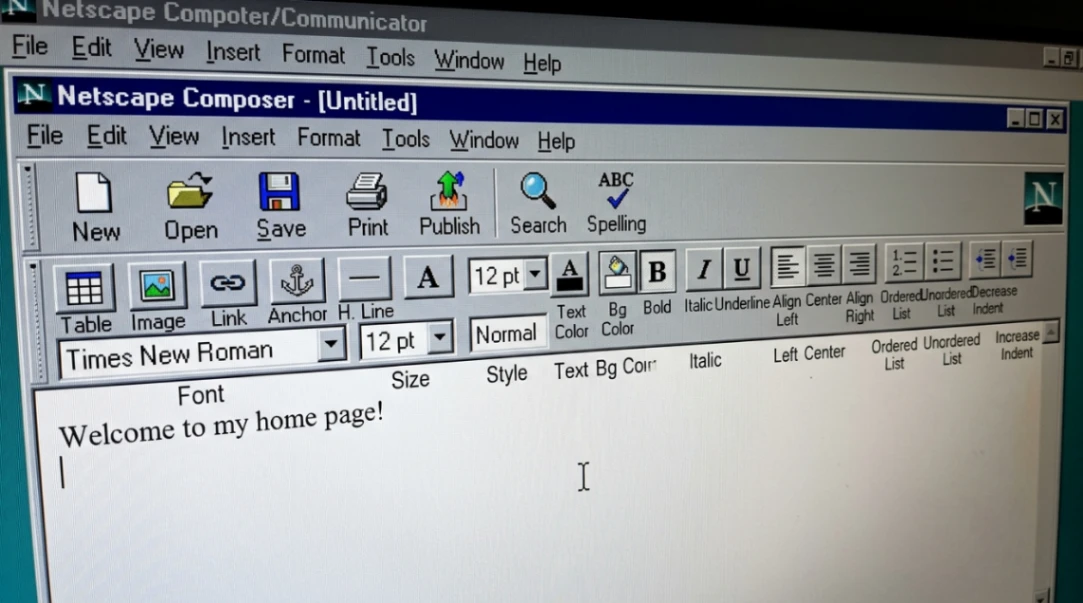
Here's what the core editing experience looked like:
- Paragraph styles: Apply Heading 1 through Heading 6, Normal, and list styles via a simple dropdown
- Character formatting: Bold, italic, font size, and colour controls on a floating toolbar
- Tables for layout: Before CSS existed, tables were the layout system. Composer made them accessible to non-coders
- Image insertion: GIF and JPEG support with Alt Text fields (surprisingly ahead of its time for accessibility)
- Whitespace control: Enter created a new paragraph; Shift+Enter did a line break. Small detail, massive frustration for beginners
One thing that really shows its age? The Special Character menu had no emoji support at all. Users were stuck typing :-) like absolute cavemen. A 2024 hands-on test of Netscape Communicator 4.8 confirmed the interface still feels "quite pleasant" but the output is largely incompatible with modern web standards.
Here's a quick comparison of Composer's tools vs. what we use today:
| Feature | Netscape Composer (1997) | Modern Equivalent |
|---|---|---|
| Page Layout | HTML Tables | CSS Flexbox / Grid |
| Styling | <font> and <center> tags | CSS Stylesheets |
| Images | GIF, JPEG only | WebP, SVG, Responsive Images |
| Publishing | One-Button Publish via FTP | Git-based CI/CD Pipelines |
| Characters | ASCII / Special Character Menu | Unicode / Emoji |
The table-based layout approach Composer leaned on was, to put it kindly, a mess for the long-term web. We've written about how table layouts actually broke the web if you want the full story on that era.
The One-Button Publish Dream (And Why It Flopped)
This is where things get really intresting.
Composer included a feature called "One-Button Publish." The idea was simple: build your page, click one button, and it's live on the internet.
No FTP client. No server configs. No command line.
The technical backbone was the HTTP PUT method, which essentially told the server "here, take this file and put it at this address." Netscape also launched a "Page Starter" program with 13 templates and a list of ISPs that supported their publishing protocols.
It sounds great. In practice? It barely worked.
Most hosting environments (schools, small businesses, basic ISPs) didn't support the server-side extensions required. Even the beta versions of Navigator Gold (the precursor to Composer) often shipped without the full publishing tool implemented.
So most people ended up using dedicated FTP programs like WS-FTP anyway.
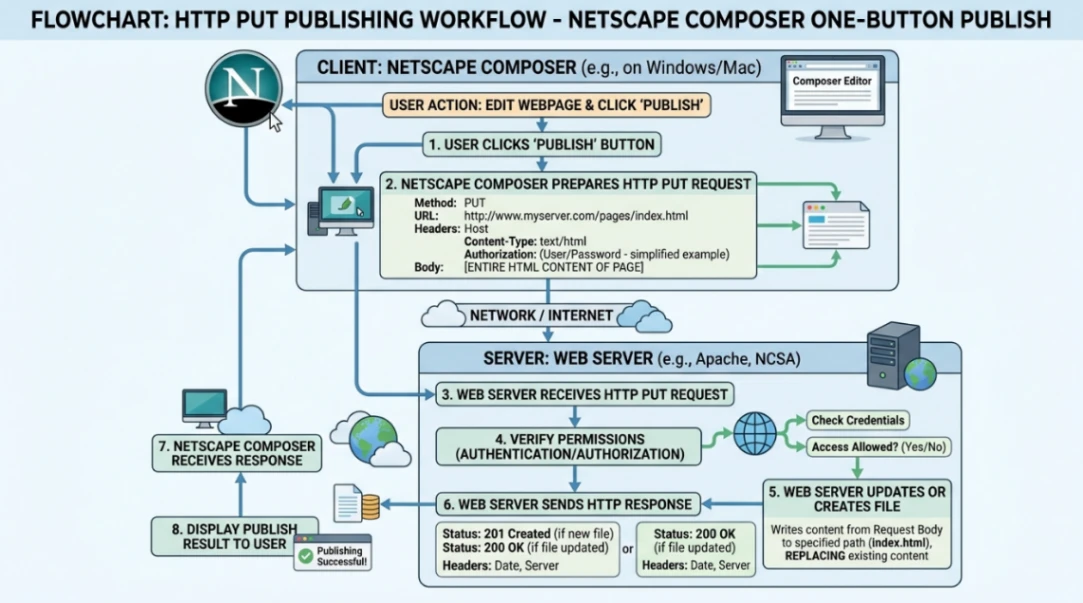
The ambition was genuinely ahead of its time though. That same dream of publishing without technical friction is exactly what powers every modern no-code browser builder today.
Composer vs. FrontPage vs. Dreamweaver
Composer wasn't the only browser builder fighting for the hearts of early web creators. Here's how the main players stacked up:
| Tool | Philosophy | Key Strength | Key Weakness |
|---|---|---|---|
| Netscape Composer | Free, inclusive, simple | Built into the browser; completely free | Sluggish; limited features |
| Microsoft FrontPage | Corporate, integrated | Mass distribution via MS Office | Proprietary code; IE-only rendering |
| Macromedia Dreamweaver | Professional, standards-focused | Split design/code view; early CSS support | Expensive; steep learning curve |
FrontPage had the install-base advantage because it shipped with Microsoft Office. But professional developers mocked it constantly for generating bloated, proprietary code that only worked properly in Internet Explorer. This retrospective on the lost tools of the web covers all three rivals really well if you want a deeper comparison.
We covered the full rivalry in our deep-dive on Dreamweaver vs FrontPage: The First No-Code War. And if you want even more context on FrontPage specifically, check out our piece on Microsoft FrontPage: The Web Builder That Built a Generation.
Composer lost the comercial war. But it won the culture war.
Because it was free for non-commercial users and educational institutions, it became the default tool in university computer labs. At places like the University of Mary Washington, students were required to use Composer simply because it was already installed on every machine.
Professors loved it because students focused on content rather than troubleshooting software.
It also fueled the entire personal homepage movement on GeoCities and Tripod, that wild, table-heavy, animated-GIF-filled era that was the actual birthplace of internet culture.
Read more: No-Code Before Wix: The GeoCities and Angelfire Story
The Legacy: From Browser Builder to No-Code Tools
Netscape the company eventually collapsed.
The reasons were brutal: engineering "featuritis," a catastrophic three-year rewrite of its browser engine, and Microsoft bundling Internet Explorer free with every copy of Windows. By the time AOL acquired Netscape for $4.2 billion in late 1998, the company had already lost the war. Airfocus has a great breakdown of exactly why Netscape failed if you want the full post-mortem, and this Medium piece on Netscape's rise and fall covers the browser war timeline in detail.
But Composer? Composer kept going.
The open-source Mozilla project inherited the Composer codebase. From there, a whole family of editors branched off:
- SeaMonkey: Still actively developed today as an all-in-one suite including a browser, email client, and Gecko-based Composer. You can find the project at seamonkey-project.org
- NVU: A standalone cross-platform editor sponsored by Linspire, aiming to be an open-source Dreamweaver alternative
- KompoZer: A community fork of NVU with improved standards compliance
- BlueGriffon: An HTML5/CSS3 editor officially recommended by the French government for public administration
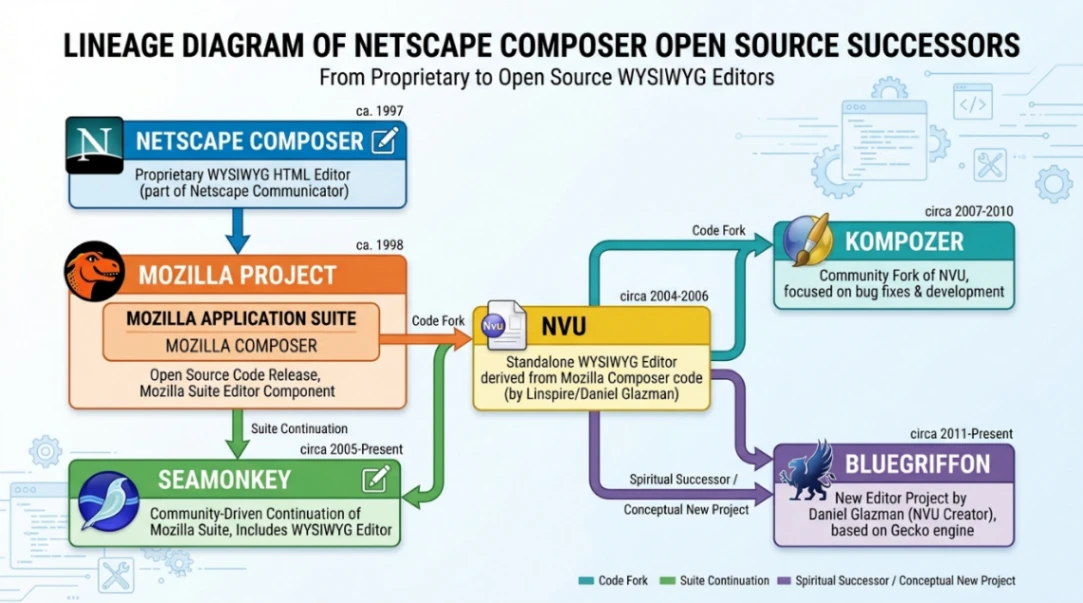
More broadly, the word processor metaphor that Composer introduced, "what you see is what you get," is now the foundational UX pattern behind every no-code tool on the market.
Squarespace, Wix, Webflow, and dozens of others are all, in a sense, spiritual descendants of that original browser builder idea.
Interestingly, Composer wasn't even the only ambitious web editor of that era. Tools like Adobe GoLive and the largely forgotten WebMagic from 1995 were also pushing the WYSIWYG envelope at the same time.
The "homemade vibe" of the 90s web is gone now. Every modern site is polished, responsive, and templated within an inch of its life.
But the core belief that the web belongs to everyone, that you shouldn't need to be a developer to have a presence online, came directly from the Netscape Composer era.
Start exploring launch-ready no-code templates here!
Key Takeaways
-
Netscape Composer was the first mass-market browser builder. Bundled inside Netscape Communicator 4.0 in June 1997, it made web creation accessible to non-technical users for the first time at scale.
-
Its "One-Button Publish" vision was ahead of its time. Even though it mostly failed in practice due to ISP limitations, it predicted the frictionless publishing experience that every modern no-code platform is built around.
-
The open-source legacy is alive. Composer's codebase directly spawned SeaMonkey, NVU, KompoZer, and BlueGriffon. Its WYSIWYG word processor metaphor underpins the entire modern no-code web builder industry.
Netscape Composer proved one thing that still matters: the distance between having an idea and putting it on the web should be as small as possible. Every tool that exists today to help you build faster is still chasing that same original promise.
FAQ
What was Netscape Composer used for? Netscape Composer was a WYSIWYG HTML editor bundled with Netscape Communicator. It let users create and publish web pages visually without writing code, targeting beginners and educational users.
Is Netscape Composer still available? Netscape Composer itself is discontinued, but its codebase lives on through open-source successors including SeaMonkey, KompoZer, and BlueGriffon, which are still available for download today.
How did Netscape Composer compare to Microsoft FrontPage? Composer was free and browser-integrated but feature-limited. FrontPage had wider distribution via Microsoft Office but generated messy, proprietary code that often only worked in Internet Explorer.
What replaced Netscape Composer? Composer evolved into Mozilla Composer, then branched into standalone tools like NVU and BlueGriffon. In the broader market, it was eventually replaced by Dreamweaver, and later by modern no-code builders like Wix and Webflow.
Why did Netscape fail despite its early dominance? Netscape suffered from engineering overreach, a three-year browser rewrite that stalled development, and Microsoft bundling Internet Explorer free with Windows, which eliminated Netscape's competitive pricing advantage entirely.
Start building without code
Browse thousands of no-code templates for Webflow, Framer, Bubble, Lovable, Replit and more.
Explore Templates