How to Build a Database Website Without Writing Code
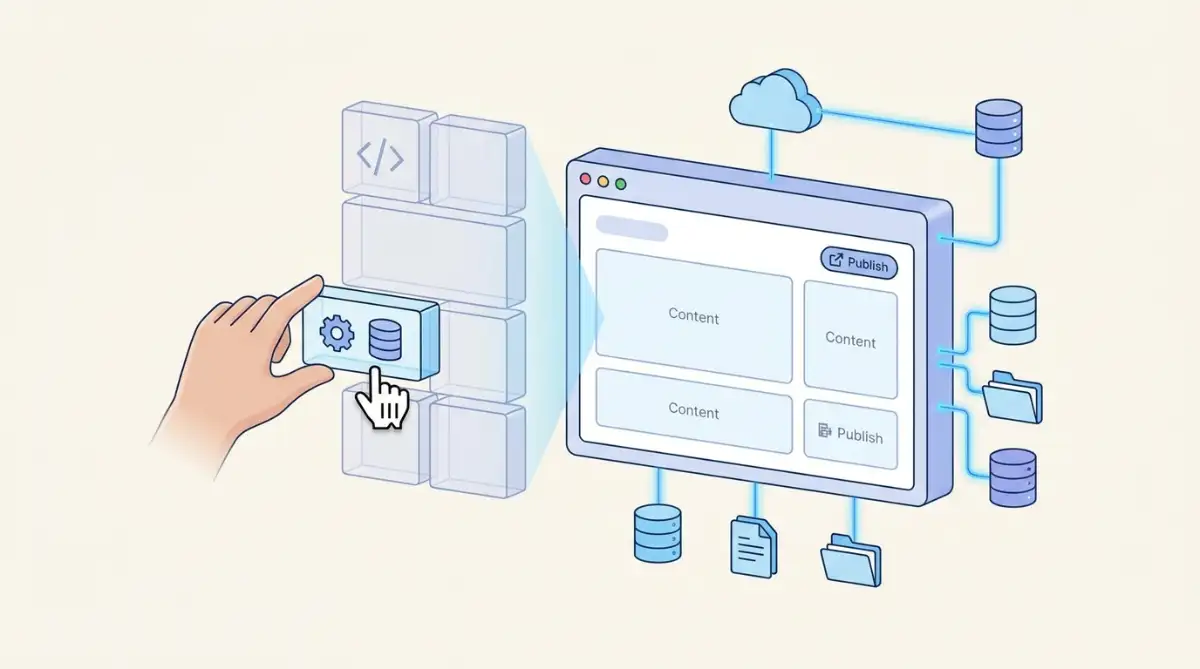
You can build a database website without code by pairing a hosted relational database with a visual publishing tool and an automation service. Common stacks include Airtable with Softr, or Webflow CMS running on its own. According to Pathfinder and Gartner, builds of this type typically ship in about three weeks.
Table of Contents:
- Key Takeaways
- Introduction
- What Actually Makes a Website a Database Website?
- How Do the Three Layers of a No-Code Database Website Fit Together?
- How Do You Build a Database Website Step by Step?
- Which Stack Should Agency Operations Leads Choose?
- What Does It Cost to Build a Database Website Without Code?
- Where Do No-Code Database Websites Break Down?
- Frequently Asked Questions
Key Takeaways
- The stack you pick matters less than the schema you draw first, and most stalled directory projects fail at the modeling step, not the publishing step.
- Airtable's 2026 sale to Bending Spoons closed at a fraction of its 2021 peak, which tells you something useful about betting your data layer on a single vendor.
- Bubble's Workload Unit pricing produced a widely cited overnight bill, and the reason it happened is structural rather than accidental.
Introduction
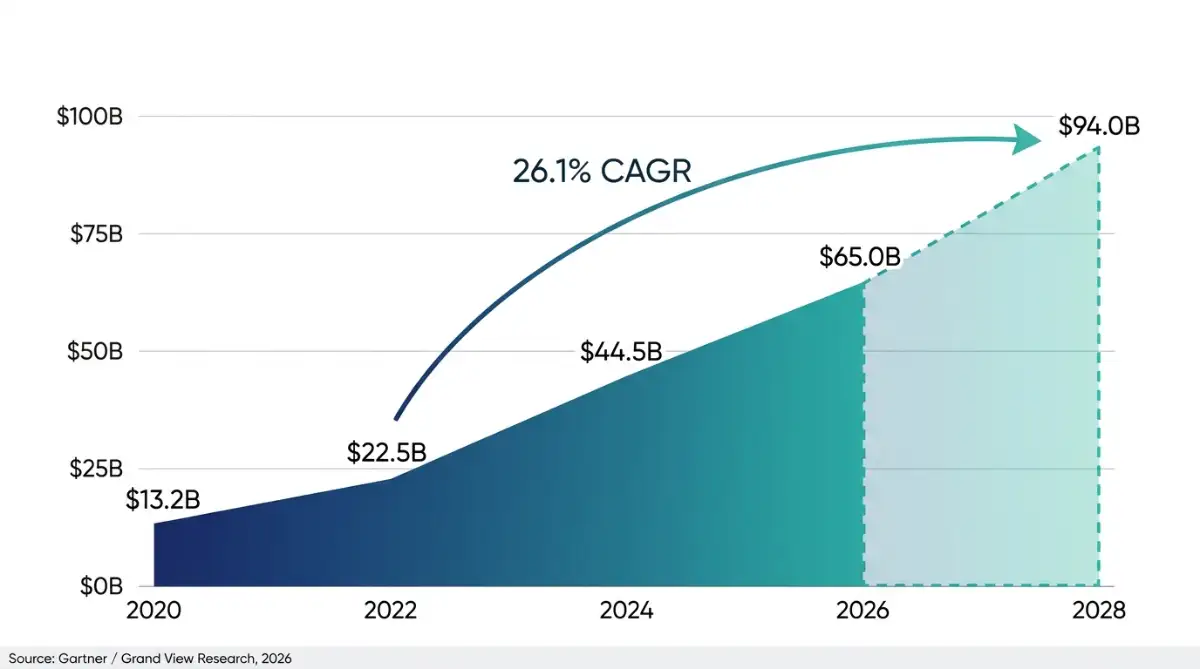
Most directory projects die in a spreadsheet. Learning how to build a database website is the skill that rescues them, and it matters most to agency operations leads and independent directory builders who have the data but no engineering queue to hand it to. According to Gartner and Grand View Research, the low-code and no-code market reached $65 billion in 2026, growing at a 26.1% CAGR toward a projected $94 billion by 2028. That money is moving because non-technical teams stopped waiting. Forrester Research counts 16.2 million active citizen developers worldwide in 2026, up 38% from 11.7 million in 2024. This guide walks the layers, the build order, the real monthly costs and the specific failure points, in the sequence you will actually hit them.
What Actually Makes a Website a Database Website?
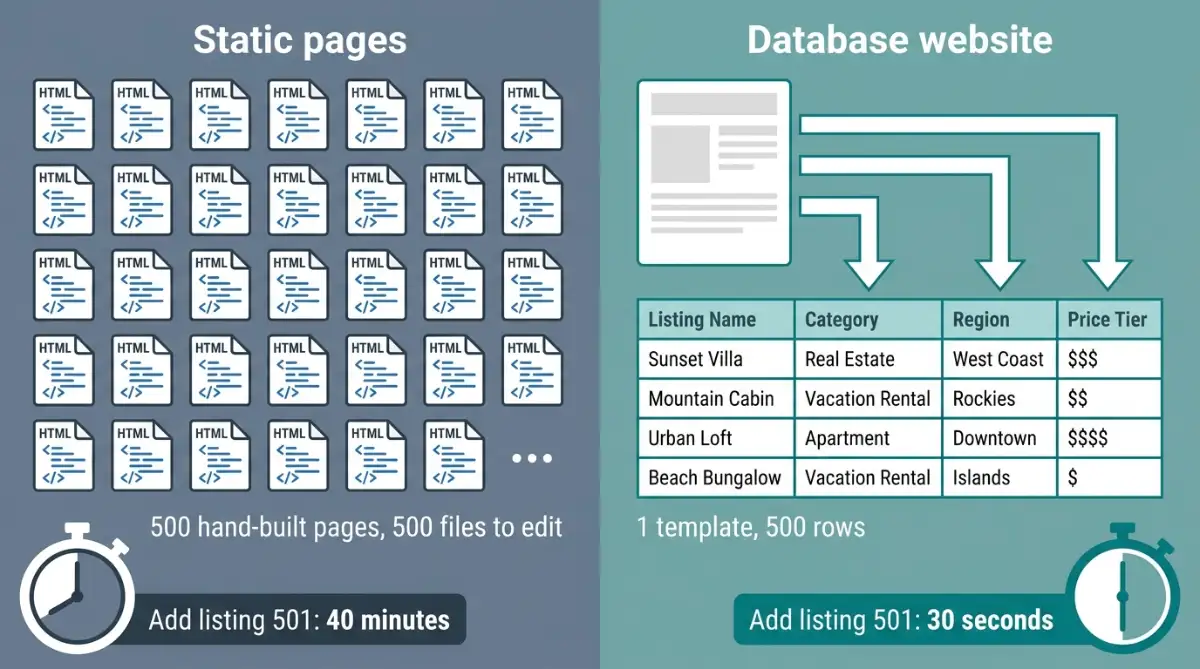
A database website stores content as structured records rather than as individual hand-built pages, then renders those records through a small number of templates. One template can serve 5,000 listings. Directories, client portals, job boards, membership hubs and internal dashboards all qualify. The defining trait is separation between the data and the design.
Traditional content management systems blurred that line. WordPress, launched in May 2003 and powering 41.2% of all global websites as of August 2026 according to W3Techs, simplified publishing but kept database queries, PHP execution and template files tightly coupled. Change the schema and you often touched code.
A database website is one where adding your 500th listing costs the same effort as adding your fifth: you type into a row, not into a page.
Modern no-code stacks break that coupling entirely, which is the same architectural idea behind a headless content architecture. Typical projects that need this structure include:
- Vendor and supplier directories with filtering by category, region or price tier
- Client portals where each account sees only its own records
- Resource libraries with tags, search and gated downloads
- Event or job boards where listings expire on a date field
How Do the Three Layers of a No-Code Database Website Fit Together?
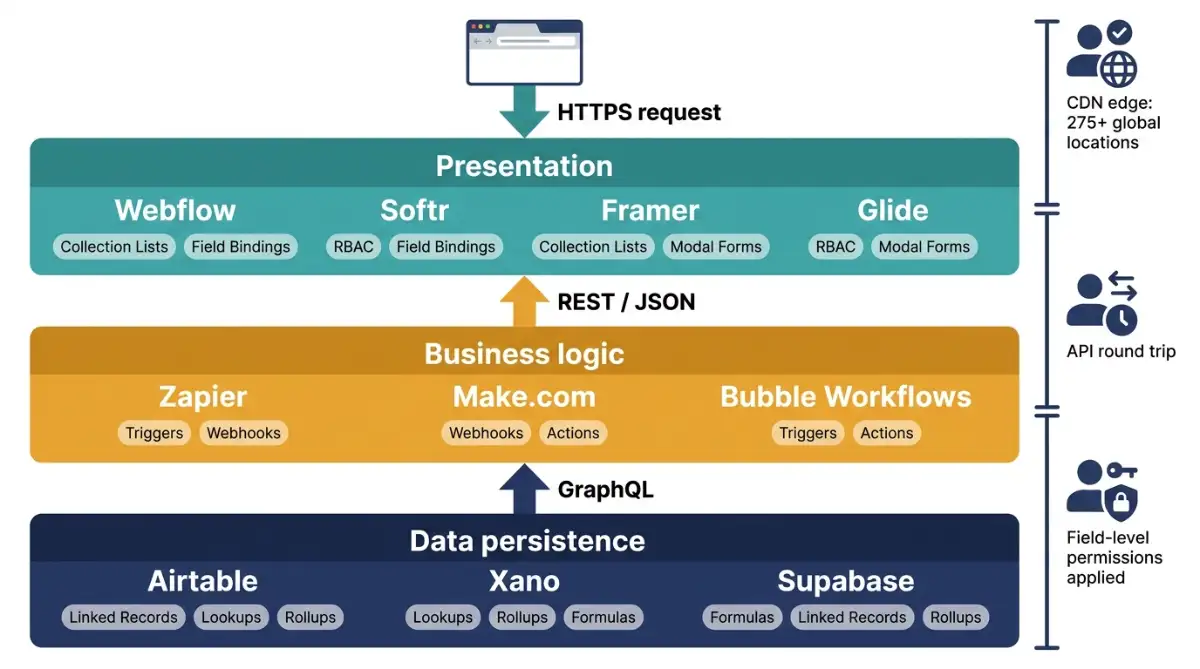
Every no-code database site runs on three functional layers: data persistence, business logic and presentation. Each layer is a separate vendor with its own runtime, connected by authenticated API calls. Understanding which layer owns which job is what keeps you from picking a tool that structurally cannot do what you need.
The primitives differ meaningfully across layers. Persistence handles typed fields, linked records and rollups. Logic handles triggers and actions. Presentation handles bindings, filters and role-based access control.
| Layer | Core job | Technical primitives | Example platforms |
|---|---|---|---|
| Data persistence | Schema modeling, record storage, relational mapping | Linked records, lookups, rollups, formula fields | Airtable, Xano, Supabase |
| Business logic | Async workflows, event listening, syncing | Triggers, webhooks, update and email actions | Zapier, Make, Bubble |
| Presentation | Interface rendering, RBAC, form validation, filtering | Collection lists, field bindings, modal forms, auth | Webflow, Softr, Framer, Glide |
When a visitor searches your directory, the request travels through all three. The browser hits pre-rendered HTML on a CDN, and Webflow serves that through AWS CloudFront and Fastly edge nodes across 275+ global locations according to ZeeFrames. The front end then fires an authenticated JSON request, the database applies field-level permissions and returns a payload, and the interface binds that payload to cards or rows without a full page reload.
Pick your persistence layer first. It is the only one of the three that is genuinely painful to swap later.
How Do You Build a Database Website Step by Step?
Build order matters more than tool choice. Model the schema, connect the presentation layer, bind fields, add access control, automate the repetitive parts, then launch. Skipping straight to design is the single most common reason projects get rebuilt from scratch six weeks in, and I have watched it happen more than once.
Work through it in this sequence:
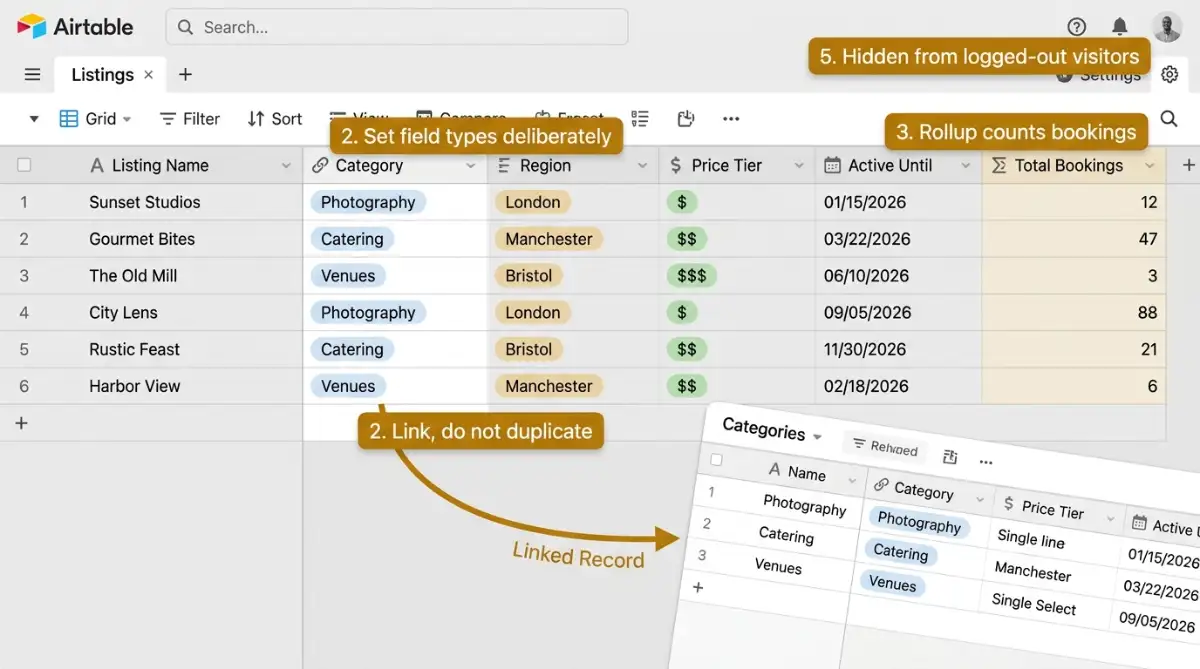
- Draw the schema on paper first. Identify your entities (listings, categories, users) and the relationships between them before opening any tool.
- Build the base. Create tables in Airtable or Xano, set field types deliberately, and use linked records rather than duplicated text columns.
- Add computed fields. Rollups and formulas handle counts, averages and status logic so your front end never has to calculate anything.
- Connect the presentation layer. Softr renders directly from an Airtable base and can produce a working portal in under ten minutes, which is roughly the fastest path from data to live URL.
- Configure access control. Decide what logged-out visitors see, what members see, and what only you see. Do this before adding real records.
- Wire the automations. Route form submissions, notification emails and third-party syncing through Make or Zapier.
If your data already lives in a spreadsheet, Glide, founded by David Siegel in 2018, generates web and mobile interfaces straight from those sheets. Starting from a ready-made directory template also removes most of the layout guesswork.
Which Stack Should Agency Operations Leads Choose?
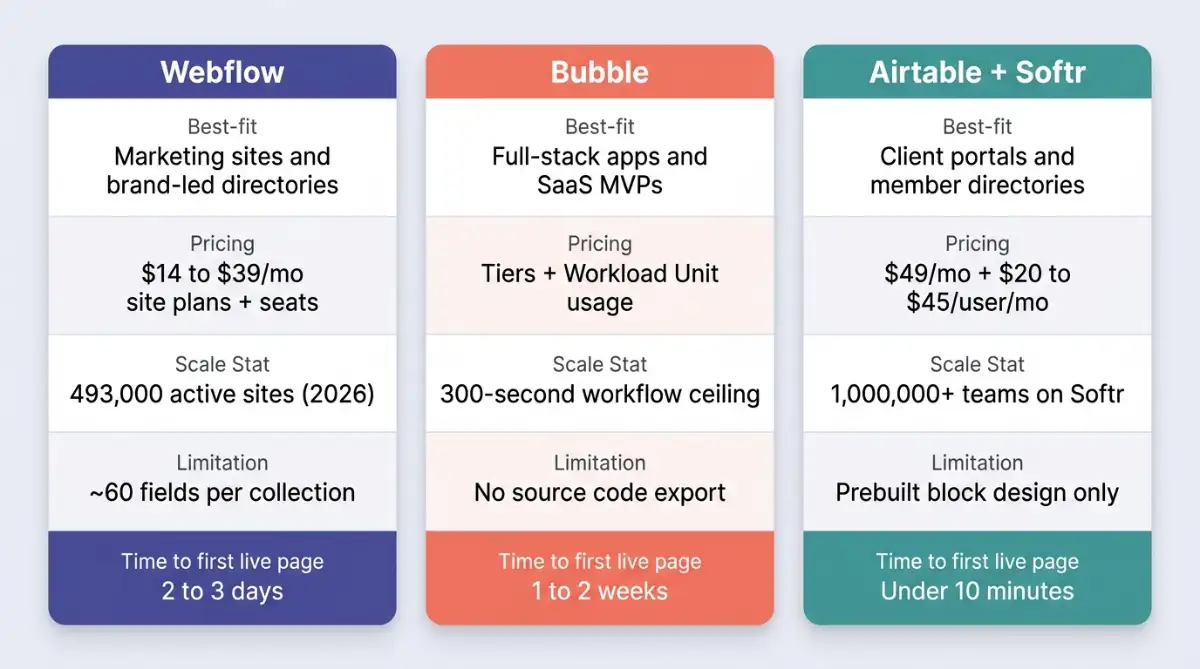
There are three defensible answers, and the honest one is that it depends on whether your bottleneck is design, logic or speed. Agency operations leads shipping client portals usually want Airtable plus Softr. Design-led teams want Webflow. Anyone building genuine transactional software wants Bubble, with the caveats that come attached.
| Dimension | Webflow | Bubble | Airtable + Softr |
|---|---|---|---|
| Best for | Marketing sites, directories, brand-led portals | Full-stack apps, SaaS MVPs, marketplaces | Client portals, member directories, dashboards |
| Learning curve | Moderate (CSS box model knowledge helps) | Steep (state and logic management) | Low (component blocks) |
| Database flexibility | Moderate, around 60 fields per collection | High, custom relational models and privacy rules | High, full relational primitives |
| Entry pricing | Site plans $14 to $39/mo plus seats | Tiers plus Workload Unit consumption | Softr from $49/mo plus Airtable $20 to $45/user |
| Core limitation | Limited app logic without external tools | Latency floors and no source code export | Design constrained to prebuilt blocks |
Scale is a real tiebreaker here. Webflow reported 493,000 active hosted websites in 2026, a 54% year-over-year increase from 320,617 in early 2024, and Sacra's Webflow profile tracks the revenue growth underneath that. Softr, founded in Berlin in 2019 by Mariam Hakobyan and Artur Mkrtchyan, reports over 1,000,000 teams according to GetLatka, and the client portal pattern is where it earns its keep.
The future is a world where programming is self-explanatory; where people talk to computers to build software. Emmanuel Straschnov and Josh Haas, co-founders of Bubble
What Does It Cost to Build a Database Website Without Code?
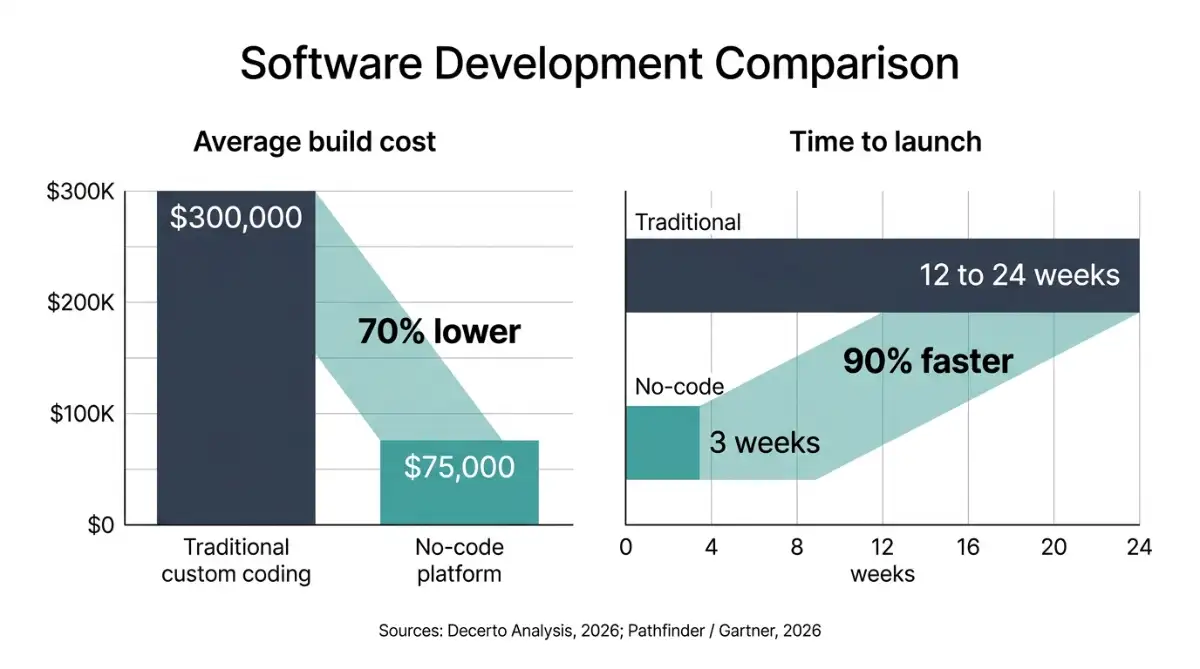
Two numbers matter: build cost and running cost. According to a Decerto analysis, the average custom-coded application costs roughly $300,000 versus roughly $75,000 on a no-code platform, a 70% reduction. Timelines compress similarly, from three to six months down to around three weeks according to Pathfinder and Gartner figures.
Running costs are where budgets drift. Webflow raised its Business site plan to $39 per month and CMS to $23 per month in December 2024 according to TapTwice Digital's Webflow figures, and workspace seats are billed separately. Per-seat pricing is the quiet line item that grows when your team does.
The productivity case is well documented. Index.dev reports that 71% of organizations achieve at least 50% faster application delivery through citizen development, with 29% recording speed improvements of 2x or greater. A Forrester Total Economic Impact study found 206% ROI and $31 million in net present value over three years, alongside a million saved employee working hours.
Budget realistically for a small directory or portal:
- Data layer: $20 to $45 per user per month on Airtable
- Presentation layer: $23 to $49 per month depending on Webflow or Softr
- Automation: free tiers cover low volume, then usage-based pricing
- Domain and email: typically under $50 per year combined
A broader cost comparison across builders is worth checking before you commit to annual billing.
Where Do No-Code Database Websites Break Down?
Three limits show up repeatedly: usage-based billing surprises, latency floors and vendor lock-in. None of them disqualify the approach, but pretending they do not exist is how directory builders end up rebuilding in year two. This is the section I would read twice.
Bubble's April 2023 shift to Workload Units triggered sustained backlash, and co-founder Emmanuel Straschnov publicly disclosed receiving physical threats during it. On November 3, 2023, a widely discussed Bubble Forum thread documented a user consuming 7 million Workload Units in 24 hours through an unhandled recursive workflow, generating roughly $1,000 in charges overnight. The structural issue was the absence of user-configurable hard spend caps combined with a 23-hour delay in usage alerting.
Performance has a floor too. Benchmarks published by Bubble to Code show P50 and P99 page load durations sitting near 5.8 seconds on visual applications even after database indexing, and background workflows hit a hard 300-second execution ceiling. Bubble's own workload optimization documentation treats page load as a billable event, which tells you how tightly performance and cost are coupled. Getting below three seconds generally means moving the backend to Xano.
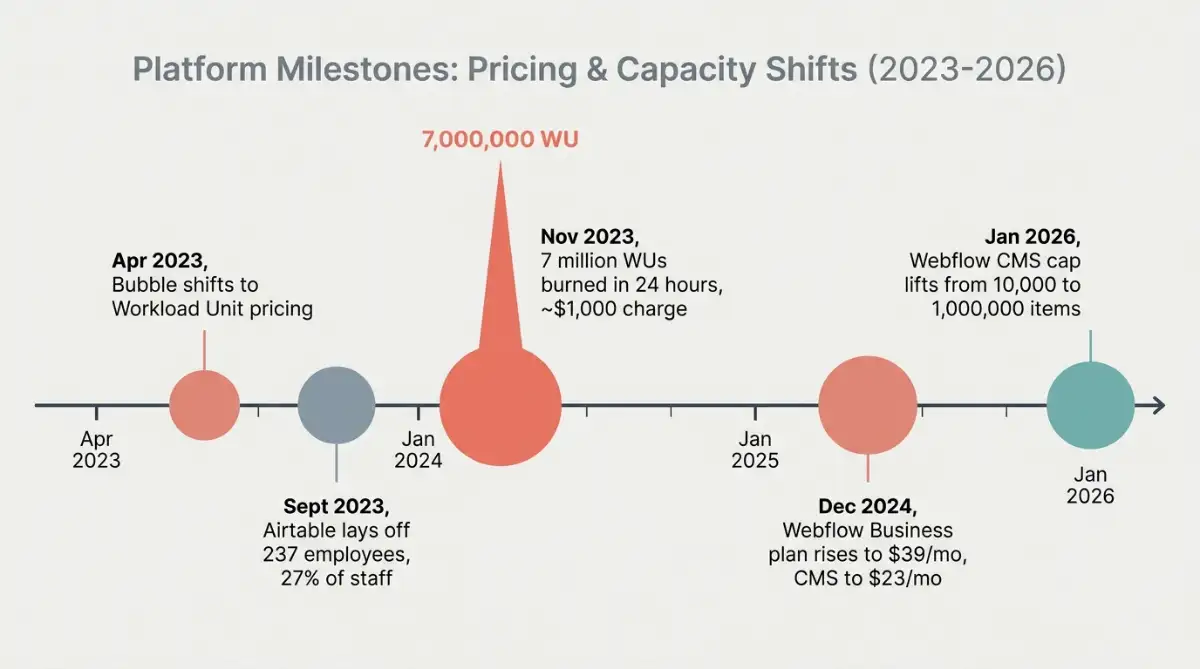
Scale caps have improved. Webflow removed its historic 10,000-item collection ceiling in January 2026, expanding enterprise limits to 1,000,000 items per project according to ZeeFrames. Lock-in remains the sharper risk: most visual platforms do not permit source code export, so migration means rebuilding both design and logic. Airtable's own trajectory illustrates the point, moving from an $11.7 billion Series F valuation in December 2021 to an all-cash agreement to be acquired by Bending Spoons at a $1.285 billion enterprise value, announced in August 2026 and still pending regulatory clearance, against roughly $480 million in ARR estimated by Sacra.
Partnering with Bending Spoons gives us the resources and the long-term commitment Airtable needs to pursue that vision even more boldly. Howie Liu, co-founder and CEO of Airtable
Compliance is the last gate. Major platforms hold SOC 2 Type II and ISO 27001, but data sits on vendor-managed cloud instances, which rules out organizations with on-premise residency mandates. A fuller risk and reality check on no-code security is worth reading before you migrate client data.
Start exploring launch-ready no-code database templates here!
Frequently Asked Questions
What is a database website?
A database website stores content as structured records in tables and displays them through reusable templates. Adding a new listing means adding a row, not building a page. Directories, job boards, client portals and membership sites are the most common examples.
Do you need SQL to build a database website?
No. Visual platforms translate your interface choices into database operations behind the scenes. Airtable exposes relational primitives like linked records, lookups and rollups through a spreadsheet-style interface, so relational thinking still helps even though query syntax does not.
Is Airtable a real relational database?
Functionally yes for most web projects. Founded in 2012 by Howie Liu, Andrew Ofstad and Emmett Nicholas, Airtable supports typed fields, linked records and aggregation. It is not a drop-in replacement for PostgreSQL at high transaction volumes.
How much does a no-code database website cost monthly?
Expect roughly $50 to $150 per month for a small directory or portal. Softr starts around $49 per month, Webflow CMS sits at $23 per month, and Airtable runs $20 to $45 per user per month depending on tier.
Can a no-code database website rank in Google?
Yes. Webflow serves pre-rendered static HTML through global edge CDNs and includes native SEO controls for meta tags, canonical URLs and structured data. Ranking depends far more on content quality and internal linking than on the builder you chose.
Start building without code
Browse thousands of no-code templates for Webflow, Framer, Bubble, Lovable, Replit and more.
Explore Templates