Is No-Code Secure? A 2026 Risk & Reality Check
No-code platforms can be secure, but security depends on how you configure them rather than on the tool itself. Vendors protect the underlying infrastructure, while builders stay responsible for access controls, data rules, and which marketplace components they trust. The headline breaches almost never start in the vendor's data center.
Table of Contents
- Key Takeaways
- Introduction
- Is No-Code Secure by Default?
- What Actually Goes Wrong? Three Breaches Worth Studying
- Who Is Responsible When a No-Code App Leaks Data?
- Does AI Make No-Code Less Secure in 2026?
- Is No-Code Good for Development in 2026?
- How Do You Actually Secure a No-Code Build?
- FAQ
Key Takeaways
- The scary 62% vulnerability figure says more about builders than about platforms, and the difference matters before you ship customer data.
- Three of the most expensive no-code breaches on record shared one quiet ingredient, and it was never the vendor's source code.
- No-code is genuinely good for development in 2026, but only inside a fence most builders never bother to draw.
Introduction
Is no-code secure? It is the question every solo SaaS builder and small agency team eventually asks, usually the night before wiring customer data into a Bubble app or a Zapier automation. You do not have a security team. You have a launch date. According to Zenity research, around 62% of low-code and AI copilot applications carry active vulnerabilities, a number that sounds alarming until you see what is actually breaking, and who caused it.
Most of it is not the platform's fault. Forrester reports that roughly 68% of marketing departments now use no-code tools daily, and there are around 16.2 million citizen developers worldwide, so this is not a fringe concern anymore. This guide walks through the real breaches, the data behind the headlines, and where security responsibility actually sits, so you can judge no-code on evidence instead of vibes.
Is No-Code Secure by Default?
No-code is not secure by default; it is secure by configuration. Platforms ship with convenient settings tuned to get you live fast, and those defaults frequently leave tables, permissions, and data flows wide open until you tighten them. The 62% vulnerability figure mostly reflects builders trusting settings they never opened.
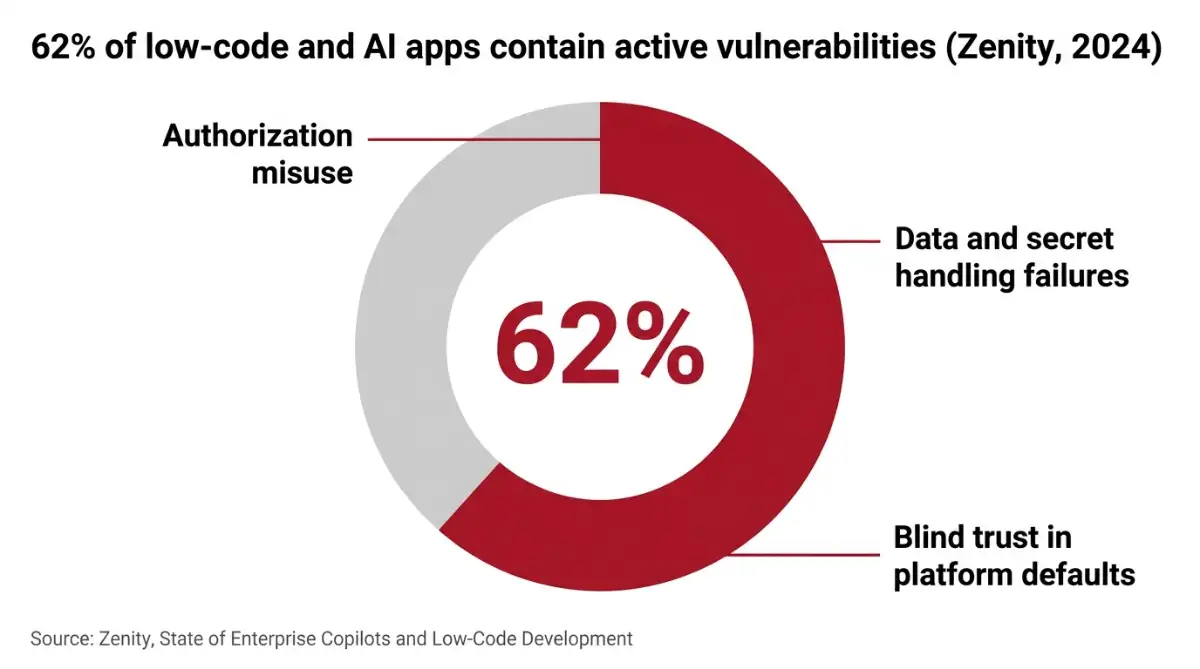
The research community has a name for this: blind trust. Citizen developers treat platform-generated logic as safe because it came from the platform, a habit closer to automation bias than to engineering. On a no-code builder like Bubble, for example, your database is not private until you write privacy rules yourself. The tool will happily let you launch without them.
You have a lot of copilots, apps, and automations being built outside of your knowledge by business users. Ben Kliger, co-founder and CEO of Zenity
The OWASP Top 10 Risks for Citizen Development documents the usual offenders. The most common default traps include:
- Public-by-default data tables that expose records to anyone who finds the API endpoint.
- Shared connection pools where one app's database credentials quietly leak to end users.
- Unscanned marketplace plugins dropped into a build with full app-level permissions.
The uncomfortable truth: a no-code app is exactly as secure as the last setting you forgot to check.
What Actually Goes Wrong? Three Breaches Worth Studying
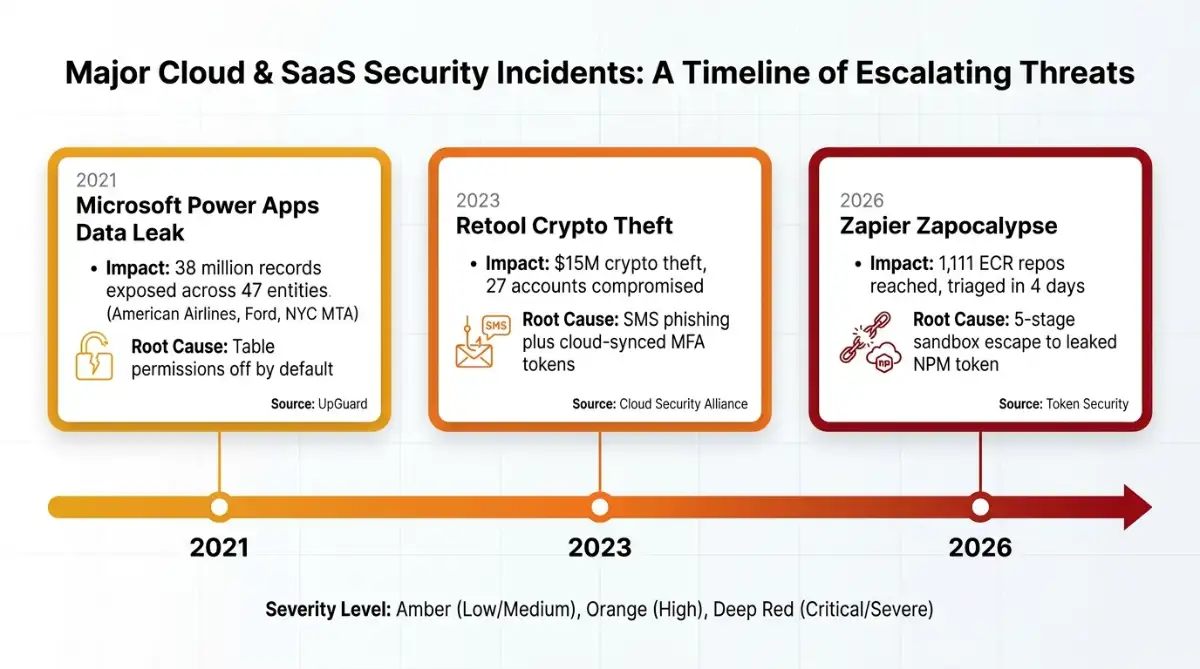
The most instructive no-code failures of the past five years share a pattern: a small misconfiguration that scaled. Microsoft Power Apps exposed 38 million records, Retool lost roughly $15 million to a phishing chain, and Zapier's 2026 "Zapocalypse" showed how minor anti-patterns combine into platform-wide account takeover.
| Incident | Year | Root cause | Impact |
|---|---|---|---|
| Microsoft Power Apps Portal | 2021 | Table permissions disabled by default + OData enabled | 38M records exposed (American Airlines, Ford, NYC MTA) |
| Retool MFA breach | 2023 | SMS phishing + cloud-synced MFA tokens | $15M crypto theft, 27 accounts compromised |
| Zapier "Zapocalypse" | 2026 | Chained sandbox escape to leaked NPM token | Near platform-wide takeover, triaged in 4 days |
According to UpGuard, the Power Apps exposure happened because the platform silently disabled table permissions when developers built a data list, leaving names, Social Security numbers, and vaccination records queryable over the open internet. Retool, documented by the Cloud Security Alliance, fell to a voice-cloned phone call and a Google Authenticator sync feature, not a code flaw. Token Security's Zapier disclosure is the cleanest lesson of all: five individually minor mistakes, stacked, which the vendor triaged within four days and fully remediated a few weeks later.
Incidents and breaches are inevitable, and you must operate with the assumption that you will be attacked. Jeremy Ventura, Field CISO at ThreatX
None of these required exotic skill. They required someone trusting a default. If you run Zapier automations or build internal tools the way Retool popularized, these are your cautionary tales, scaled down to your size.
Who Is Responsible When a No-Code App Leaks Data?
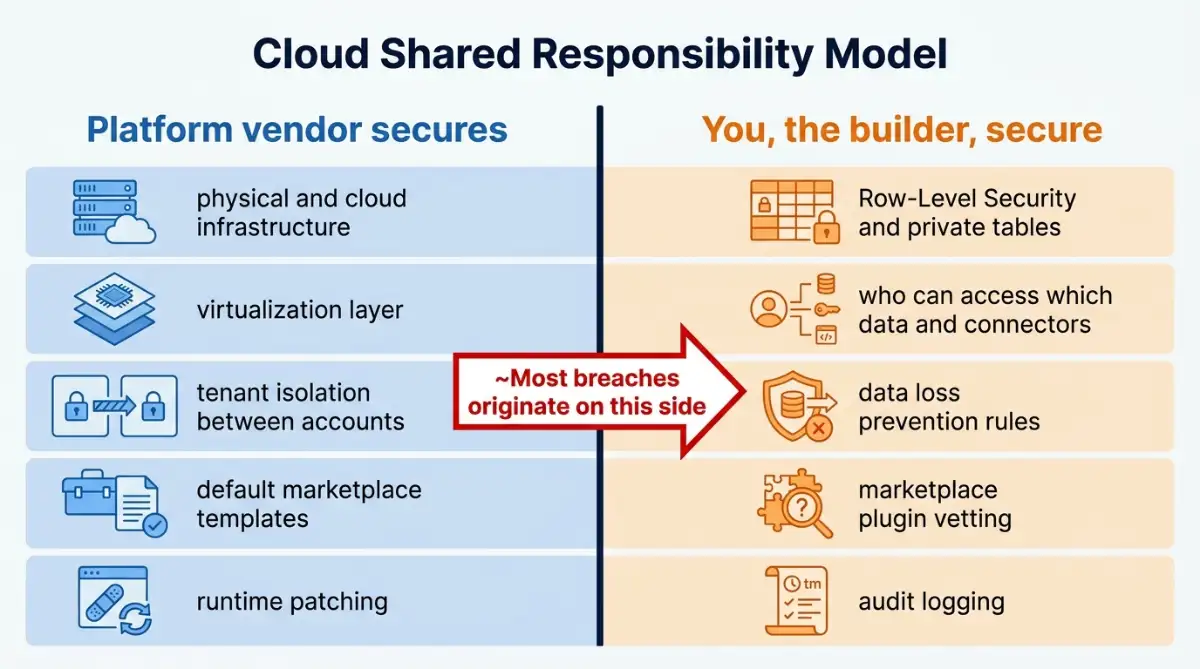
Every no-code platform runs on a Cloud Shared Responsibility Model, and the split is the single most misunderstood thing in this whole topic. The vendor secures the hardware, the virtualization layer, and the default marketplace templates. You, the builder, own access controls, permissions, and data loss prevention. When records leak, the failure almost always sits on the customer side of that line.
Here is the division in plain terms.
The platform handles:
- Physical and cloud infrastructure security
- Tenant isolation between customer accounts
- Patching the underlying runtime and engine
You handle:
- Row-Level Security and private table permissions
- Who can access which data and connectors
- DLP rules that stop data walking out through an integration
This is why understanding how visual building works matters more than it looks. In traditional software, security is written into the source code; in no-code, it lives entirely in configuration screens like Dataverse permissions or Bubble privacy rules. The platform handing you a secure foundation does not make your app secure. It hands you the materials and a fence you still have to build.
There is one responsibility most builders discover too late: forensic visibility. Many no-code platforms do not log backend visual actions or API calls in granular detail, so when something breaks, reconstructing what happened is hard. If a connector quietly exfiltrates data, you may have no trail to follow. Treat audit logging as a feature to verify before you commit a project, not after.
Does AI Make No-Code Less Secure in 2026?
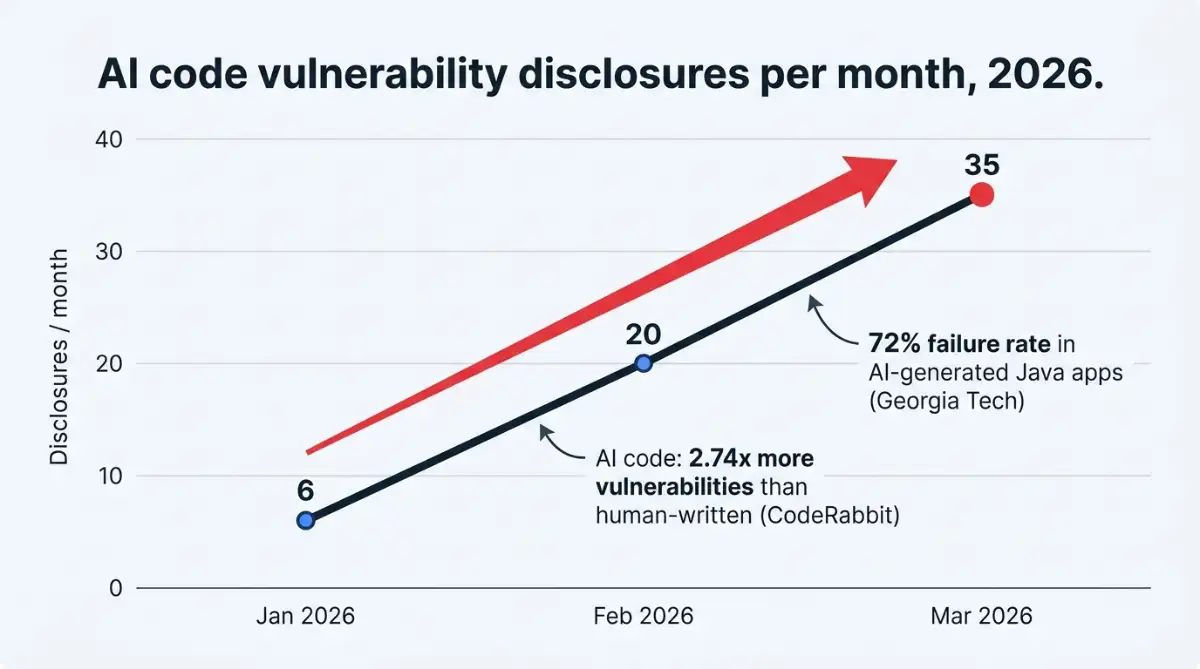
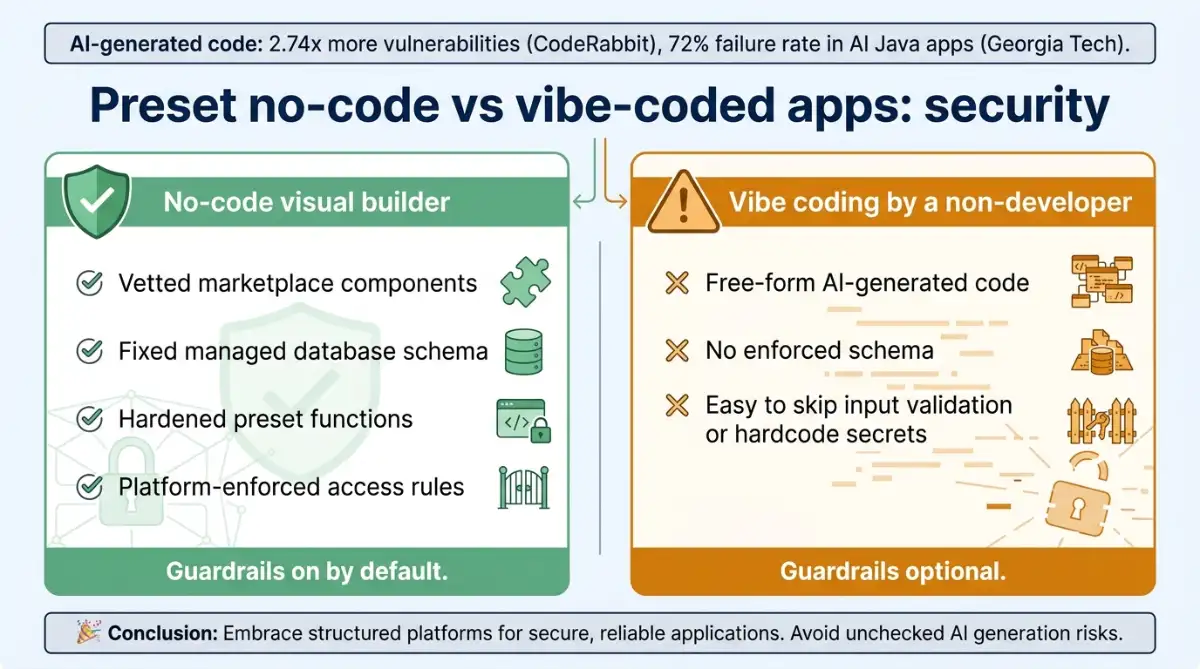
Agentic AI raises the stakes considerably. Once autonomous agents get direct access to your data and tools, new attack paths open that did not exist in drag-and-drop land: prompt injection, sandbox escapes, and poisoned context. According to CodeRabbit, AI-generated code introduces 2.74 times more security vulnerabilities than human-written code.
The supporting numbers are not subtle. Researchers at Georgia Tech documented a 72% security failure rate in AI-generated Java applications. The Cloud Security Alliance found that 53% of organizations had AI agents exceed their intended permissions, and 47% suffered a direct AI-agent security incident in the past year.
The same group reports that 43% of organizations now have more than half their staff using AI agents regularly, so the exposure is widening faster than most teams can review it. Disclosure velocity tells the same story, climbing from roughly 6 per month to about 35 per month between January and March 2026.
We need to empower citizen developers with low-code tools, the same way Excel let everyone build spreadsheets. Satya Nadella, CEO of Microsoft
Recent CVEs make it concrete: an unauthenticated remote code execution flaw in the n8n automation platform, a path traversal bug in Langflow, and a sandbox escape in Anthropic's Claude Code. The new danger is "reality poisoning," where an agent reads a malicious instruction hidden in an email or database and executes it without a human in the loop. If you are leaning into building apps by talking to AI, treat agent permissions the way you would treat a stranger's hands on your production database.
Here is the nuance worth holding onto: for someone who is not a trained developer, a visual builder is usually safer than vibe coding. When you drag in a Bubble database or a vetted connector, you inherit preset functions and a schema the platform already hardened, so the secure path is the default path. Vibe coding hands that same non-developer a blank canvas, and the AI will cheerfully produce a working login screen that skips input validation or hardcodes an API key. The skill gap a no-code builder quietly absorbs is the exact gap free-form AI generation exposes, which is why platform-managed components tend to beat improvised code when the person at the keyboard cannot read the security implications.
Is No-Code Good for Development in 2026?
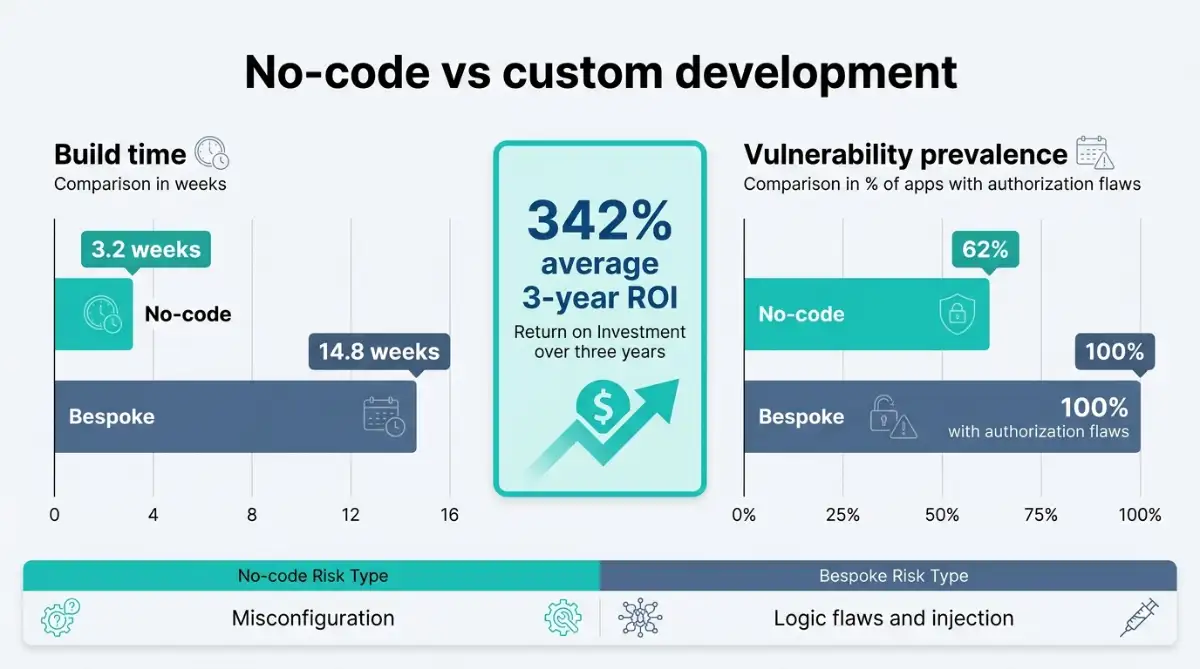
For the right project, yes, and the gap is large enough to matter. No-code ships in roughly 3.2 weeks against 14.8 weeks for bespoke code, with a reported 342% three-year ROI. It is good for development when the work is an internal tool, an MVP, or standard automation. It struggles the moment you hit mission-critical scale or regulated data.
| Metric | No-Code / Low-Code | Bespoke Custom | Packaged SaaS |
|---|---|---|---|
| Dev lifecycle | 3.2 weeks | 14.8 weeks | Immediate |
| 3-year ROI | 342% average | Highly variable | Predictable opex |
| Main risk | Misconfiguration | Logic flaws, injection | Supply-chain, credential theft |
| Review method | Config audits | SAST/DAST | Compliance audits |
The honest read is that fit decides everything. No-code earns its keep for low-complexity, standard-data-model projects, which is exactly what most solo builders and small agencies are shipping anyway. Gartner predicts that 70% of new enterprise applications will use no-code or low-code by 2026, up from under 25% in 2020, so the direction of travel is clear even if your project is small.
Reach for custom engineering instead when the app is mission-critical, handles data under GDPR or HIPAA sovereignty rules, needs sub-millisecond execution, or must scale to millions of concurrent users. Platforms like OutSystems and Mendix sit in between for heavier builds. The no-code market keeps expanding, and for a sense of the low-code middle ground that bridges visual building and real engineering, the direction is the same: up and to the right. Good for development does not mean good for everything.
How Do You Actually Secure a No-Code Build?
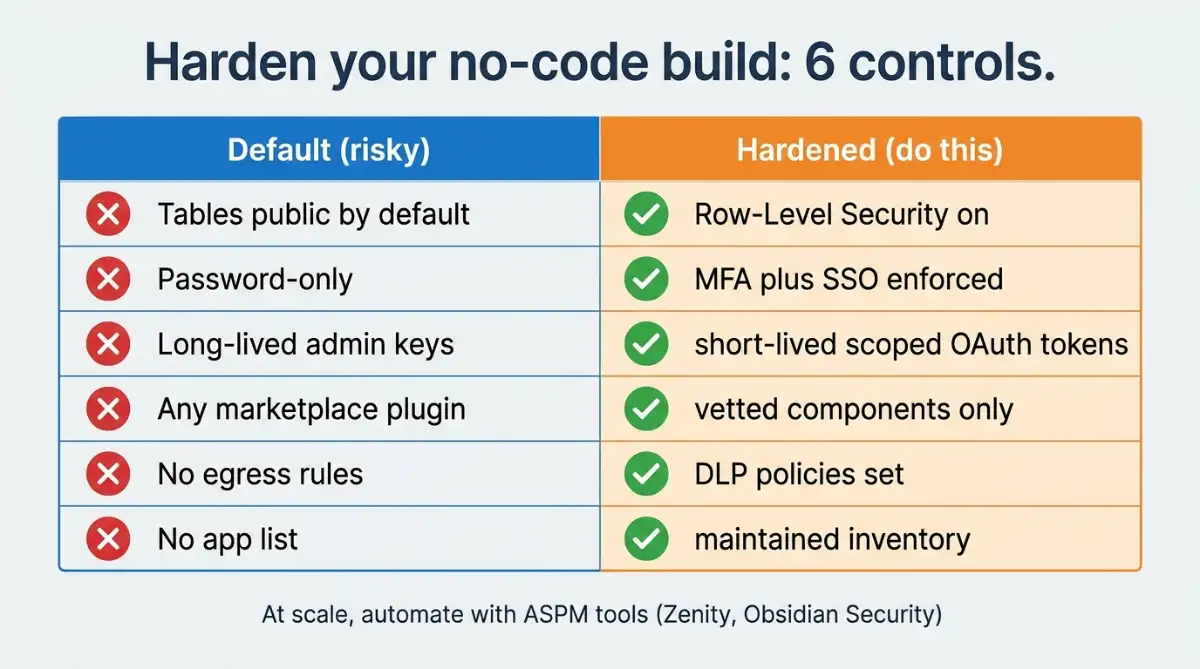
Securing no-code is mostly about reversing the defaults you accepted to ship fast. The fixes are configuration, not code, which means a non-technical builder can close most gaps in an afternoon. The order matters less than actually doing it before real users arrive.
A practical checklist:
- Turn on Row-Level Security and make private tables the default, not an afterthought.
- Enforce MFA and SSO on every account that touches the build.
- Use short-lived, scoped tokens for integrations instead of long-lived admin credentials.
- Vet every marketplace plugin before installing; unscanned components inherit your app's permissions.
- Set DLP rules so data cannot leave through a connector you forgot about.
- Keep an inventory of what you have built, because shadow apps you forgot about are the ones that leak.
At scale, teams adopt Application Security Posture Management tools like Zenity or Obsidian Security that plug into platform APIs and flag misconfigured apps automatically. Large enterprises now manage as many as 80,000 low-code apps and agents, which is why manual review has stopped working for them. For a one-person shop, the inventory habit alone beats most of the 62% into submission. The single highest-leverage move is boring: open the permission settings the platform left convenient, and make them restrictive.
Start exploring launch-ready no-code templates here!
FAQ
Is no-code safe for storing customer data? Yes, if you configure it correctly. The platform encrypts and isolates storage, but you must enable Row-Level Security, write privacy rules, and restrict table permissions. The 38-million-record Power Apps leak happened precisely because those builder-side controls were left at their open defaults.
Is no-code more secure than writing custom code? Neither wins outright. No-code's risk is misconfiguration, while custom code's risk is logic flaws and injection. Research shows essentially all tested bespoke apps had authorization issues, versus 62% of low-code apps, so discipline matters more than the method you pick.
Does no-code work for GDPR or HIPAA compliance? Sometimes, but cautiously. Compliance-ready platforms offer SOC 2 Type II, SSO, mandatory MFA, and configurable DLP. For data under strict sovereignty laws or anything mission-critical, the research recommends bespoke engineering rather than a visual builder.
Can hackers break into a no-code app easily? Not easily, but predictably. The documented breaches relied on exposed default settings, phishing, and unscanned plugins rather than clever exploits. Most no-code attacks succeed because of a forgotten configuration, which also means most are preventable.
What is the most common no-code security mistake? Trusting platform defaults without checking them, often called blind trust. Builders assume platform-generated logic is secure and leave tables public or credentials shared. Reviewing every default permission before launch closes the majority of real-world vulnerabilities.
Start building without code
Browse thousands of no-code templates for Webflow, Framer, Bubble, Lovable, Replit and more.
Explore Templates