What Is a Desktop App? 2026 Guide for Founders
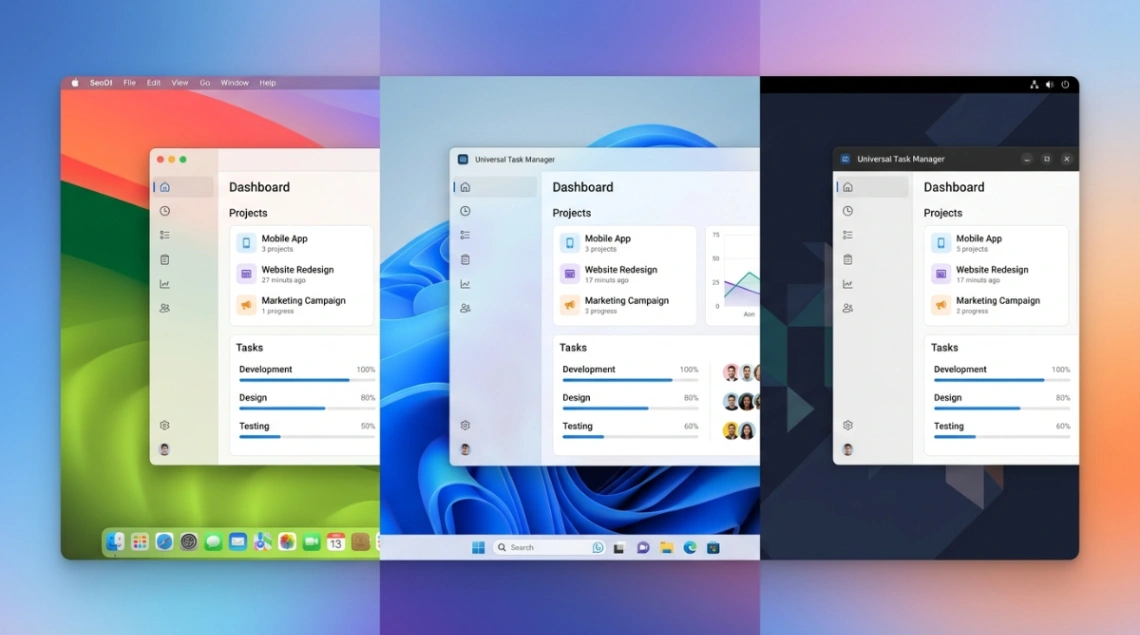
A desktop app is software installed locally on a computer that runs independently of a browser, with direct access to the OS, file system, GPU, and offline storage. In 2026, you can build one natively (WinUI 3, SwiftUI, GTK/Qt) or cross-platform (Flutter, .NET MAUI, Tauri, Electron).
Table of Contents
- Why desktop apps still matter in 2026
- Desktop app vs. web app vs. PWA
- Native frameworks: WinUI 3, SwiftUI, GTK, and Qt
- Cross-platform frameworks: Flutter, MAUI, Electron, Tauri
- Distribution, sandboxing, and the Windows 10 cliff
- Deal-breaker questions founders actually ask
- Key takeaways
- FAQ
Introduction
Here's the stat that should stop any non-technical founder mid-scroll: Windows 11 just hit 66.71% of the gaming market on the Steam Hardware Survey, while it's still only 37.34% of the broader desktop world. That gap is your entire problem in one number. The "desktop" you're building for in 2026 isn't one platform, it's at least three operating systems moving at three different speeds, plus a wave of progressive web apps eating the easy use cases.
If you're a non-technical founder weighing whether to ship a real installable product or just a slick web build, this guide gives you the actual decision tree: when a desktop app is worth the cost, which framework matches your team, and what'll bite you on launch day. No fluff, no Swift tutorials, just the trade-offs.
Why Desktop Apps Still Matter in 2026
A desktop app earns its keep when the browser can't keep up. It runs locally, talks straight to the CPU, GPU, and file system, and doesn't fall over when the Wi-Fi does. That's why high-frequency trading dashboards, video editors, IoT control panels, and machine-learning tools still ship as desktop software, not tabs.
The market backs this up. Windows holds roughly 60.8% of global desktop devices as of March 2026 per Statcounter, with macOS at 15.19% (closer to 25% in North America) and Linux crossing 4.7% globally in 2025, a 70% jump in three years according to SQ Magazine's Linux Statistics 2026. For a small team, that's three real audiences worth shipping to, not a rounding error.
If you're still mapping the difference between this and a browser-based product, our web app guide and native app breakdown cover the boundary cases.
Desktop App vs. Web App vs. PWA
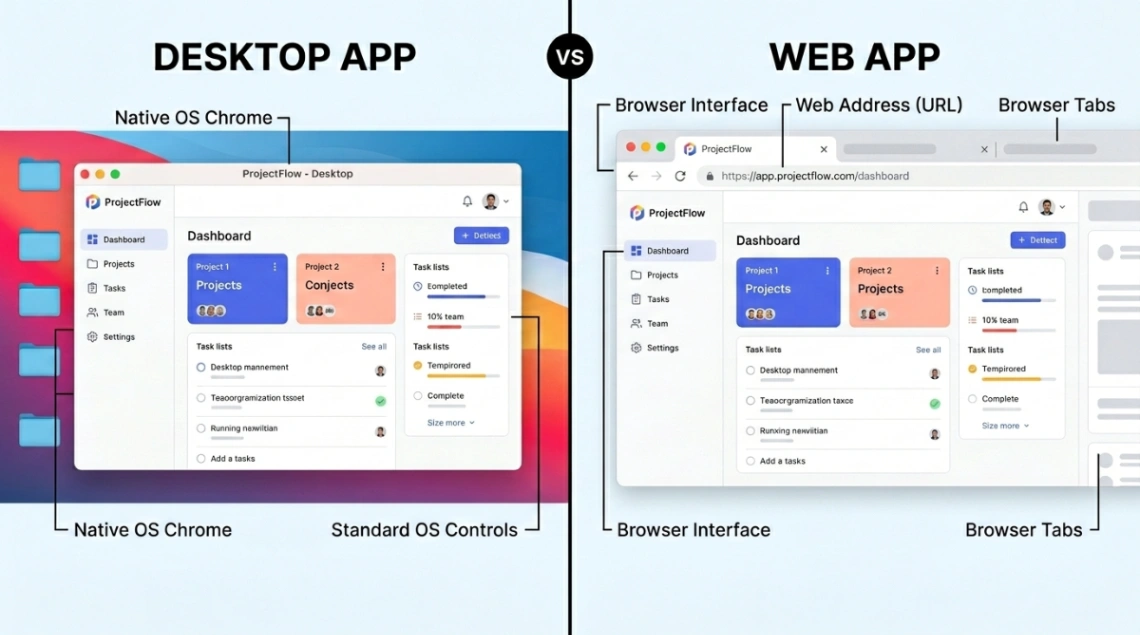
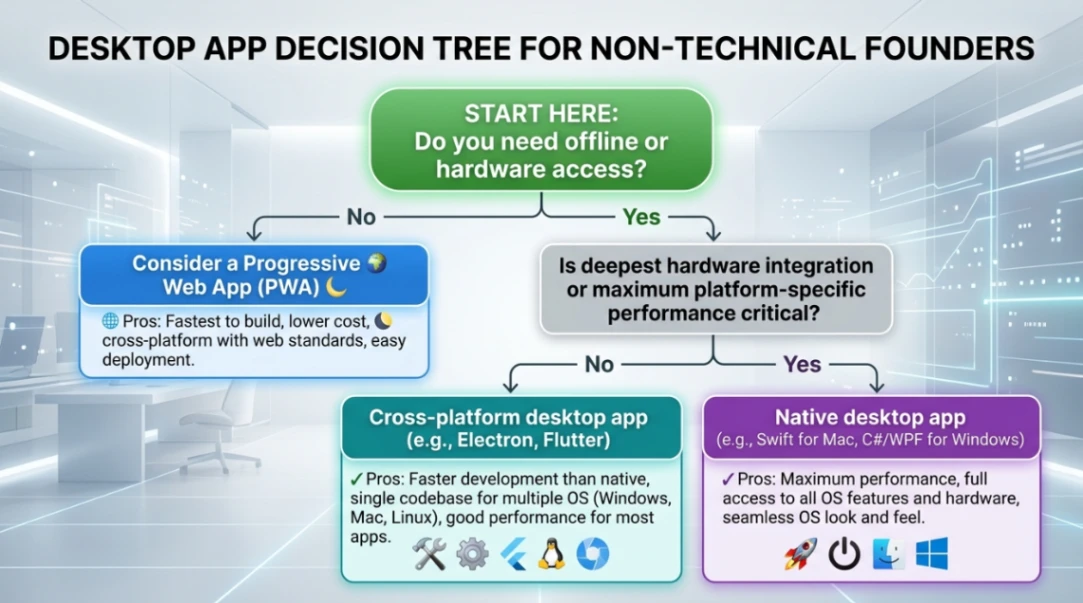
Short answer: A desktop app installs on your machine and runs offline; a web app lives in the browser; a PWA is a web app dressed up to feel installed. Pick desktop when you need hardware access or zero network risk.
| Capability | Desktop App | Web App | PWA |
|---|---|---|---|
| Offline use | Full | None | Partial |
| Hardware access | Direct (GPU, file system) | Sandboxed | Expanding via Project Fugu |
| Install friction | Installer required | Zero | One click |
| Update control | Manual or auto | Instant | Instant |
| Build cost (3 OS) | Highest | Lowest | Low |
PWAs are the elephant in the room. They're projected to capture 60% of enterprise desktop and mobile development projects by 2026, and companies report 40-60% lower development costs versus maintaining native apps (Straits Research PWA Market Report). Starbucks shrank its app from 148MB to 600KB by going PWA. Pinterest saw a 60% engagement lift. For e-commerce, content, or simple tools, the desktop app may be overkill.
But the moment you need real GPU work, persistent local files, or guaranteed offline behavior, the browser hits a wall. That's the line.
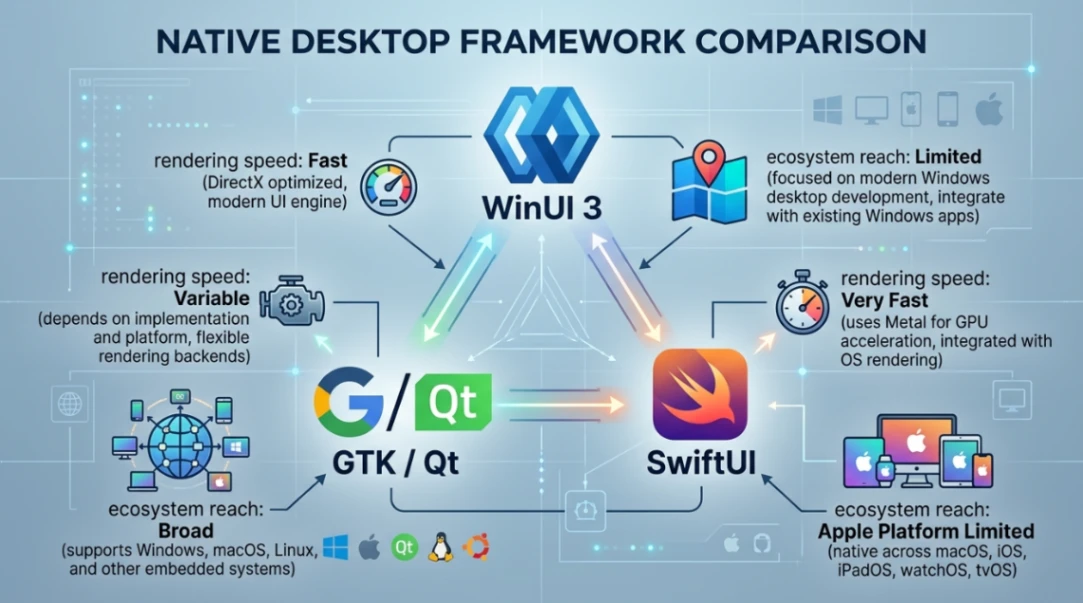
Native Frameworks: WinUI 3, SwiftUI, GTK, and Qt
Short answer: Native means writing one codebase per OS using the vendor's official tools. You get the best performance and the most "at home" feel, at roughly 3x the build cost.
- Windows: WinUI 3 is Microsoft's current flagship, part of the Windows App SDK, built on the Fluent Design System and GPU-accelerated. It replaces the older WPF and Windows Forms for new builds (see Visual Studio Magazine's UI framework breakdown).
- macOS: SwiftUI is Apple's declarative framework and has largely replaced AppKit. Starting April 2026, all new App Store apps must be built with the macOS 26 SDK and Xcode 26, which unlocks the new "Liquid Glass" interface and on-device Foundation Models for AI (full breakdown in this Apple submission changes summary). Apple's App Sandbox documentation is required reading before you commit.
- Linux: GTK and Qt split the world. GTK (C-based, powers GNOME and GIMP) is opinionated and clean. Qt (C++, powers KDE and VLC) is more versatile and runs on every major OS, which makes it a sneaky cross-platform option. Baeldung's GTK vs Qt comparison is a solid primer.
Native is the right call if your app is performance-critical or platform-specific. For most non-technical founders, it's the wrong call.
Cross-Platform Frameworks: Flutter, MAUI, Electron, Tauri
Short answer: Cross-platform frameworks let you ship one codebase to all three operating systems. Flutter and Tauri are the 2026 momentum picks; Electron is the safe veteran; MAUI suits C# shops.
| Framework | Backend | Rendering | Footprint | Best fit |
|---|---|---|---|---|
| Flutter | Dart | Custom (Impeller) | Medium | Brand-consistent UI; used by 46% of cross-platform devs in 2025 |
| .NET MAUI | C# | Native controls | Medium | Enterprise teams already on .NET |
| Electron | Node.js | Bundled Chromium | Heavy | Mature ecosystem (VS Code, Slack, Discord) |
| Tauri | Rust | System webview | Tiny (single-digit MB) | Web devs who want a small, secure binary |
For a deeper head-to-head, Digisoft's .NET MAUI vs Flutter 2026 guide and Red Sky Digital's Electron vs Tauri vs Flutter analysis cover the trade-offs in depth.
Tauri is the interesting story. It uses your OS's built-in webview instead of bundling Chromium, dropping app size from hundreds of megabytes to a few. The Rust backend is memory-safe by default, which matters more every year. The flip side: smaller community, fewer plugins, and webview behavior varies slightly per OS.
If you're already comfortable with no-code thinking, the cross-platform app guide walks through the build-once philosophy in plain terms.
Distribution, Sandboxing, and the Windows 10 Cliff
Short answer: Each OS has its own gate. Microsoft Store wants signed MSIX packages, the Mac App Store mandates the App Sandbox, and Linux uses Flatpak, Snap, or AppImage.
- Windows: Apps must be digitally signed or Windows Defender SmartScreen will scare users off. Windows 10 support ended in October 2025, which kicked off a hardware refresh cycle (Licendi's Windows usage data). If your installer assumes Windows 10, it's already aging out.
- macOS: Every Mac App Store app runs in a sandbox by default. You'll need an Apple Developer Program membership and "entitlements" for any unusual file access. Plan for a longer review cycle than you expect.
- Linux: Flatpak wins for GUI apps thanks to Flathub's centralized updates. Snap (Canonical) handles auto-updates well. AppImage is the portable, no-install option, great for one-shot tools.
The hidden cost of multi-OS distribution is signing, certificates, store fees, and update infrastructure. Budget for it before you commit.
Start exploring launch-ready no-code templates here!
Deal-Breaker Questions Founders Actually Ask
Do I really need a desktop app, or will a PWA do? If your app is mostly forms, dashboards, content, or commerce, ship the PWA. If it needs hardware, offline guarantees, or heavy compute, build desktop.
Cheapest way to cover all three operating systems? Tauri or Flutter. Tauri for tiny binaries and Rust safety, Flutter for a polished, brand-consistent UI.
Will my app feel native everywhere? Only if you use platform-native controls (MAUI) or do per-OS theming. Flutter looks identical everywhere, which is a feature or a bug depending on your taste.
How do I survive Apple's sandbox? Use security-scoped bookmarks for persistent file access, design for the entitlement model from day one, and budget extra time for App Store review.
What if I'm coming from web tools? Tauri or Electron will feel most familiar. Our WordPress no-code history piece is a useful read on why web-first thinking has reshaped every other category, including desktop.
Key Takeaways
- Desktop apps still win on offline use, hardware access, and predictable performance. PWAs are eating the rest, with 40-60% lower build costs and projected 60% enterprise share by 2026.
- Cross-platform frameworks (Tauri, Flutter, MAUI, Electron) are the realistic path for small teams. Native development gives the best feel but roughly triples the cost of supporting three operating systems.
- Distribution is the hidden tax. Apple's sandbox, Windows code signing, and the Linux packaging maze (Flatpak, Snap, AppImage) all need planning before launch, not after.
The desktop app of 2026 isn't a relic, it's a specialist. The question isn't "web or desktop?" anymore. It's "what's the smallest amount of native I can ship to deliver the experience my users actually need?" Answer that honestly, and the framework picks itself.
FAQ
1. What counts as a desktop app in 2026? Software installed locally on macOS, Windows, or Linux that runs independently of a browser, with direct access to the OS, file system, and hardware. PWAs blur the line but technically remain web apps.
2. Is Electron still worth using? Yes for mature teams (VS Code, Slack, Discord all run on it), but Tauri is a stronger pick in 2026 for small footprint, Rust-level security, and faster startup times.
3. Do I need separate teams for Windows, Mac, and Linux? Not anymore. Flutter, Tauri, MAUI, and Electron all let one team ship one codebase to all three. Native still wins on feel and performance for specialized apps.
4. What's the deal with Windows 10 ending? Microsoft ended Windows 10 support in October 2025, triggering a hardware refresh. New apps should target Windows 11, which already holds 66.71% of the gaming desktop market.
5. How does a desktop app differ from a mobile app? Desktop apps target larger screens, keyboard/mouse input, and heavier compute. Mobile apps prioritize touch and battery. See our mobile app guide for the full split.
Start building without code
Browse thousands of no-code templates for Webflow, Framer, Bubble, Lovable, Replit and more.
Explore Templates