What Is a Mobile App? Native vs Web Guide for Solopreneurs
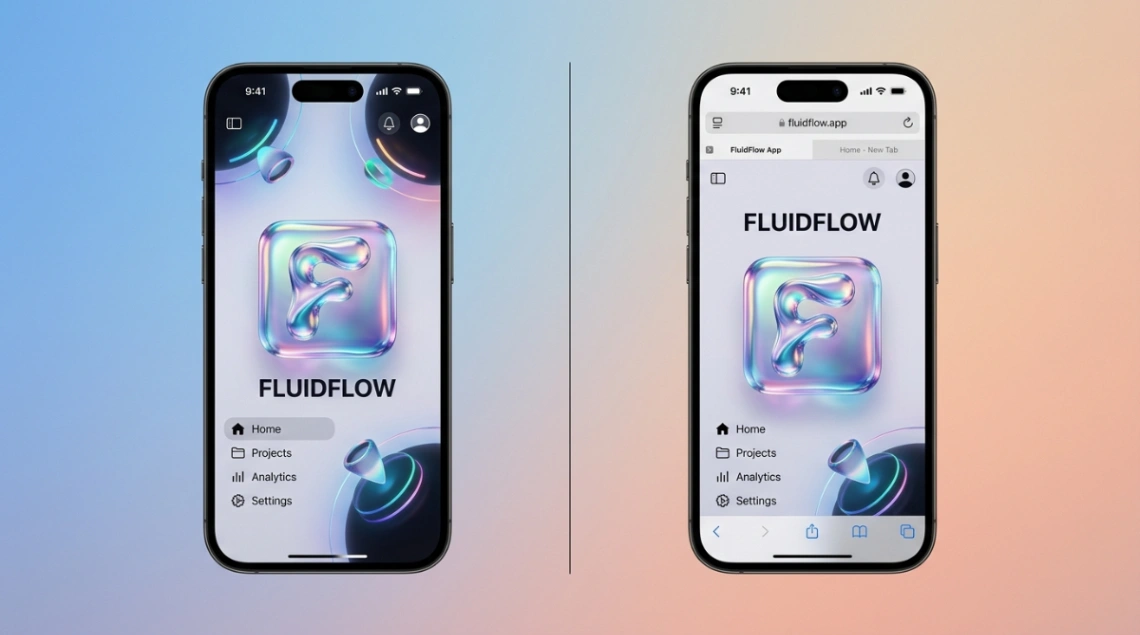
A mobile app is software that delivers a task-focused experience on a phone, either through a native install (Swift/Kotlin), a browser URL, or a hybrid wrapper. Native apps run directly on device hardware for peak speed, while web-based apps load through a browser and update instantly without app store approval. In 2026, solopreneurs increasingly start with a PWA or no-code mobile app builder to validate ideas before committing to native development.
Table of Contents:
- So What Actually Counts as a Mobile App in 2026?
- Native vs Web-Based: The Real Performance Gap
- What a Native App Can Do That Your Browser Just Can't
- The Honest Cost Breakdown for Solopreneurs
- Picking the Right Mobile App Builder Path
- Key Takeaways
- FAQ
What Is a Mobile App? Native vs Web Guide for Solopreneurs
Mobile app is a piece of software designed to help you complete a specific task on a phone, whether it lives on your home screen as a native install or runs inside a browser tab. For solopreneurs trying to ship something users will actually open twice, the choice between a native build and a web-based experience shapes your budget, your launch date, and how often Apple gets to veto your updates.
I've shipped both, and I can tell you the "right" answer depends entirely on what you're trying to prove. Let's break down the four flavors of mobile apps in 2026, the real trade-offs, and which mobile app builder path makes sense when you're a team of one with a tight runway.
So What Actually Counts as a Mobile App in 2026?
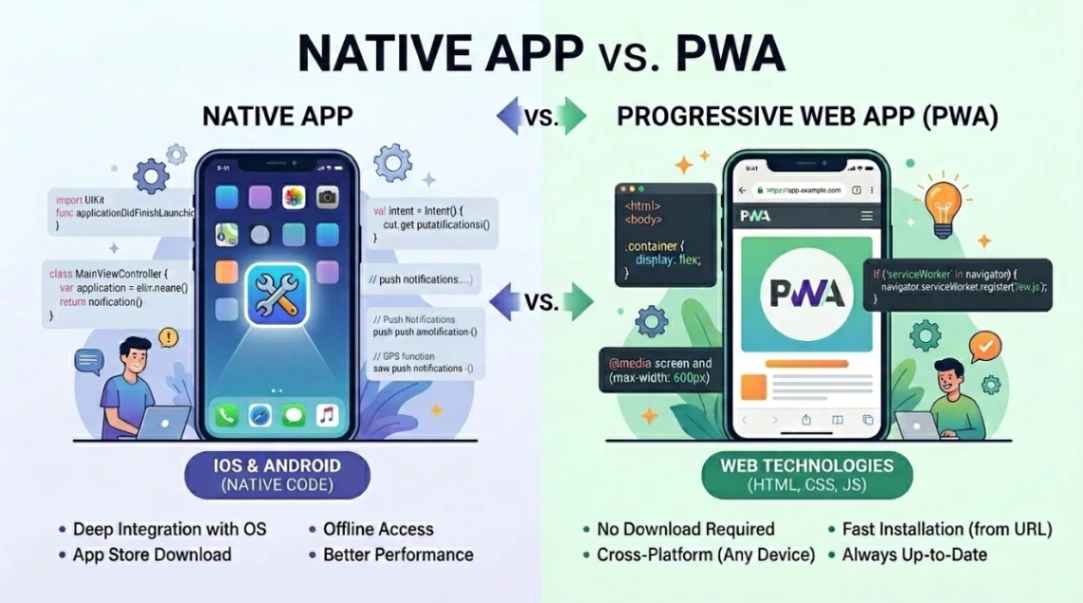
A mobile app is any software experience optimized for a phone, but the delivery method splits into four buckets: native, web-based, hybrid, and Progressive Web Apps (PWAs). The home-screen icon is no longer the dividing line. According to the architectural analysis from late 2025, the modern definition spans everything from a Swift-compiled iOS app to a URL that installs to your home screen via a service worker.
Here's how the four models stack up:
| Type | Built With | Lives Where | Install Required |
|---|---|---|---|
| Native | Swift, Kotlin | App Store, Play Store | Yes |
| Web App | HTML, CSS, JS | Browser via URL | No |
| Hybrid | Web tech + native shell | App stores | Yes |
| PWA | Service workers + manifest | Browser or home screen | Optional |
If this whole "what counts as software on the web" question feels familiar, it's because we've been arguing it since the Netscape Composer days. The names change, the tension doesn't.
Native vs Web-Based: The Real Performance Gap
Native apps cold-start in under 1.5 seconds and respond to taps in roughly 100 milliseconds, while web apps add 1 to 3 seconds of browser initialization on top of network latency. That's the headline gap, and it matters more in some categories than others.
According to 2026 Flutter vs React Native benchmarks, native apps still hold a 20-30% edge in raw response times for real-time tasks. But cross-platform frameworks like Flutter (with the Impeller engine hitting 120fps) and React Native's Fabric renderer have closed the gap to "indistinguishable" for most consumer apps.
| Metric | Native | Cross-Platform | Web/PWA |
|---|---|---|---|
| Cold Start | Under 1.5s | 1.8s to 2.5s | 3.0s to 5.0s |
| UI Response | ~100ms | ~120-150ms | 200ms+ |
| Battery Impact | Low | Moderate | High |
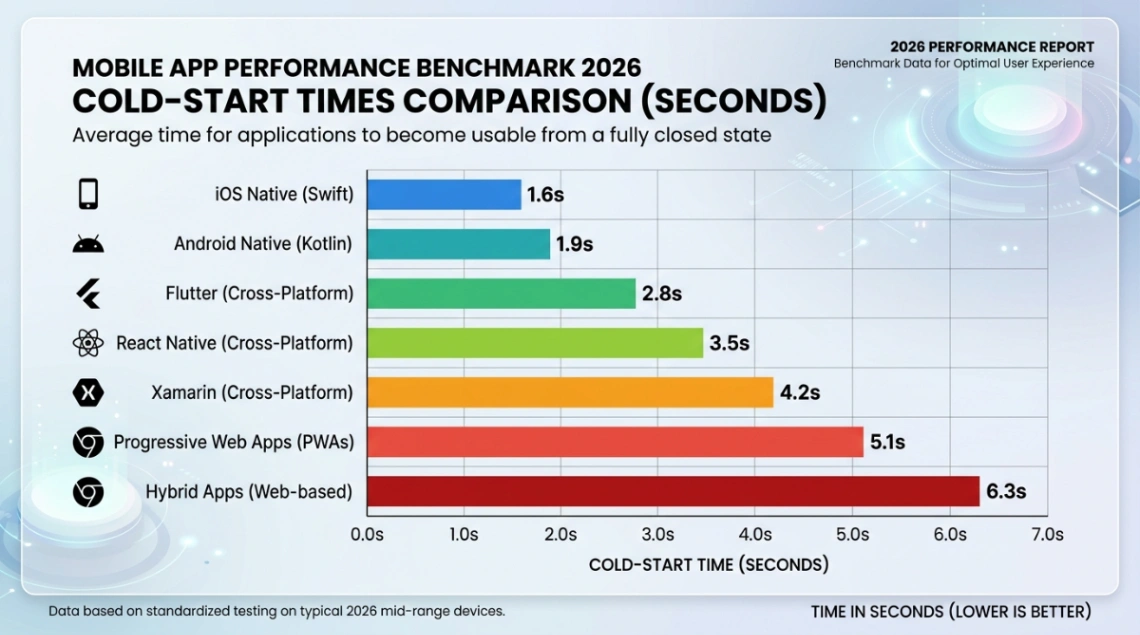
For a solopreneur shipping a content tool or a booking app, that extra second of load time won't kill you. For a real-time multiplayer game, it absolutely will.
What a Native App Can Do That Your Browser Just Can't
Native apps get full access to device hardware: ARKit cameras, background GPS, biometric Face ID, NFC payments, and on-device AI through CoreML or ML Kit. Web apps and PWAs get a much shorter list, especially on iOS.
Here's where it stings if you're a solopreneur:
- Background location: Native only. Critical for fitness, delivery, or navigation apps.
- Bluetooth and NFC: iOS PWAs still don't support Bluetooth in 2026; NFC works on Android PWAs only.
- PWA storage on iOS: Capped at 50MB, with a 7-day cache expiry that wipes data if a user doesn't open the app for a week. (MagicBell breaks down the full list of iOS PWA limits.)
- Widgets, Siri, Live Activities: Native exclusive.
So if your idea genuinely depends on these, native is the move. If it doesn't (and most MVPs don't), you're paying a tax for features you won't use.
The Honest Cost Breakdown for Solopreneurs
Building a native mobile app for both iOS and Android typically runs $50,000 to $250,000 with a 5 to 10 month timeline, while web apps and PWAs cut costs by 30-70% and ship in 2 to 4 months. That's not a small delta when you're funding this from your own savings.
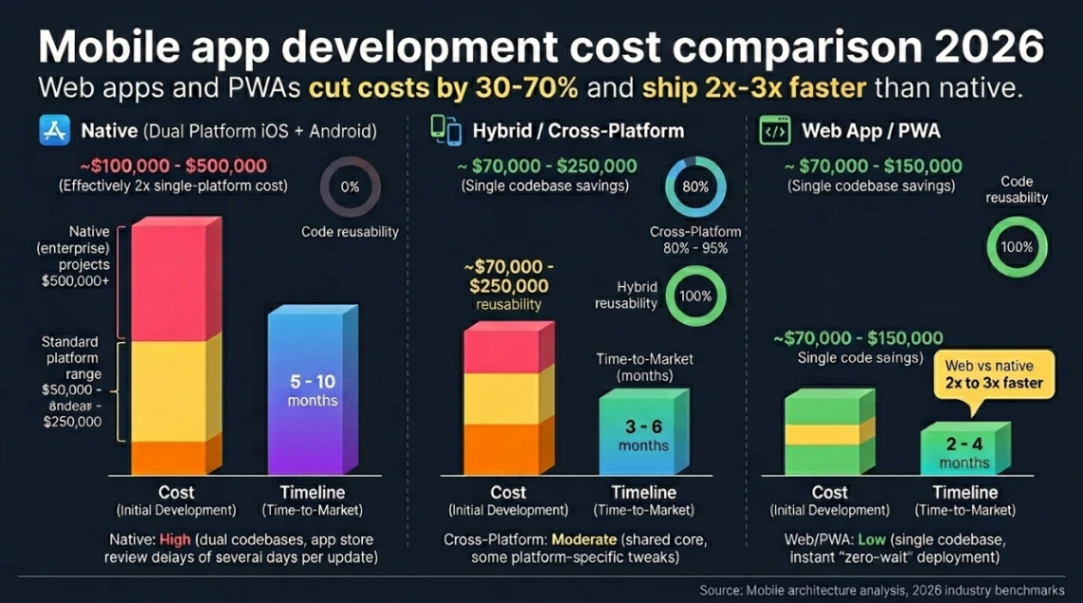
The hidden cost nobody talks about is maintenance. Native means two codebases, two App Store review queues, and waiting days for a security patch to actually reach users. On top of that, Apple's 2026 mandate now requires all apps to be built with Xcode 26 and submit Privacy Manifests, as detailed in this iOS 26 compliance guide. Web apps deploy instantly with none of that overhead.
Then there's the App Store commission. Native apps still pay Apple and Google 15-30% on digital goods, while routing payments through your own web checkout via Stripe runs about 2.9% plus $0.30. The EU's Digital Markets Act has cracked this open, but as ArcTouch's breakdown of web payments vs Apple's IAP explains, you trade convenience for compliance work.
This is the same tension we saw when WordPress made no-code real in 2003: platform control versus owner freedom.
Picking the Right Mobile App Builder Path for Solopreneurs
For most solopreneurs in 2026, the smartest mobile app builder strategy is starting with a PWA or no-code web app, validating the idea, then upgrading to native only if user behavior demands it. Think of it as the MVP-then-mansion approach instead of mortgaging your runway on day one.
Here's a quick decision filter:
- Go native if: You need AR, background tracking, BLE/NFC, or peak gaming performance.
- Go PWA or web if: You're validating an MVP, need SEO traffic, or want to push updates daily.
- Go cross-platform (Flutter/React Native) if: You've validated demand and need both stores without doubling your dev team.
If you're not sure where you fall yet, this guide on what a website actually is in 2026 pairs nicely with this one. And if you want a head start with templates that already handle responsive design, PWA manifests, and conversion-ready layouts, start exploring launch-ready no-code mobile app templates here!
Key Takeaways
- A "mobile app" in 2026 isn't one thing. Native, web, hybrid, and PWA are all valid mobile app categories, each with sharply different cost, speed, and capability profiles.
- Native wins on hardware, web wins on economics. Native apps deliver under-1.5s cold starts and full device access, but cost up to $250,000 and 10 months. Web and PWA cut both by 30-70%.
- Solopreneurs should usually start web-first. A PWA or no-code build lets you validate, iterate, and skip the App Store gatekeepers, then graduate to native once your users actually demand it.
The best mobile app isn't the most technically impressive one. It's the one your specific users open on a Tuesday afternoon without thinking about it. Build for that, not for the demo reel.
FAQ
1. What is a mobile app in simple terms? A mobile app is software built to run on a phone or tablet, either installed natively from an app store or accessed through a browser URL. It helps users complete a specific task quickly.
2. Is a PWA considered a real mobile app? Yes. A Progressive Web App installs to the home screen, sends push notifications, and works offline through service workers. It functions like a native app while being delivered through a browser.
3. What's the cheapest mobile app builder option for a solopreneur? PWAs and no-code web app builders are the cheapest path, often cutting development costs by 30-70% compared to native. They use one codebase that works across iOS, Android, and desktop.
4. Can I avoid the 30% App Store fee? Yes, by routing payments through your own web checkout using providers like Stripe (around 2.9% plus $0.30). Recent rulings under the EU Digital Markets Act make this legally viable in 2026.
5. Do I need a native app if my competitors have one? Not necessarily. A well-built PWA can match 80% of native functionality at a fraction of the cost, which is often enough to validate demand before committing to native development.
Start building without code
Browse thousands of no-code templates for Webflow, Framer, Bubble, Lovable, Replit and more.
Explore Templates