How Typeform Reinvented the No-Code Form Builder Without SQL

Typeform reinvented data collection by replacing SQL-mapped HTML form fields with a dynamic JSON schema architecture that presents questions one at a time, routes responses via API webhooks, and integrates directly with marketing stacks without requiring a developer or a relational database. Founded in Barcelona in 2012 by designers David Okuniev and Robert Muñoz, the platform grew from a single showroom kiosk into a no-code form builder processing over 600 million digital interactions annually. Its success reflects a broader no-code shift: moving data collection from a back-end engineering problem into a front-end experience design problem.
Table of Contents
- Key Takeaways
- Introduction
- The Web Form's Dirty Secret: It Was Always a Database Interface
- How Two Barcelona Designers Broke the SQL Mold
- What Actually Replaced SQL: JSON, Webhooks, and Progressive Profiling
- Zero-Party Data and the Bigger Cultural Shift
- Honest Tradeoffs: What the No-Code Form Revolution Still Gets Wrong
- FAQ
Key Takeaways
- For decades, every web form was really a SQL entry point: a front-end wrapper that mapped user inputs to rigid relational database columns, requiring developer time to build, validate, and maintain.
- Typeform's foundational break was architectural, not cosmetic: replacing SQL-mapped fields with a dynamic JSON schema let non-technical users build, deploy, and route form data without touching a database or writing a line of code.
- The conversational format that made Typeform famous also introduced a hard constraint: the one-question-at-a-time layout is permanently locked, and teams that need tabular data entry, dense grids, or multi-gateway payments are better served elsewhere.
Introduction
Most people who have built a website contact form have never thought about what happens the moment someone clicks submit. For the first two decades of the web, the answer was almost always the same: a PHP script pushed the input into a MySQL table, a developer had to write the schema, and a data team had to pull records out. The form was just a polite front door to a database.
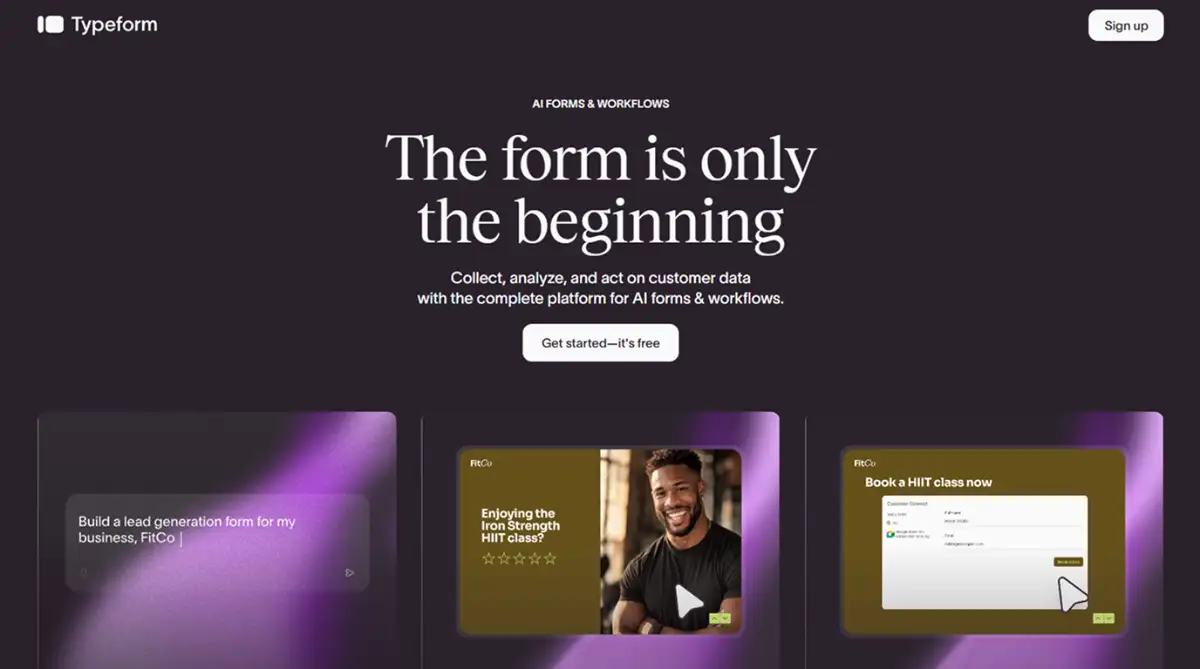
Typeform, launched publicly in February 2014, challenged that model at the architecture level. By eliminating relational database dependencies, it turned form building into a no-code design task and changed what non-technical builders could do with raw audience data. This is the story of how that happened, and what it actually means for anyone working with forms today.
The Web Form's Dirty Secret: It Was Always a Database Interface
For most of internet history, a web form and a SQL database were inseparable, and that dependency was the primary reason non-technical users could not build their own data collection tools. Every input field in a traditional HTML form corresponded to a specific column in a relational database table. According to SurveyJS, building even a basic form required developers to define the front-end HTML input variables, write server-side validation logic, and map each field to the correct database schema on both client and server sides. A marketing manager who wanted to add a new question to a lead form had to open a support ticket, wait for an engineer, and risk breaking downstream data mappings.
The earliest attempts to abstract this were blunt. PHP mail scripts in the late 1990s pushed form inputs directly to email inboxes, bypassing databases entirely but creating an obvious scale problem. Contact Form 7, launched for WordPress in 2007, became one of the most installed plugins in the CMS ecosystem by letting non-developers build contact forms without writing server-side code.
It was a genuine step forward, though it still depended on PHP processing and offered no structured data routing. The history of how WordPress plugins killed the PHP script era covers that transition in full.
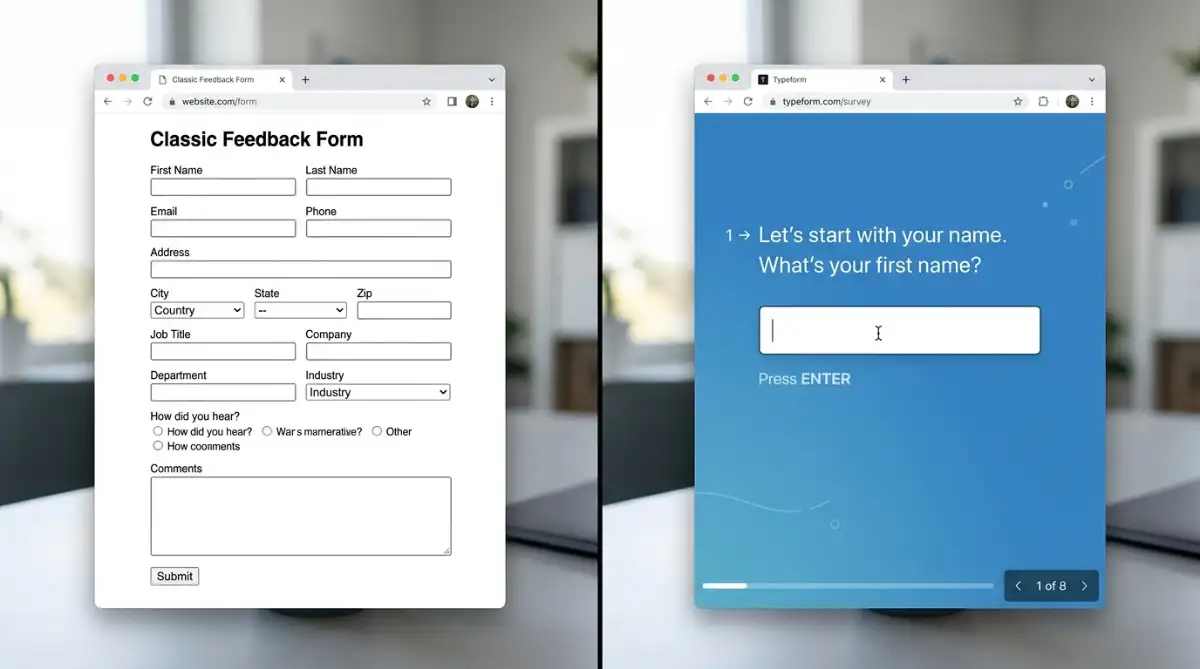
The deeper problem was cognitive, not just technical. Traditional multi-field forms presented users with a wall of blank inputs simultaneously, a layout borrowed directly from database entry screens. Respondents confronted with 15 fields in a grid behaved accordingly: they skimmed, skipped, or abandoned. The form served the database's architecture, not the person filling it in.
How Two Barcelona Designers Broke the SQL Mold
Typeform's founding moment was not a Silicon Valley pivot or a Y Combinator thesis: it was a single client request in a Barcelona co-working space. UI/UX designers David Okuniev and Robert Muñoz shared offices in 2010, each running independent web design agencies. According to Growfers, Okuniev had a background as a professional musician in the UK before founding design studio Fat Man Collective, while Muñoz operated PulpoLab, an interactive agency specializing in UX and mobile development.
The project that became Typeform arrived in 2012, when Spanish bathroom brand Roca asked Muñoz to build a lead-generation form for wall-mounted iMacs inside one of their physical showrooms. The brief called for a standard HTML form. The solution they delivered was something else entirely.
Drawing on their UI backgrounds and, according to Growfers, Okuniev's instincts from musical composition around pacing and flow, they built a prototype that presented one input at a time with custom animated transitions. The form felt like a conversation, not a database entry screen.
Recognizing that this approach had broader market potential, the co-founders pooled resources from their agencies and built the SaaS product in a vacuum. Per the Zapier blog, they consciously avoided early user testing, believing that users conditioned by standard web layouts would push them back toward convention. It was a calculated bet against lean methodology, and it worked.
An invitation-only alpha launched in February 2013, followed by seed funding of €550,000 from Point Nine Capital and RTAventures. By February 2014, the public beta launched, and according to Wikipedia, the platform had 100,000 registered users within six months. Every form on the free tier carried a "Powered by Typeform" badge at the bottom, turning each respondent into a potential customer and funding successive rounds through organic reach alone.

What Actually Replaced SQL: JSON, Webhooks, and Progressive Profiling
The technical shift Typeform introduced was replacing relational database column mapping with a dynamic JSON schema, and this is the architectural move that made it a genuine no-code form builder rather than a friendlier front end to the same old pipeline. According to Typeform's developer documentation, the entire form (questions, logic branches, conditional jumps, scoring, and visual themes) lives inside a single JSON file. Adding a new question does not require a database schema change.
Removing a field does not break a downstream column mapping. The structure is flexible by design, and that flexibility is harder to appreciate until you have spent an afternoon waiting for an engineer to update a form field in a legacy system. I have, and the contrast with dragging a new question into Typeform is stark.
On the frontend, the platform uses custom React and Vue frameworks to manage state validation, conditional logic, and multi-step animations entirely on the client side without page reloads, according to Orbit Forms. The hidden fields feature allows developers to inject pre-existing CRM attributes (such as a user's email or company name) directly into the form URL. When that data already exists in the system, the form skips the corresponding question automatically, a technique called progressive profiling that reduces friction without any additional engineering work.
For data routing, the Responses API delivers clean JSON payloads on demand, enabling direct pipelines into data warehouses like Snowflake or BigQuery, according to dltHub. The Webhooks API transmits form completions in real time the instant a respondent submits, authenticated with HMAC SHA-256 signatures to verify payload integrity and prevent spoofing per Hookdeck. If the receiving endpoint fails, the system retries automatically every 2 to 3 minutes for up to 10 hours.
A single form submission can trigger Slack alerts, populate HubSpot leads, schedule a Google Calendar invitation, and begin a Klaviyo email sequence without a developer writing a single ETL script. That is what no-code automation looks like when baked into the form layer itself. For a broader map of where form tools sit inside the no-code ecosystem, this overview of no-code builders covers the full category.

Zero-Party Data and the Bigger Cultural Shift
The timing of Typeform's rise was not accidental: it coincided almost exactly with the regulatory and industry conditions that made SQL-dependent, passive tracking architectures legally and practically difficult to sustain. With GDPR enforcement intensifying and the deprecation of third-party tracking cookies accelerating, brands found themselves unable to rely on behavioral signals to qualify and target buyers. According to Influenceflow.io, companies can no longer use passive tracking as a primary data source without significant legal exposure.
This created demand for what researchers and marketers began calling zero-party data: information a consumer actively, explicitly, and voluntarily shares with a brand. Purchase preferences, budget ranges, product interests, timeline for a decision. The kind of contextual detail behavioral tracking could only infer, a well-designed form could ask for directly. According to Typeform's own product research, the conversational one-question-at-a-time format delivers completion rates up to 4x higher than standard multi-field forms, meaning more people share more data willingly when the interface does not feel like a spreadsheet.
The platform's most recent AI features push this further still. Under CPTO Aleks Bass, appointed in March 2026, Typeform launched AI Data Enrichment, which deploys agentic search models the instant an email is submitted, appending job titles, company size, and industry profiles from external databases without requiring custom integrations, according to Typeform's blog.
Growth Flow, released May 2026, routes that enriched data through Slack, CRM platforms, and calendar scheduling inside a single interface, replacing the intermediary automation layer that tools like Zapier previously occupied. Per Aleks Bass in a May 2026 press release, the platform is now "the engine that turns responses into revenue and relationships," a framing that marks the full transition from passive data repository to active business workflow.

Honest Tradeoffs: What the No-Code Form Revolution Still Gets Wrong
Typeform's architectural departure from SQL is real, but the "no-code" label obscures a set of tradeoffs that matter in practice.
The most significant is layout lock-in. The one-question-at-a-time slide format that made Typeform famous is also permanent and unchangeable, per FormGrid. Academic researchers, medical intake teams, and accounting offices consistently report that the isolated question presentation prevents respondents from comparing fields to verify consistency across entries, according to SurveyMars. You cannot scroll back, view multiple fields simultaneously, or present a tabular grid.
For use cases where density and cross-referencing matter, the conversational format is a liability rather than a feature. That is a genuine design limitation, not just a UX preference.
The completion rate claims also deserve scrutiny. The 4x figure Typeform cites compares its interface against the worst-case traditional form designs, not against well-designed multi-step alternatives. Tally, for instance, offers document-style modular block forms with no response caps on its free tier, and no published evidence suggests its completion rates are dramatically lower for most use cases, according to FormGrid. Calling Typeform the obvious no-code form builder for every team is an overclaim the data does not support.
The pricing structure quietly reintroduces a form of technical gatekeeping the product promised to eliminate. Bot protection and CAPTCHA capabilities start at $199/month per G2, which means smaller teams are structurally vulnerable to spam submissions exhausting their monthly response cap. And the response cap itself, 100 per month on the $25/month Basic plan, freezes form collection mid-campaign rather than billing for overages, according to Anve Voice Forms. I find that mechanic genuinely hard to defend for a platform that markets itself on accessibility.
SQL's core strength, the ability to run relational queries across structured tables, also remains irreplaceable for certain workflows. Complex multi-table data relationships, nested database joins, and high-volume transactional records still require proper database architecture. Typeform's JSON schema is flexible and human-friendly, but it is not a substitute for a relational data model when your use case genuinely needs one. The low-code middle ground exists precisely for teams that need more structure than Typeform provides without building a full database schema from scratch.
Start exploring launch-ready no-code templates here!
FAQ
What does "no-code" actually mean in the context of data collection? In data collection, no-code means a non-technical user can build, deploy, and route form responses without writing SQL, configuring a database schema, or touching server-side code. Typeform achieves this by storing the entire form as a JSON schema and routing responses via webhooks and API integrations rather than direct database writes.
Is Typeform truly SQL-free, or does it use SQL somewhere internally? From the builder's perspective, it is entirely SQL-free: there are no database columns to map, no schema to configure, and no queries to write. Internally, Typeform's infrastructure likely uses database systems to store submission data, but those are completely abstracted away. What matters for non-technical users is that none of that infrastructure is exposed or required to operate the platform.
What is zero-party data, and why has it become so important? Zero-party data is information a consumer deliberately and voluntarily shares with a brand, such as purchase intent, product preferences, or budget ranges. With GDPR enforcement and the end of third-party cookie tracking, passive behavioral data collection has become both legally risky and less reliable. Forms that feel like conversations, rather than database entry screens, collect this kind of data more effectively because respondents actually complete them.
How did Contact Form 7 and PHP scripts shape what Typeform eventually replaced? Contact Form 7, launched for WordPress in 2007, removed the need to write server-side PHP from scratch, making basic contact forms accessible to non-developers. But it still relied on PHP processing, email delivery, and offered no structured data routing. That generation of tools solved the "I can't code" problem without solving the "my data goes nowhere useful" problem. Typeform's contribution was making the entire pipeline from form submission to CRM entry non-technical.
What are the most significant limitations of Typeform's approach? Three stand out. First, the one-question-at-a-time format is permanently locked: there is no multi-column, tabular, or scrollable layout option. Second, payment processing is Stripe-only, which excludes international merchants who need PayPal, Square, or regional gateways. Third, the pricing model imposes hard monthly response caps that freeze collection mid-campaign rather than billing automatically for overages, which creates disruption risk for any team running active paid advertising.
Start building without code
Browse thousands of no-code templates for Webflow, Framer, Bubble, Lovable, Replit and more.
Explore Templates