Pygmalion: The 1975 Origin of Visual Programming
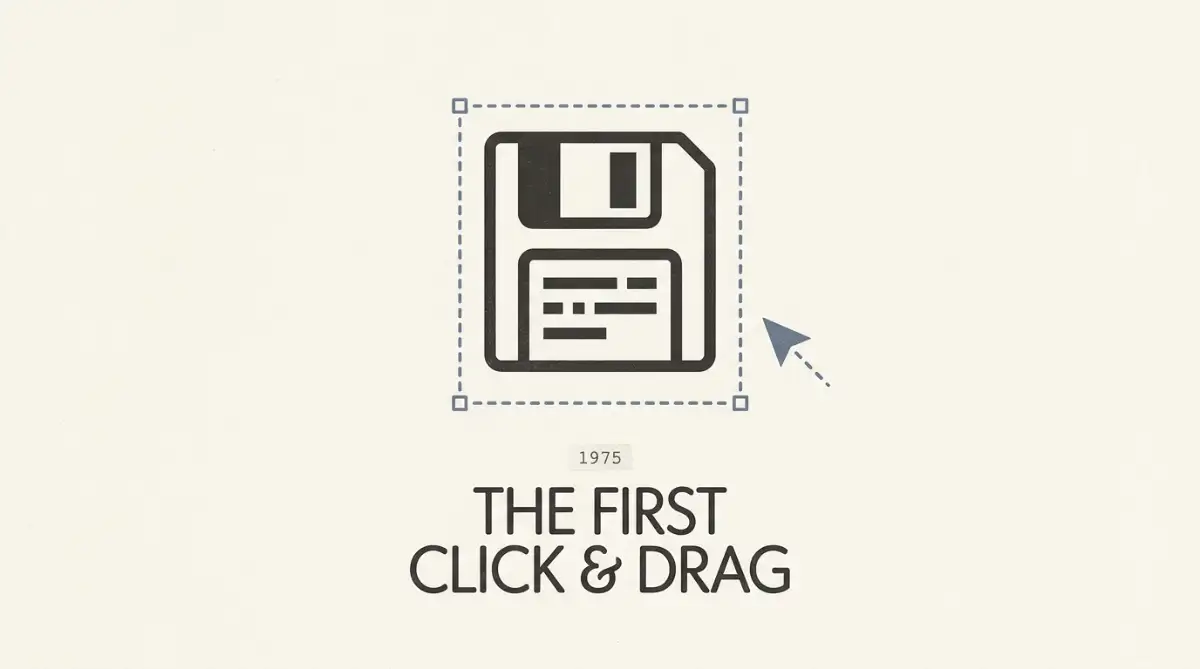
The Pygmalion project, completed by David Canfield Smith at Stanford in 1975, is widely recognized as the first true visual programming environment. It gave computing two lasting inventions, the icon and programming by demonstration, both built on a Xerox Alto.
Table of Contents:
- Key Takeaways
- Introduction
- Who Built the First Visual Programming System, and Why?
- How Did Programming by Demonstration Actually Work?
- Why Is Pygmalion Credited With Inventing the Computer Icon?
- How Did Pygmalion Compare to GRAIL and AMBIT/G?
- Why Did This Visual Programming Prototype Stay a "Toy System"?
- What Does Pygmalion Have to Do With Modern No-Code Tools?
- Frequently Asked Questions
Key Takeaways
- A disillusioned AI researcher abandoned the dream of a smarter machine and built something stranger instead: the first interface where you programmed by drawing pictures, not typing syntax.
- Pygmalion gave us the word "icon" and the drag-and-drop gesture we still use daily, yet asking it to compute a single factorial once crashed the entire machine.
- The 1975 prototype that computer scientists dismissed as a "toy system" quietly seeded today's no-code builders, robotic process automation, and even modern AI coding agents.
Introduction
If you build websites or apps by dragging blocks around a canvas, you are using an idea that turns 50 last year. Every no-code builder, from Webflow to Bubble, traces a straight line back to a single 1975 Stanford dissertation that pioneered visual programming and that almost nobody read at the time. Its author, David Canfield Smith, was not trying to start an industry.
He was trying to fix something he kept watching at the chalkboard: brilliant people who thought in diagrams, then mangled those diagrams the second they typed them into code. The system he built to close that gap introduced two things you still touch every day. This is the story of where the icon and the drag came from, and why the prototype that invented them could barely run.
Who Built the First Visual Programming System, and Why?
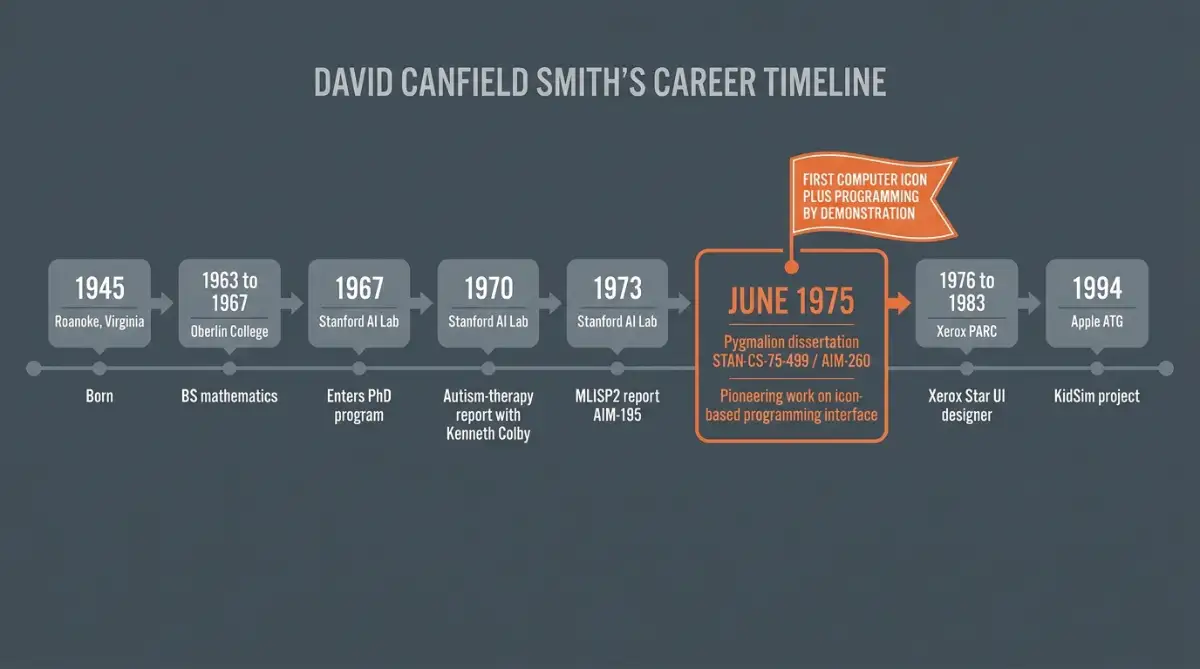
Pygmalion was the doctoral dissertation of David Canfield Smith, completed at Stanford on June 1, 1975, under the supervision of Alan Kay. Smith began in artificial intelligence, grew frustrated with weak 1970s hardware, and switched to a simpler goal: building a tool that made human thinking visible on screen.
Smith's route there was a string of pivots. Born in Roanoke, Virginia, in 1945, he studied mathematics at Oberlin College, read Computers and Thought by Edward Feigenbaum and Julian Feldman, and changed fields. He entered Stanford in 1967 chasing self-improving machines, but the hardware could not keep pace, so Kay redirected him toward people instead.
I don't want to make a smarter computer; I want to use computers to make people smarter.
Kay handed Smith a reading list with almost nothing to do with engineering:
- Rudolf Arnheim's Visual Thinking (1971)
- Arthur Koestler's The Act of Creation (1964)
- Ernst Gombrich's Art and Illusion (1960)
The real spark came from a chalkboard. Smith watched researchers sketch algorithms as spatial diagrams, then flatten them into linear text and introduce errors in the act of translating. Funded by ARPA and the National Institute of Mental Health, his fix was a system that could execute the diagram directly, so the messy translation step disappeared.
How Did Programming by Demonstration Actually Work?
Instead of typing syntax, a Pygmalion programmer demonstrated each step on real values, and the system recorded and generalized the gestures into reusable code. Smith compared the experience to building a storyboard: you changed one frame at a time with a three-button mouse, and the machine remembered the whole sequence.
The cleverness sat in what Smith called incremental iconic compilation. Every on-screen action carried three jobs at once:
- Internal machine semantics: actually running the logical or mathematical operation
- Display semantics: animating a visual response so you saw the result
- Remember semantics: logging the step so it could replay on different inputs
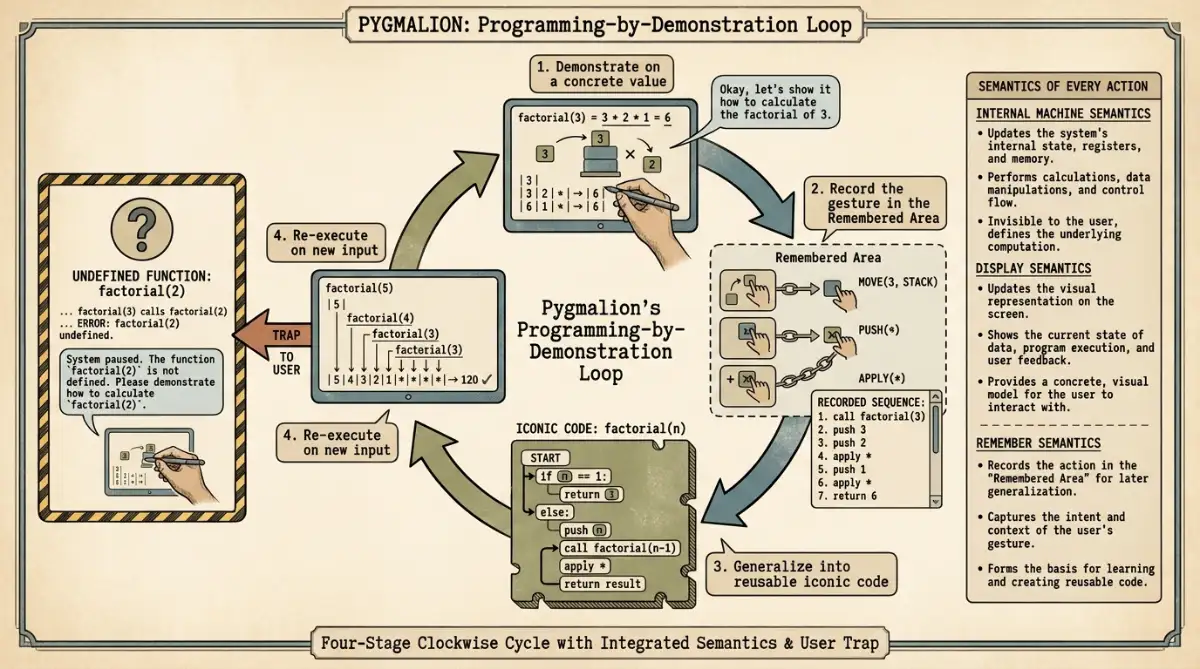
The workspace split into five panes, including a Menu Area of icon templates, a Remembered Area that scrolled a live trace of your last operations, and a Smalltalk Area where you could drop into raw Smalltalk-72 when the graphics got in the way. If execution hit an undefined function, Pygmalion did not error out. It paused, handed control to you, and asked you to demonstrate the missing steps on the live data, then compiled them and resumed. That single behavior, demonstrate the gap and continue, is the seed of what modern tutorials call recording a macro.
Why Is Pygmalion Credited With Inventing the Computer Icon?
Smith coined the term "icon" in his 1975 dissertation, borrowing from Eastern Christian theology, where an icon is believed to embody the holy figure it depicts rather than merely picture it. On screen, that meant a graphic was simultaneously live code and data. The same project introduced drag-and-drop and later shaped the desktop metaphor.
That theological framing was not decoration. To Smith, an icon fused an aesthetic picture with the machine instructions sitting behind it, which is precisely why clicking one could do something.
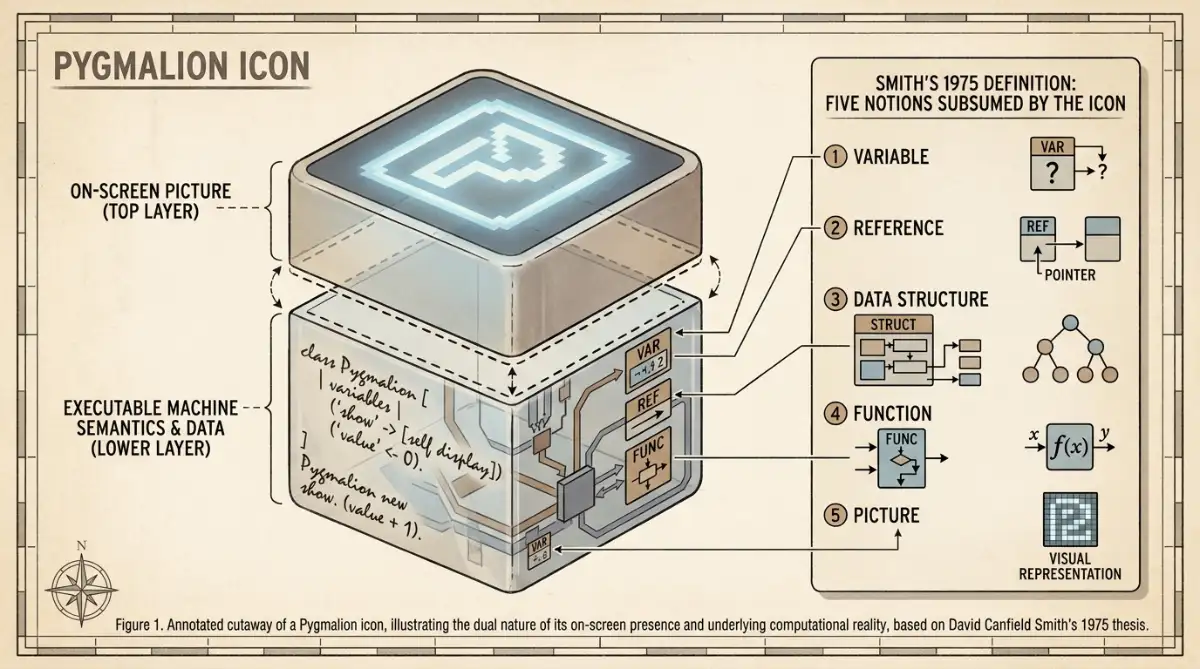
Communication between human being and computer is by means of visual entities called icons, subsuming the notions of variable, reference, data structure, function, and picture.
Passing an argument meant physically dragging a data icon and dropping it inside a function icon, the first appearance of the drag-and-drop gesture now built into every operating system. After finishing his PhD, Smith joined the Xerox System Development Division in 1976 and spent seven years turning programmer icons into office objects for the Xerox Star, released in 1981. Working with Charles Irby, Eric Harslem, and others, he replaced abstract logic boxes with familiar things:
- Documents and file folders
- Filing cabinets
- A wastebasket for deletion
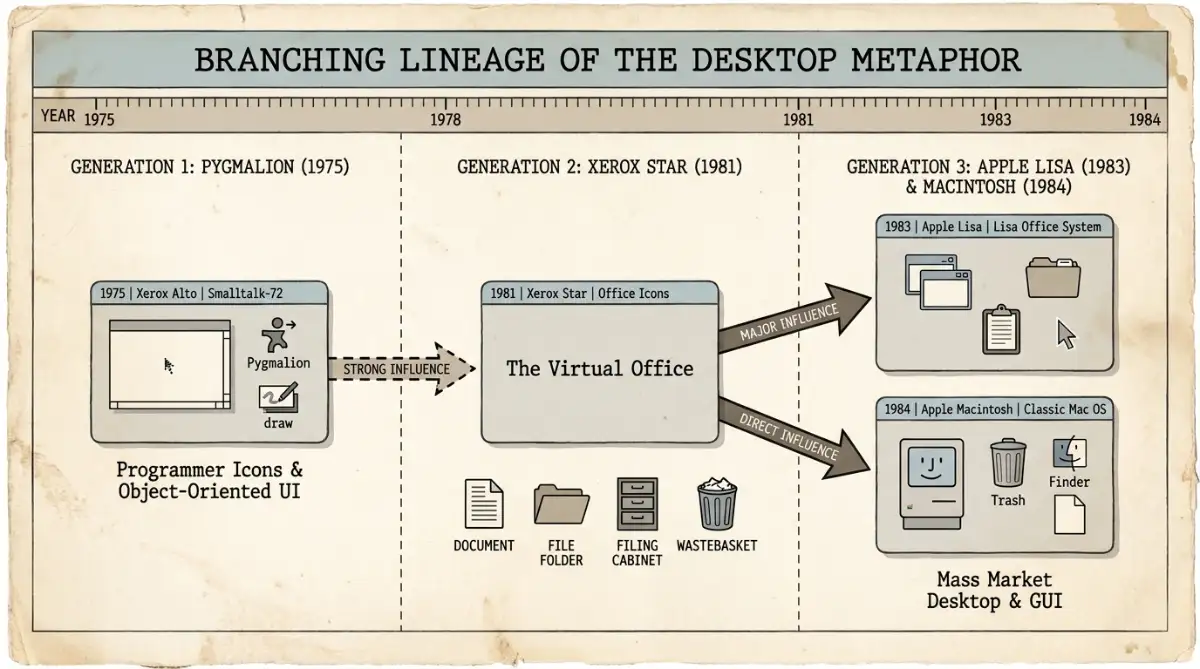
Apple studied that work for the Lisa and the Macintosh, which is how a 1975 thesis ended up on your phone's home screen.
How Did Pygmalion Compare to GRAIL and AMBIT/G?
Pygmalion was not the only attempt at visual computing in its era, but it was the first to combine icons with programming by demonstration. RAND's GRAIL (1969) recognized hand-drawn flowcharts on a tablet, while AMBIT/G (1969) let specialists rewrite directed graphs. Each solved a narrower problem with very different hardware.
The three systems show how unsettled visual computing still was at the start of the 1970s:
| System | Year / origin | Core paradigm | Input device | Built for |
|---|---|---|---|---|
| Pygmalion | 1975, Stanford | Icons plus programming by demonstration | Three-button mouse | Computer scientists |
| GRAIL | 1969, RAND Corporation | Hand-drawn flowchart recognition | RAND tablet and stylus | Systems programmers |
| AMBIT/G | 1969, Applied Data Research | Directed-graph rewriting | Lightpen or tablet | Symbolic and algebra specialists |
GRAIL felt more natural to use because it read your handwriting, but it stayed locked to flowchart logic. AMBIT/G, created by Carlos Christensen, was mathematically rigorous yet impenetrable to anyone outside graph theory.
What strikes me is how much the hardware shaped each design, more than the ideas did: GRAIL ran on an IBM System/360, AMBIT/G on a DEC PDP-10, and Pygmalion on the Xerox Alto, and all three were funded in part by ARPA. The visual idea was clearly in the air. Pygmalion's distinguishing move was conceptual rather than ergonomic: it treated the icon as a unit that carried both a picture and executable behavior, which neither rival did.
Why Did This Visual Programming Prototype Stay a "Toy System"?
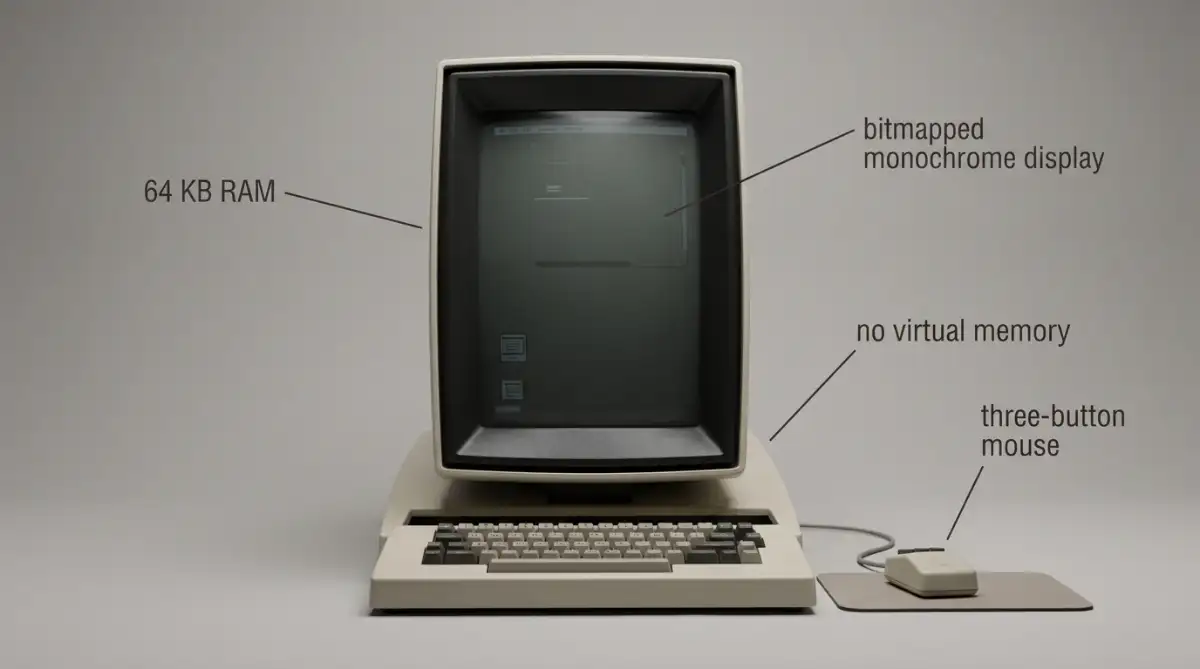
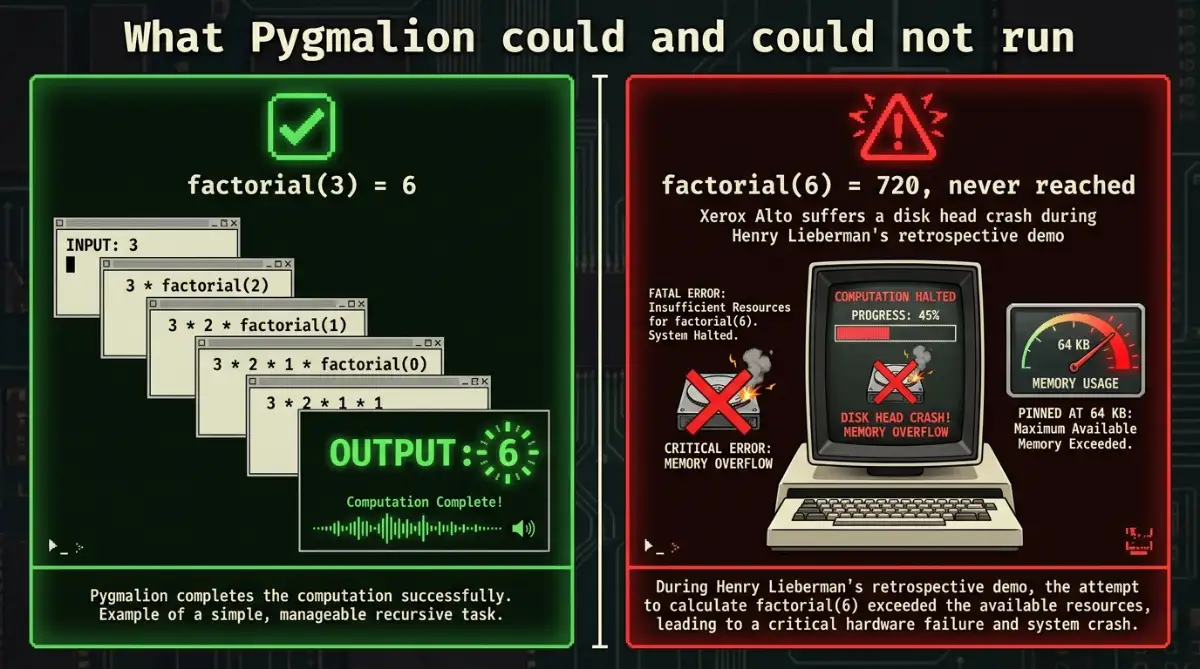
Smith himself called Pygmalion a toy system. Drawing and linking icons added so much overhead that only trivial algorithms ran, and the Xerox Alto's 64 kilobytes of memory, with no virtual memory at all, left no headroom. In one retrospective demo, asking it for factorial of six crashed the disk entirely.
The factorial story is the perfect epitaph. Pygmalion could compute factorial of three without complaint, but when researcher Henry Lieberman asked it to run factorial of six in a later demonstration, the Alto suffered a disk head crash and stopped dead.
A visual language that can render a factorial but not a filing system is a beautiful proof of concept and a terrible product.
The problems went deeper than memory. Whether Pygmalion was a failure depends entirely on what you measure: as a research artifact it succeeded wildly, as software you could ship it never had a chance. Three issues stand out:
- It targeted computer scientists, expecting fluency in recursion and Boolean logic, despite its democratizing pitch
- Editing meant re-demonstrating an entire branch by hand, which destroyed any fast iteration
- It had no empirical user testing, the kind of validation a modern ACM CHI submission requires
The dissertation itself was enormous. University library catalogs list the original Stanford report at 468 pages, while AbeBooks records the trimmed 1977 Birkhäuser book at just 187. Scale the workspace up and the linked icons turned into a tangle, the same visual mess later tools hit with the spaghetti code that broke early WYSIWYG editors.
What Does Pygmalion Have to Do With Modern No-Code Tools?
Pygmalion never shipped, yet its core idea, demonstrate an action and let the machine generalize it, runs through modern no-code platforms, robotic process automation, and AI coding agents. Smith later adapted the approach for children, and scholars still name the 1975 work as the ancestor of visual building.
The clearest descendant is the no-code builder. When you drag a block into place and the tool writes the underlying markup for you, that is programming by demonstration with a friendlier coat of paint, the same logic behind how visual building works today. The same lineage shows up in Bubble, the first true visual builder for non-coders, and across modern no-code builders that hide databases behind drag targets.
Smith eventually delivered on his own thesis. In 1994, at Apple's Advanced Technology Group, he built KidSim (later sold as Stagecast Creator) with Allen Cypher and Alan Kay, letting children program games like Pac-Man with graphical rewrite rules instead of code. According to Semantic Scholar, the original dissertation has gathered more than 131 citations, and a 2024 episode of the Feeling of Computing podcast pulled it back into view.
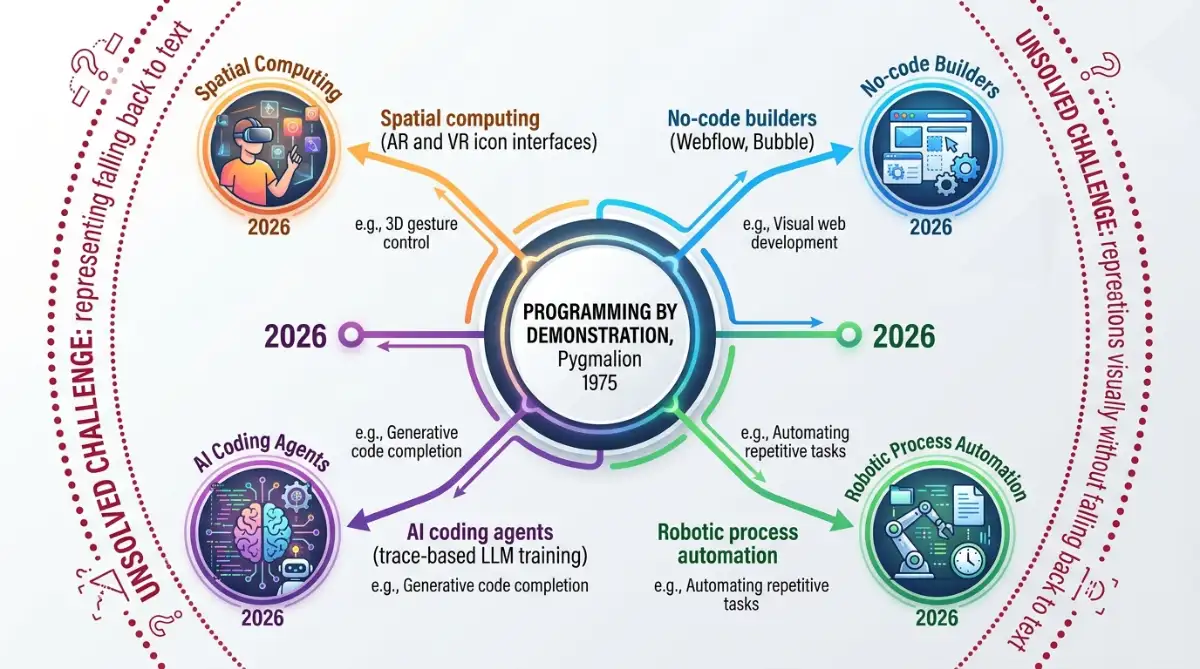
Now the idea is mutating again. In 2026, researchers are using trace-based visual demonstration to train AI agents, and spatial computing designers are reviving Smith's dynamic blackboard inside AR and VR. The newest twist is conversational: tools built around vibe coding ask you to describe an outcome and let the model generalize it, which is the demonstrate-and-generalize loop spoken aloud rather than drawn.
I keep coming back to one detail: the loop Smith sketched by hand in 1975 is the loop a no-code builder now runs for you. The open question he never solved still stands, which is how you draw the abstract parts of a program without sliding straight back into text.
Start exploring launch-ready no-code templates here!
Frequently Asked Questions
What is visual programming? Visual programming lets you build software by manipulating graphical elements (icons, blocks, diagrams) instead of writing text-based code. The logic still runs underneath, but you express it spatially. Pygmalion (1975) pioneered the approach, and today's no-code builders are its most widely used form.
Who invented the computer icon? David Canfield Smith coined the term "icon" in his 1975 Stanford dissertation. He drew on Eastern Christian theology, where an icon embodies what it depicts, to describe an on-screen object that holds both a picture and the executable code sitting behind it.
What programming language did Pygmalion use? Pygmalion was written in Smalltalk-72 and ran on a Xerox Alto with just 64 kilobytes of memory and no virtual memory. Users could even type raw Smalltalk-72 commands in a dedicated pane when the graphical interface became limiting.
Is no-code the same as visual programming? Not exactly. Visual programming is the broad idea of building logic graphically, while no-code refers to modern commercial tools that hide code completely from the user. Every no-code builder is visual programming, but not all visual programming aims to remove code entirely.
What did David Canfield Smith create after Pygmalion? After his PhD, Smith joined Xerox in 1976 and helped design the Xerox Star's desktop metaphor, released in 1981. In 1994 he built KidSim at Apple, teaching children to program through demonstration, which later shipped as Stagecast Creator.
Start building without code
Browse thousands of no-code templates for Webflow, Framer, Bubble, Lovable, Replit and more.
Explore Templates