Framer vs Webflow: Which No Code Website Builder Wins in 2026
Framer is the faster, more design-forward no code website builder, ideal for startups and creatives. Webflow is the stronger choice for agencies and content-heavy sites that need advanced SEO, relational CMS, and enterprise governance. In 2026, many teams use both.
Table of Contents
- Introduction
- Pricing: What You Actually Pay in 2026
- CMS: Simple Canvas vs Relational Powerhouse
- AI Features: Who's Doing It Better?
- SEO and Performance: The Technical Truth
- Which No Code Website Builder Should You Pick?
- Key Takeaways
- FAQ
Introduction
Picking the wrong no code website builder at the start of a project is the kind of mistake that costs you three months and a painful migration. I've watched early-stage startup founders fall in love with a platform's aesthetic, only to hit its CMS ceiling six months post-launch when their blog starts scaling. That's exactly the trap this article helps you avoid.
Whether you're a SaaS founder shipping your first marketing site or an agency managing a portfolio of client builds, the Framer vs Webflow debate in 2026 is genuinely worth slowing down for. Both platforms have levelled up dramatically over the past 12 months, and the gap between them has shifted in some surprising directions. Framer even published their own official comparison against Webflow if you want the view from one side of the table.
Here's what you'll walk away with: a clear, data-backed answer on pricing, CMS depth, AI tooling, SEO control, and the right pick for your specific situation.
Pricing: What You Actually Pay in 2026
Short answer: Framer is cheaper for small teams. Webflow gets expensive fast once you add seats and add-ons.
In October 2025, Framer restructured its plans from seven tiers down to five, cutting the popular "Mini" and "Startup" plans in the process (full breakdown over at hxmzaehsan.com). Here's where things land now:
| Plan | Framer (Annual/mo) | Webflow Site (Annual/mo) |
|---|---|---|
| Free | $0 | $0 (Starter) |
| Entry | $10 (Basic) | $14 (Basic) |
| Mid | $30 (Pro) | $23 (CMS) |
| Growth | $100 (Scale) | $39 (Business) |
| Enterprise | Custom | Custom |
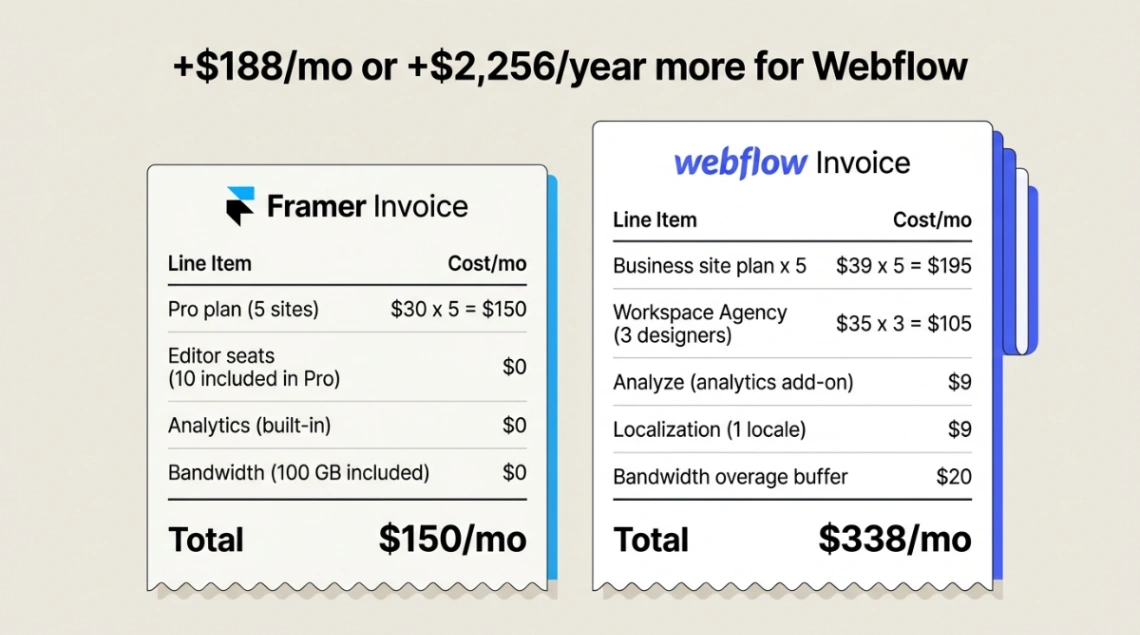
On the surface those numbers look close. The real divergence is in how each platform handles seats. Framer's Basic plan includes two editor seats and the Pro plan includes ten. Webflow charges per seat separately through its Workspace plans. The "Core" plan starts at $19/seat/month, and agencies on the "Agency" plan pay $35/seat/month. An agency running five Business-plan sites with three designers can easily clear $300/month before touching any add-ons.
Webflow has also leaned into modular "success tax" features (their words), essentially. Native analytics (Analyze) starts at $9/month, AI-powered A/B testing and personalization (Optimize) starts at $299/month based on page views, and localization starts at $9 per locale. These are genuinely useful features, but they add up. CheckThat.ai's Webflow pricing guide does a solid job mapping out all the hidden costs if you want to run the full numbers.
One edge Framer holds globally: Purchase Power Parity pricing. Framer offers localized discounts of up to 60% for users in markets like India or Brazil. Webflow charges standard USD pricing everywhere. For budget-conscious designers and founders in emerging markets, Framer is often the default choice before the comparison even begins.
If you want a deeper breakdown of both tools before committing, check out our dedicated pages for Webflow and Framer.
Watch Framer's official overview:
CMS: Simple Canvas vs Relational Powerhouse
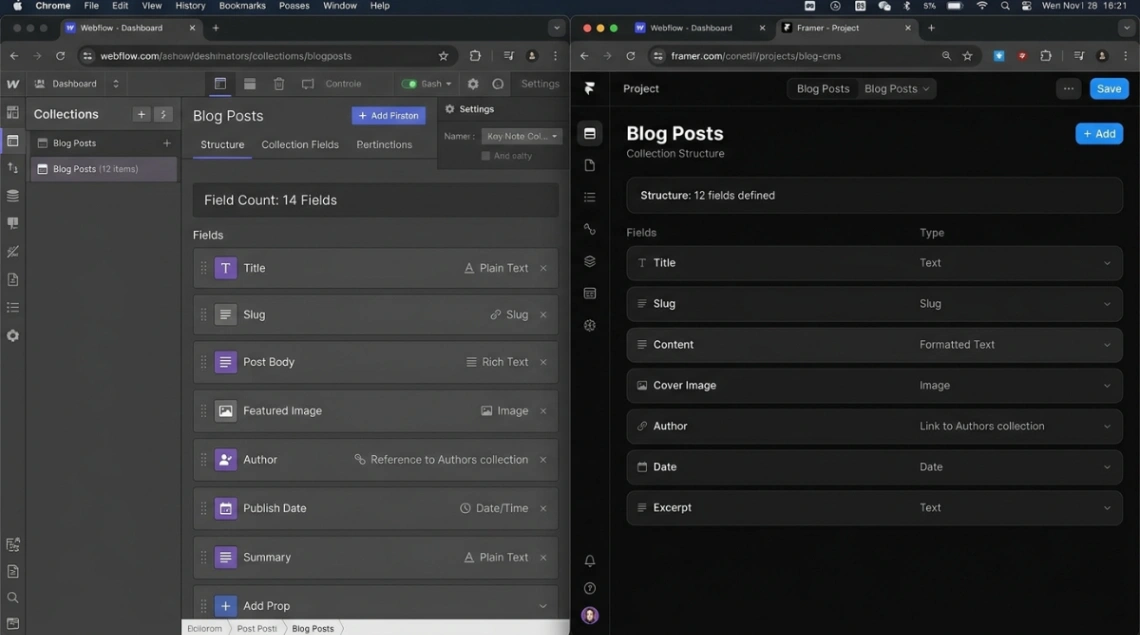
Short answer: Webflow's CMS is a relational database with a visual interface. Framer's is great for simple sites, but hits a ceiling fast.
This is the biggest functional divide between the two platforms in 2026, and it's where most migration pain comes from.
Webflow's CMS was designed for content at scale. Since May 2025, it supports up to two nested collection lists per page and roughly 60 fields per collection. Collections can reference each other in many-to-many relationships the kind of architecture you need when you're running a 10,000-post content hub, a complex directory, or a knowledge base with technical SEO precision. Enterprise teams also get "Page Branching," which lets developers create isolated page snapshots for QA before merging to production. Webflow also completed the GA rollout of its real-time collaboration engine in February 2026, covered in detail on Medium.
Framer's CMS is a different animal. It improved significantly with collection references added in late 2024, but it still doesn't support true nested collections without manual workarounds. Where it genuinely shines is rich text: Framer lets you embed live interactive components directly inside article content carousels, live demos, custom UI elements which makes it exceptional for product storytelling and case studies where visual flair matters more than database depth.
A practical way to think about it: Framer is built for content sprints. Webflow is built for content marathons.
The "CMS Bottleneck" on Framer's Basic plan is also worth flagging. It limits you to a single CMS collection which means you can't run a blog and a portfolio simultaneously without upgrading to the $30/month Pro plan. For freelancers and studios, that's a real constraint.
AI Features: Who's Doing It Better?
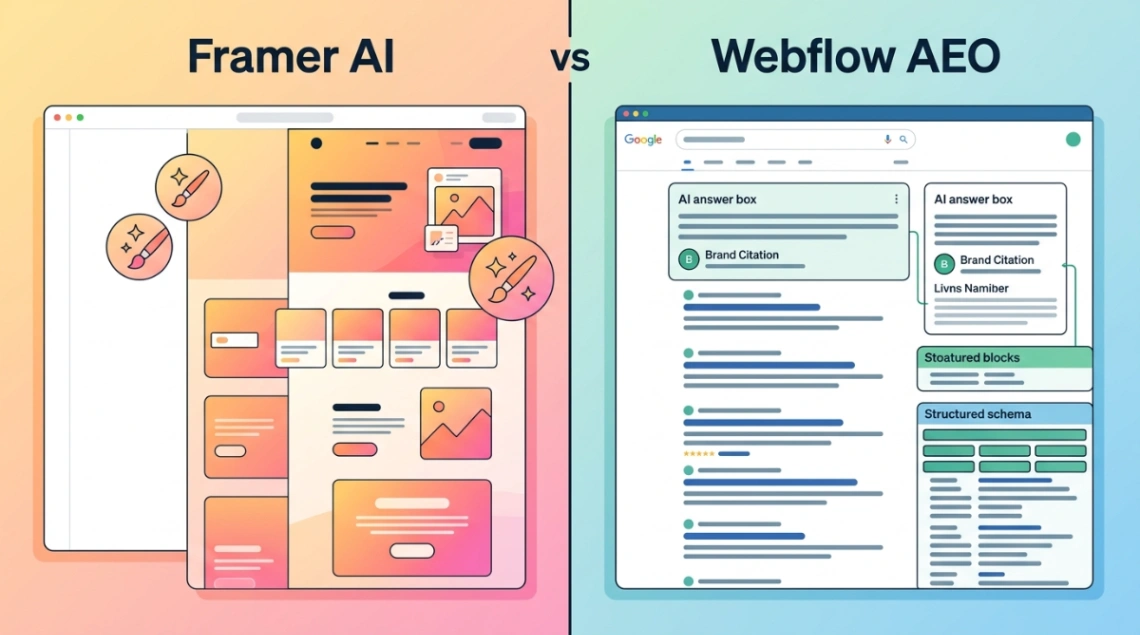
Short answer: Framer uses AI to build faster. Webflow uses AI to rank better. They're solving different problems.
This bifurcation is one of the most interesting developments in 2026. Neither platform is wrong they've just bet on different versions of what "AI-powered" means for web builders.
Framer's AI suite focuses on speed and creativity. Tools like "Wireframer" and "Workshop" take you from a text prompt to a production-ready responsive layout in seconds. The standout features include AI Layout Morphing (automatically adapts desktop designs for tablet and mobile while preserving visual hierarchy), Generative Components (creates carousels, FAQ accordions, cookie banners that inherit your site's global styles automatically), and AI-Powered Motion Presets (describe an animation in plain language, get the Framer Motion code).
On top of that, Framer launched its Server API in February 2026, enabling agentic workflows that sync CMS content from Notion or Airtable without the app needing to be open. For founders who need to ship a high-quality landing page this week, this matters a lot. If you're curious about this kind of builder approach, our guide on what is a no code builder is worth a read.
Webflow's bet is on AEO Answer Engine Optimization. Launched in 2026, the Webflow AEO framework is designed to get your brand cited accurately in AI-generated answers from ChatGPT, Perplexity, and Google AI Overviews.
It operates across four pillars: structured "Answer Blocks" of 40-60 words built for LLM citation, technical integrity signals (fast load times, Schema.org metadata), "Prompt Insights" to track brand mentions in AI queries versus competitors, and native AEO Agents that audit your content for machine readability. For content-led businesses where organic discovery is the primary growth channel, that's a serious competitive edge.
Watch Webflow's official overview:
SEO and Performance: The Technical Truth
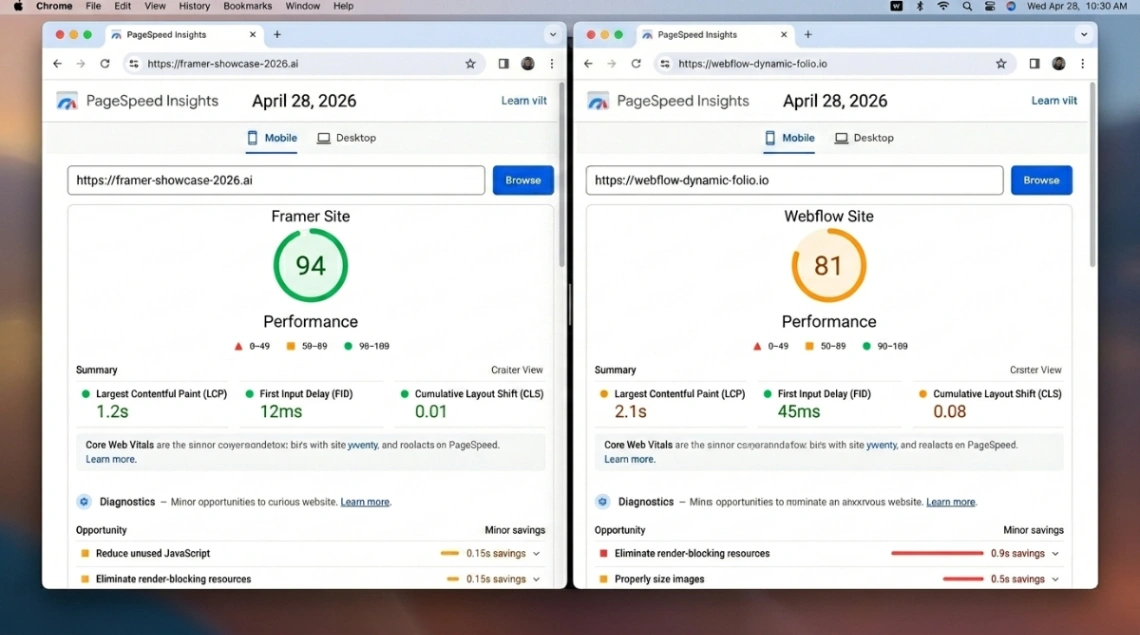
Short answer: Both score 90+ on PageSpeed. But Webflow gives you far more control for serious SEO campaigns.
Both platforms generate pre-rendered static HTML, so baseline performance is strong on either side. Framer typically hits 90+ on Google PageSpeed Insights with zero manual optimization its hardware-accelerated animations hold up on low-end mobile too. Webflow can match those scores but requires more deliberate asset optimization; it does natively minify CSS/JS and compress images to AVIF/WebP format.
Where the gap opens up is technical SEO depth. Webflow gives you granular control over meta tags, 301 redirects, canonical tags, robots.txt, and automated Schema.org structured data across thousands of CMS items. That's the kind of infrastructure you need when organic search is your primary acquisition channel. Framer covers the basics metadata, sitemaps, dynamic meta fields but lacks the depth for large content hubs. Omnius has a thorough breakdown of exactly how the two platforms compare on SEO if you want to go deeper.
There's another strategic factor worth knowing: Webflow supports full code export (clean HTML/CSS/JS) on most Workspace plans, giving you platform independence if you ever need to migrate to your own hosting. Framer has no code export. Once you build on Framer, you're on Framer's infrastructure period. For teams with IT governance requirements or long-term flexibility concerns, that's a hard blocker.
One more thing that rarely gets flagged: infrastructure. Webflow runs on AWS and Fastly with no exposed databases at the point of request. Framer runs on Vercel's Edge Network, which is excellent for performance-critical landing pages and rapid global delivery. Both platforms have achieved SOC 2 Type II and ISO 27001:2022 certification, though Framer's enterprise-grade certifications are gated to the Enterprise plan.
The history of how we got to tools like these is genuinely fascinating from early WYSIWYG builders like WebMagic in 1995 to the Dreamweaver vs FrontPage wars that shaped what no code even means today.
Which No Code Website Builder Should You Pick?
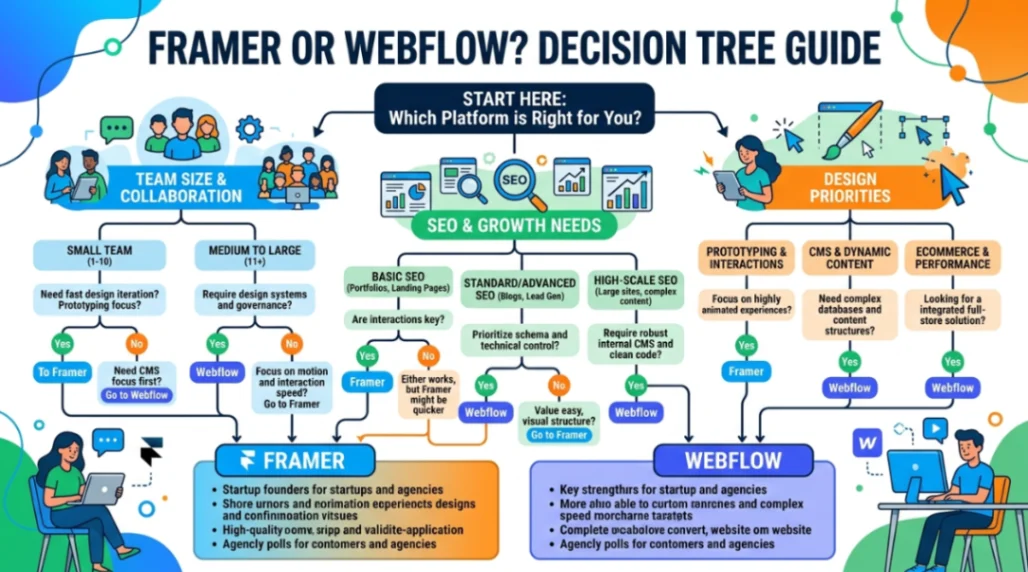
Short answer: Framer for speed and design impact. Webflow for scale, SEO, and complex data.
Here's the honest breakdown for startup founders and agencies evaluating these platforms in 2026.
Pick Framer if:
- You need a polished marketing site or landing page live within days, not weeks
- Your brand competes on visual identity, motion, and creative storytelling
- Your team already lives in Figma and wants zero handoff friction
- You're operating on a tight budget, especially outside the US (PPP pricing is a real advantage)
- You're doing e-commerce via Shopify Framer's Shopify integrations (Framer Commerce at $16/month, or the one-time Frameship option at ~$99) give you creative control over the frontend without rebuilding the backend. Goodspeed Studio's Framer ecommerce breakdown covers the plugin options in depth.
Pick Webflow if:
- You're building a content-heavy site that needs to scale to thousands of CMS items
- Organic search is your primary acquisition channel and you need technical SEO depth
- You need complex relational CMS structures, deep CRM/ERP integrations, or advanced user permissions
- You require code export for platform independence or governance compliance
- You're at Series A or beyond and need AEO infrastructure to compete in AI-driven search
According to industry data in the research, many agencies now maintain expertise in both using Framer for campaign microsites and Webflow for core corporate infrastructure. That "sprint vs marathon" split has become a legitimate operating strategy for growth-focused teams. There's a candid Reddit thread on exactly this migration question worth reading, and Velox Themes also published a detailed 2026 comparison covering speed, design, CMS, and pricing side by side.
| Consideration | Framer | Webflow |
|---|---|---|
| Speed to launch | Fast (days) | Slower (weeks) |
| Design flexibility | Exceptional | Strong |
| CMS depth | Basic to moderate | Enterprise-grade |
| Technical SEO | Adequate | Advanced |
| Seat pricing | Inclusive | Per-seat |
| Code export | No | Yes |
| AI tooling | Generative / creative | AEO / discovery |
| Best for | Startups, creatives, designers | Agencies, B2B, content hubs |
Curious how this compares to other builder matchups? We've done a deep dive on Wix vs Framer and covered what low-code looks like as an alternative path.
Start exploring launch-ready no-code templates for Framer and Webflow here!
Key Takeaways
- Framer wins on velocity and design. For startup founders and creative teams who need a high-impact, visually polished site live fast, Framer's lower pricing, generous seat model, and AI-driven layout tools make it the smarter starting point especially with PPP discounts reaching up to 60% for global users.
- Webflow wins on scale and control. For agencies and B2B brands where organic search, relational CMS, and enterprise governance drive growth, Webflow's AEO suite, technical SEO depth, and code export capability make it the durable long-term platform.
- The smartest teams use both. The emerging agency playbook in 2026 is Framer for sprints, Webflow for marathons a "design-first, then infrastructure" stack that reflects how modern web teams actually ship work.
The question isn't really which no code website builder is better. It's which one fits where you are right now, and which one you'll need when you get to where you're going.
FAQ
Is Framer or Webflow better for beginners? Framer. Its Figma-style interface has a much lower learning curve than Webflow's CSS-logic-based editor. Most designers are productive in Framer within hours, not days.
Can you use Webflow for e-commerce in 2026? Yes. Webflow's native e-commerce Standard plan starts at $29/month and handles up to 500 products with a 2% transaction fee via Stripe. The Plus plan at $74/month drops the transaction fee and scales to 5,000 products. For larger or more complex stores, a headless Shopify setup via Framer offers more creative control.
Does Framer lock you into its hosting? Yes. Framer has no code export feature. Once you build on Framer, you're tied to their hosting. Webflow offers code export on most Workspace plans, giving you the option to self-host.
Which platform is better for SEO in 2026? Webflow, for serious SEO campaigns. It provides granular control over meta tags, Schema.org automation, canonical tags, and its new AEO suite optimizes content specifically for AI-generated search answers.
What is the cheapest way to start with either platform? Both platforms have free starting points. Framer's Free plan supports up to 1,000 pages with no monthly cost. Webflow also has a free Starter plan (publishing to a webflow.io subdomain). For paid plans with a custom domain, Framer Basic is $10/month (annual) versus Webflow Basic at $14/month.
Start building without code
Browse thousands of no-code templates for Webflow, Framer, Bubble, Lovable, Replit and more.
Explore Templates