Retro Desktop Simulator Template
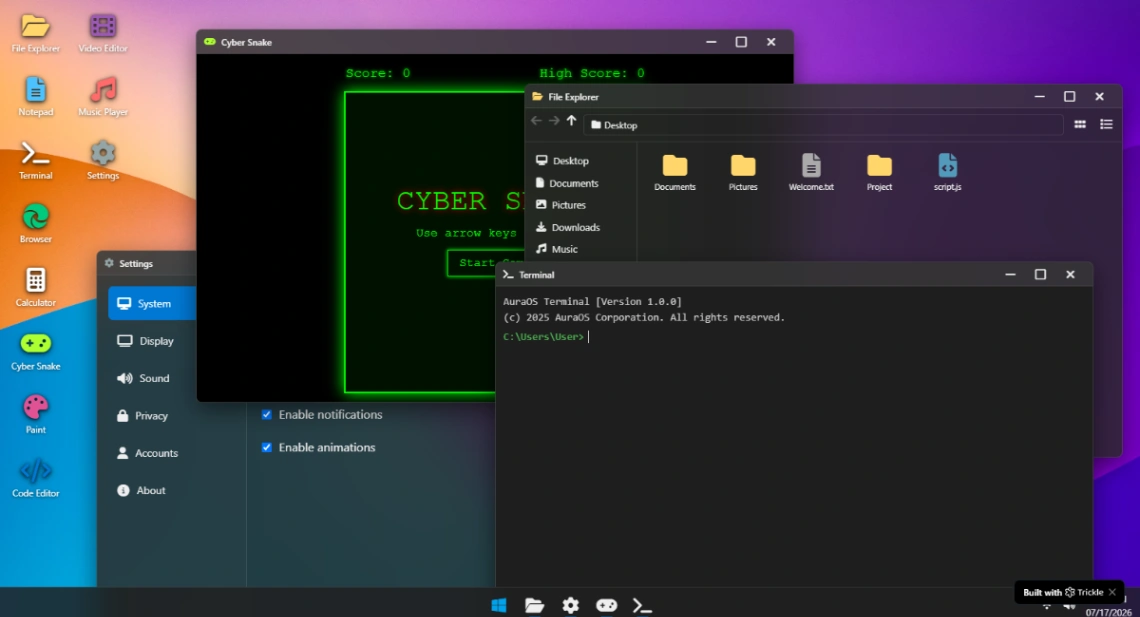
Interact with a nostalgic Windows OS-style website template featuring draggable application windows, file explorer, terminal emulator, settings interface, mini-games like Cyber Snake, and classic desktop applications all in a browser-based retro computing experience.
Best for
- 01Tech companies and software firms
- 02Media and entertainment brands
- 03Freelance creatives building a portfolio
- 04Design agencies and creative studios
- Desktop interface simulator
- Draggable window windows
- File explorer window
- Terminal emulator window
- Settings panel
- Cyber Snake game window
- Game score display
- Taskbar interface
- Desktop icons (File Explorer, Video Editor, Notepad, Music Player, Terminal, Settings, Browser, Calculator, Cyber Snake, Paint, Code Editor)
- Window minimize/maximize/close buttons
- File navigation system
- Folder structure display
Where is this template hosted?
Retro Desktop Simulator is hosted on Trickle. All files, databases, and logic run on Trickle's infrastructure - no separate hosting setup is required.
What platform do I need to use this template?
You'll need a Trickle account to use and customize Retro Desktop Simulator. Trickle handles everything - from the visual editor to publishing. You can browse all Trickle templates to explore more options built on the same platform.
How much does Retro Desktop Simulator cost?
Retro Desktop Simulator is available for $0. Keep in mind that Trickle has its own subscription plans which are required to publish your site. Check the Trickle page for current pricing details.
Can I use this template to build a project for my client?
Yes, you can use Retro Desktop Simulator to build a project for a client. Once you purchase the template, you can customize and deploy it for any project, including client work. We recommend confirming the specific usage terms with Trickle directly, as platform licensing policies can vary.