80s Mall Photo App Template
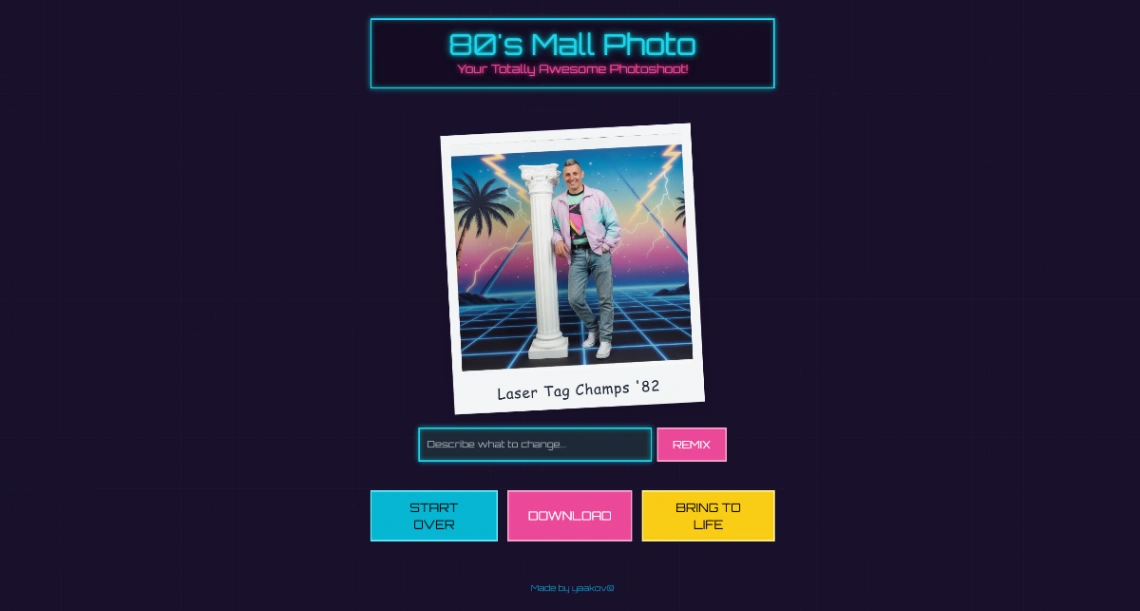
80s Mall Photo is a nostalgic template in Google AI Studio. It uses Gemini 2.5 Flash Image to transform your photo into an 80s studio portrait with classic laser backgrounds and "floating head" overlays. Then, it uses Veo 3.0 Fast to animate the scene, adding cinematic motion and era-appropriate lighting to your retro look.
Best for
- 01Media and entertainment brands
- 02Professional photographers showcasing work
- 03Video production companies and studios
- 04Early-stage startups launching an MVP
- Retro Style Transformation
- Subject Identity Preservation
- Floating-Head Superimposition
- Instant Video Animation
- 80s Laser Backgrounds
- Prompt-based Styling
- Dynamic Motion Synthesis
- High-speed Rendering
- Gemini 2.5 Flash Image
- Veo 3.0 Fast
- Vibe Coding
- Build Mode
Where is this template hosted?
80s Mall Photo App is hosted on Google AI Studio. All files, databases, and logic run on Google AI Studio's infrastructure - no separate hosting setup is required.
What platform do I need to use this template?
You'll need a Google AI Studio account to use and customize 80s Mall Photo App. Google AI Studio handles everything - from the visual editor to publishing. You can browse all Google AI Studio templates to explore more options built on the same platform.
How much does 80s Mall Photo App cost?
80s Mall Photo App is available for $0. Keep in mind that Google AI Studio has its own subscription plans which are required to publish your site. Check the Google AI Studio page for current pricing details.
Can I use this template to build a project for my client?
Yes, you can use 80s Mall Photo App to build a project for a client. Once you purchase the template, you can customize and deploy it for any project, including client work. We recommend confirming the specific usage terms with Google AI Studio directly, as platform licensing policies can vary.