Home Canvas app Template
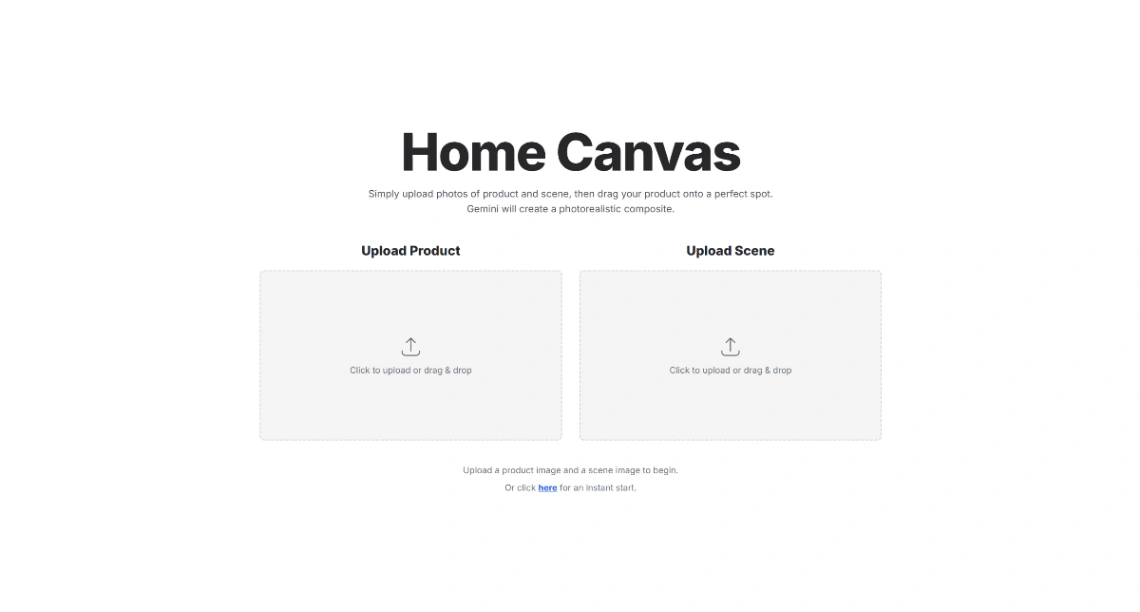
Home Canvas is a spatial visualization template in Google AI Studio for testing decor. Using Gemini 2.5 Flash-Lite and Flash Image, it lets you drag and drop furniture into your room photos. The app triggers a high-fidelity generation that realistically blends objects into your space with accurate lighting and perspective.
Best for
- 01Design agencies and creative studios
- 02Lifestyle brands, studios, and experience businesses
- 03Early-stage startups launching an MVP
- 04AI-powered SaaS products
- Spatial Visualization
- Multi-image Fusion
- Drag-and-drop UI
- Product Placement
- Room Restyling
- Perspective Matching
- Photorealistic Rendering
- Asset Upload
- Gemini 2.5 Flash-Lite
- Gemini 2.5 Flash Image
- Vibe Coding
- Build Mode
Where is this template hosted?
Home Canvas app is hosted on Google AI Studio. All files, databases, and logic run on Google AI Studio's infrastructure - no separate hosting setup is required.
What platform do I need to use this template?
You'll need a Google AI Studio account to use and customize Home Canvas app. Google AI Studio handles everything - from the visual editor to publishing. You can browse all Google AI Studio templates to explore more options built on the same platform.
How much does Home Canvas app cost?
Home Canvas app is available for $0. Keep in mind that Google AI Studio has its own subscription plans which are required to publish your site. Check the Google AI Studio page for current pricing details.
Can I use this template to build a project for my client?
Yes, you can use Home Canvas app to build a project for a client. Once you purchase the template, you can customize and deploy it for any project, including client work. We recommend confirming the specific usage terms with Google AI Studio directly, as platform licensing policies can vary.