Content Tracking Template
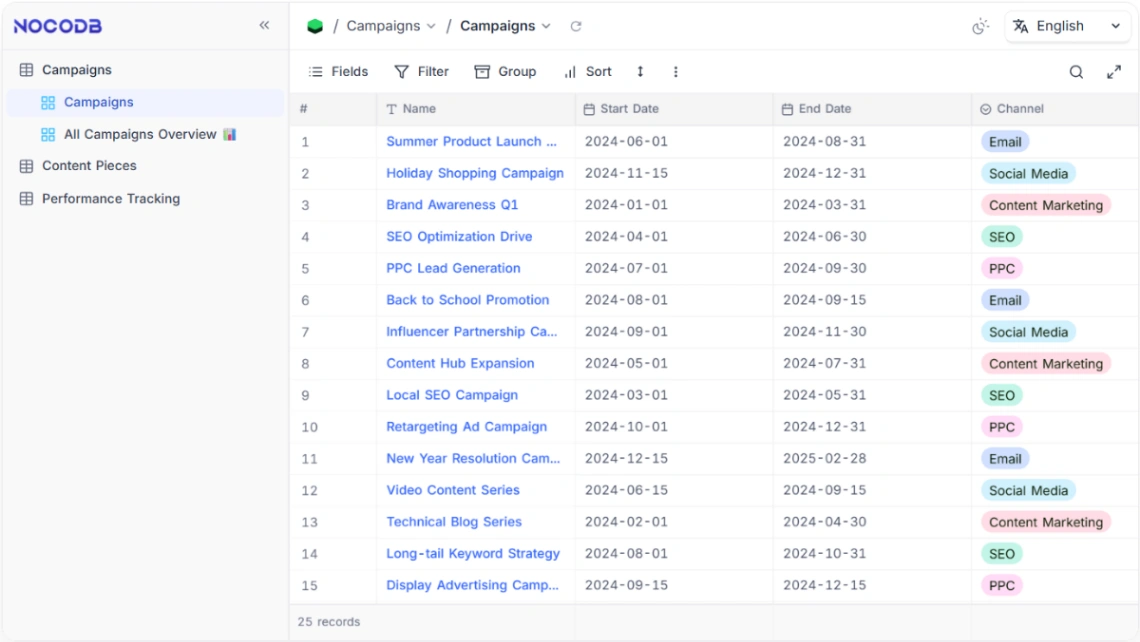
This editorial command center unifies content production, distribution, and performance tracking. It functions by connecting creative briefs to publication schedules and social media channels in a relational database, allowing marketing teams to maintain a "Single Source of Truth" for all omnichannel assets while automating workflow triggers from ideation to final analytics.
Best for
- 01Social media management tools
- 02Digital marketing agencies
- 03Business process automation tools
- 04Internal data management tools
- Editorial Calendar
- Asset Library
- Channel Mapping
- Creator Management
- Status Kanban
- Publication Deadlines
- Performance Metrics
- Workflow Automation
- Visual Editor
- AI Generator
- Analytics Tools
- Marketing Automation
Where is this template hosted?
Content Tracking is hosted on NocoDB. All files, databases, and logic run on NocoDB's infrastructure - no separate hosting setup is required.
What platform do I need to use this template?
You'll need a NocoDB account to use and customize Content Tracking. NocoDB handles everything - from the visual editor to publishing. You can browse all NocoDB templates to explore more options built on the same platform.
How much does Content Tracking cost?
Content Tracking is available for $0. Keep in mind that NocoDB has its own subscription plans which are required to publish your site. Check the NocoDB page for current pricing details.
Can I use this template to build a project for my client?
Yes, you can use Content Tracking to build a project for a client. Once you purchase the template, you can customize and deploy it for any project, including client work. We recommend confirming the specific usage terms with NocoDB directly, as platform licensing policies can vary.