Audio Workstation Template
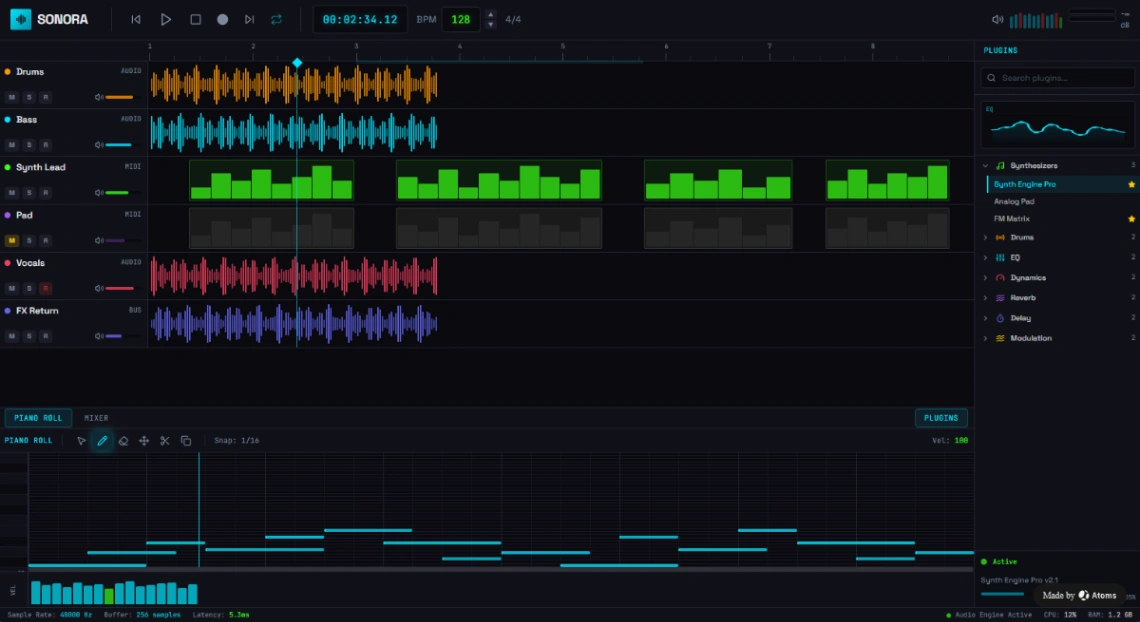
Build a music production web app with this professional template featuring multi-track audio timeline with waveform visualization, track mixer controls with solo/mute buttons, MIDI sequencer grid, real-time playback controls, BPM and tempo display, plugin browser sidebar, effects chain management, piano roll editor, and audio metering display.
Best for
- 01Podcast apps and audio streaming platforms
- 02Musicians and bands promoting music
- 03Product managers needing data visualization
- 04Early-stage startups launching an MVP
- Top playback control buttons
- Timeline with measure markers
- Multi-track audio display with waveforms
- Individual track mute/solo controls
- Track volume sliders
- Color-coded audio tracks
- MIDI note grid visualization
- Drum pattern sequencer
- Real-time playback indicator
- BPM and tempo controls
- Time display with milliseconds
- Plugin browser panel
Where is this template hosted?
Audio Workstation is hosted on Atoms. All files, databases, and logic run on Atoms's infrastructure - no separate hosting setup is required.
What platform do I need to use this template?
You'll need a Atoms account to use and customize Audio Workstation. Atoms handles everything - from the visual editor to publishing. You can browse all Atoms templates to explore more options built on the same platform.
How much does Audio Workstation cost?
Audio Workstation is available for $0. Keep in mind that Atoms has its own subscription plans which are required to publish your site. Check the Atoms page for current pricing details.
Can I use this template to build a project for my client?
Yes, you can use Audio Workstation to build a project for a client. Once you purchase the template, you can customize and deploy it for any project, including client work. We recommend confirming the specific usage terms with Atoms directly, as platform licensing policies can vary.